
OmaFMail
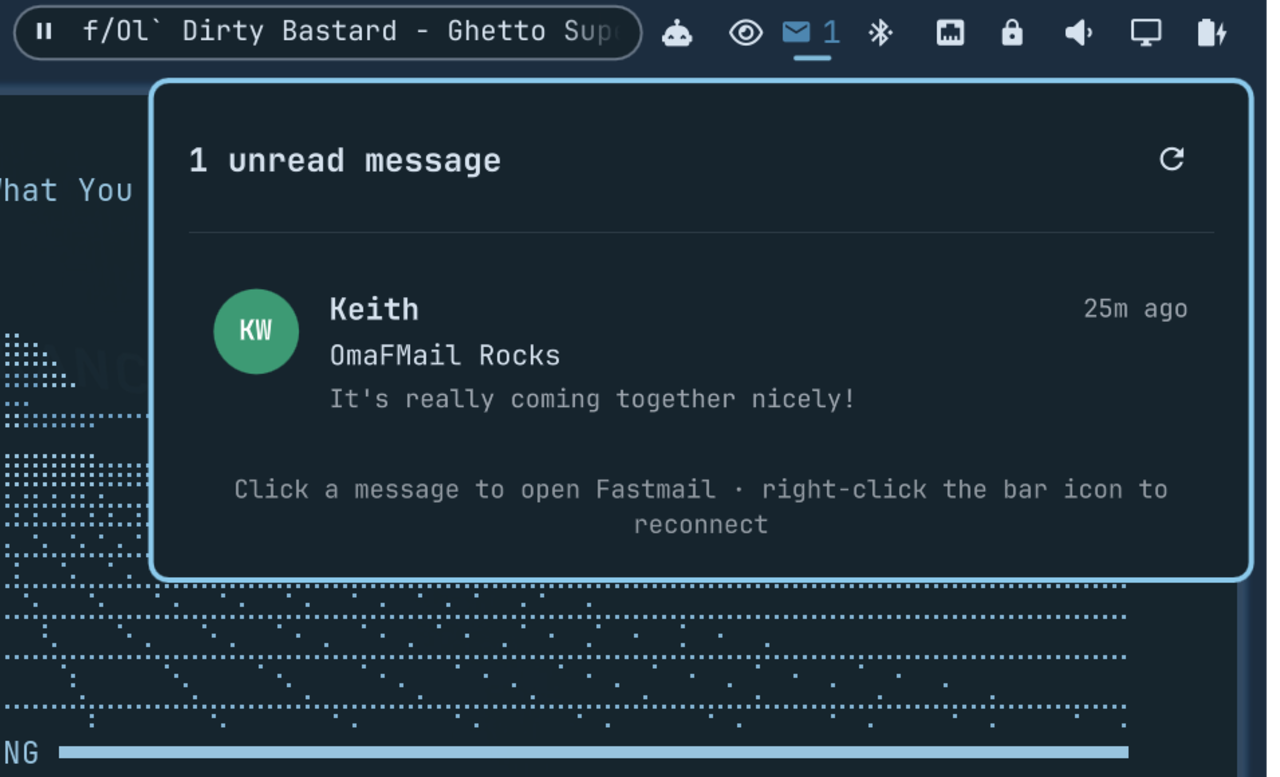
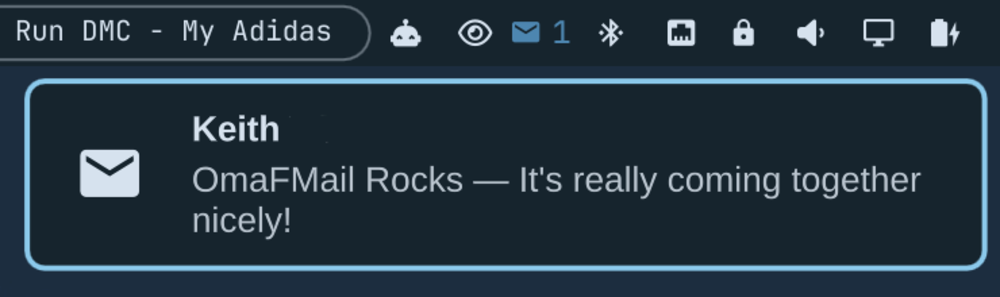
OmaFMail is an Omarchy shell plugin that watches a Fastmail (or other IMAP) mailbox over a persistent IMAP IDLE connection and shows unread mail — sender, subject, and a text preview — in a native bar popup, with desktop notifications when new mail actually arrives.
It exists because leaving the Fastmail web app open in a background tab doesn't refresh the inbox until that tab has focus.
Current features
- Persistent IMAP IDLE connection: near-instant notification of new mail, not polling
- Bar badge showing unread count; click to open a popup with sender, subject, and a short preview of each unread message
- Desktop notification only for mail that's new since the last time you saw it — no notification flood on first install or on reconnect
- Read-only IMAP session (
SELECT ... READONLY,BODY.PEEK[]fetches): this plugin can never mark your mail as read - App password stored in the system keyring (Secret Service /
secret-tool), never written to a config file - Automatic reconnect with backoff on network errors; a slower backoff (5 min) on auth/config errors so a bad password doesn't hammer the server
- Click a message to open Fastmail's inbox in your browser; right-click the bar icon, or use the popup button, to reconnect immediately
Install
Install directly from GitHub and enable the bar widget:
omarchy plugin add https://github.com/keithnyc/omafmail.git --enable
Install for local development
Install the plugin by linking this checkout into Omarchy's user plugin directory:
ln -s "$PWD" ~/.config/omarchy/plugins/io.github.keithnyc.omafmail
omarchy-shell shell rescanPlugins
omarchy plugin enable io.github.keithnyc.omafmail right
Setup
-
Create a Fastmail app password: Settings → Privacy & Security → App passwords, with IMAP access only. Fastmail passwords with 2FA enabled will not work directly with IMAP; an app password is required.
-
Store it in the system keyring — nothing else reads or writes this:
secret-tool store --label="OmaFMail: you@fastmail.com" service omafmail account you@fastmail.comYou'll be prompted to paste the app password.
secret-toolneeds a running Secret Service provider (GNOME Keyring is already active on most Omarchy installs —gnome-keyring-daemon). -
Create your configuration:
mkdir -p ~/.config/omafmail
cp ~/.config/omarchy/plugins/io.github.keithnyc.omafmail/config.example.json \
  ~/.config/omafmail/config.json
Edit
~/.config/omafmail/config.jsonwith your Fastmail address. TheaccountandsecretServicevalues must match what you used withsecret-tool storeabove.
Configuration
OmaFMail watches ~/.config/omafmail/config.json and reconnects
automatically when it changes.
account: your Fastmail email address (also thesecret-toollookup key)host: IMAP host, defaultimap.fastmail.comport: IMAP port, default993mailbox: mailbox to watch, defaultINBOXsecretService: theserviceattribute used withsecret-tool, defaultomafmailfetchLimit: max unread messages to fetch/display, default20
Dependencies
- Omarchy shell with third-party service and bar-widget support
- Python 3 (standard library only — no pip installs)
- A running Secret Service provider and
secret-tool(libsecret) omarchy-notification-send
Plugins execute unsandboxed inside omarchy-shell. Review local and
third-party plugin code before enabling it.
Remove
omarchy plugin remove io.github.keithnyc.omafmail
Removal leaves your configuration, keyring entry, and local state intact. If you no longer want that data:
rm -rf ~/.config/omafmail ~/.local/state/omafmail
secret-tool clear service omafmail account you@fastmail.com
Privacy
OmaFMail connects to your IMAP server directly from your computer.
Configuration lives in ~/.config/omafmail/config.json (no secrets);
the app password lives only in your system keyring; a small state file
recording which message IDs you've already seen (used to avoid
re-notifying on reconnect) lives in ~/.local/state/omafmail/state.json.
None of this belongs in this repository.
Limitations
- "Click a message" opens Fastmail's general inbox view, not a deep link to that exact message — IMAP UIDs don't map to Fastmail's web message IDs.
- The preview is the plain-text part of the message; HTML-only mail without a plain-text alternative may show a rough or empty snippet.
License
MIT