
OmaNetWatch
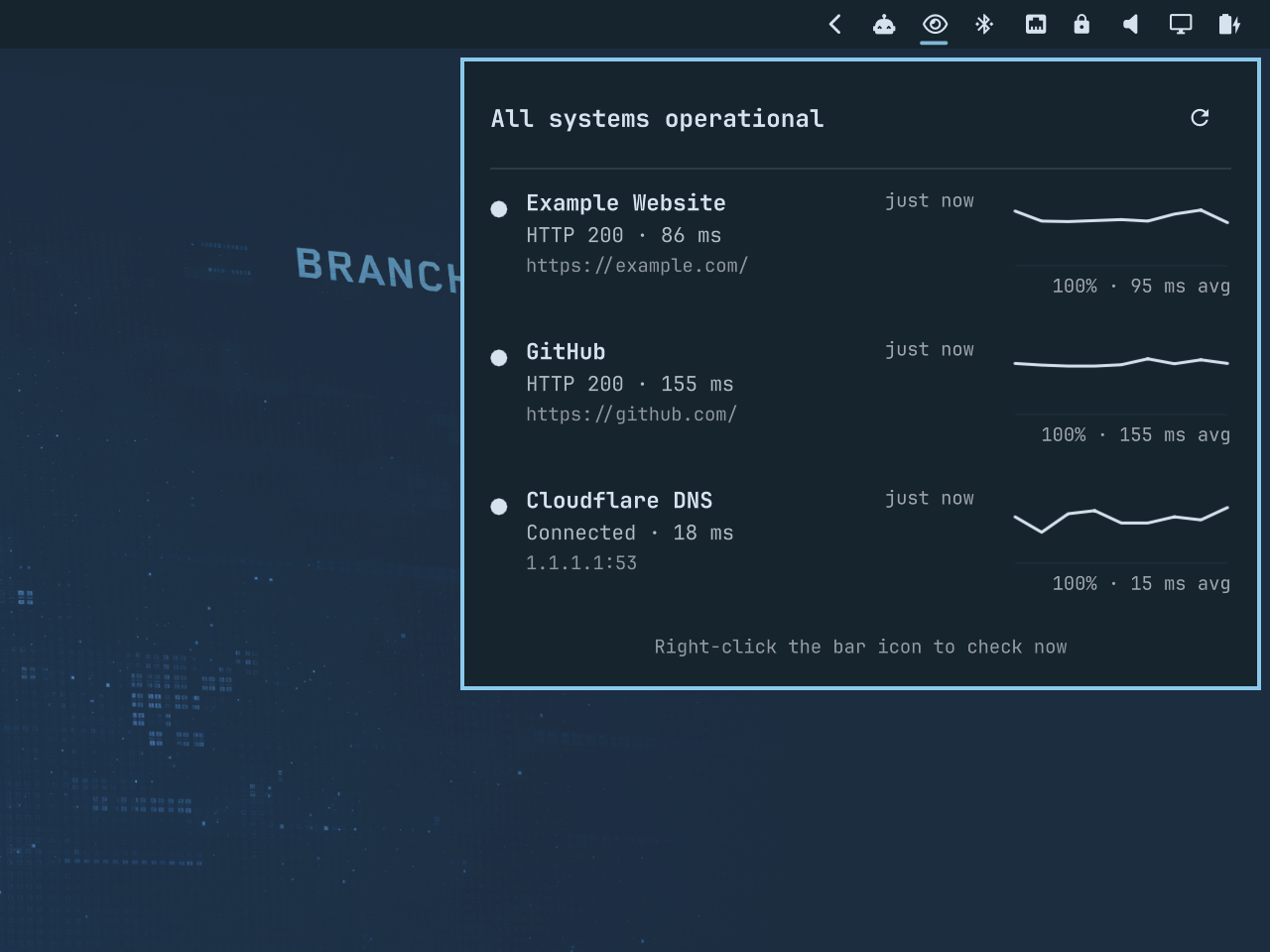
OmaNetWatch is an Omarchy shell plugin that monitors HTTP, TCP, structured JSON status endpoints, and RSS/Atom incident feeds from a native bar popup.
Current features
- One background monitoring service, even with multiple monitors
- HTTP checks with an expected status code
- TCP host/port checks
- JSON status checks with configurable field paths and health mappings
- RSS/Atom incident updates with quiet first-run baselining and persistent deduplication
- Operational, degraded, outage, and unknown health states
- Native add, edit, enable/disable, and remove controls in the popup
- Independent interval, timeout, and failure threshold per endpoint
- Alert on non-operational state changes after the configured threshold; notify again on recovery
- Bar summary with a detailed, theme-aware popup
- Right-click the bar icon, or use the popup button, to check everything immediately
- Live reload when the targets file changes
- Rolling 30-check latency and availability history with a sparkline for each target
- History persisted across shell restarts in
~/.local/state/omanetwatch/history.json
Install
Install directly from GitHub and enable the bar widget:
omarchy plugin add https://github.com/keithnyc/omanetwatch.git --enable
Open the bar popup and press + to add your first service. The manage button exposes enable, edit, and remove actions.
To start from the bundled GitHub Status and Cloudflare Status examples instead, copy the example configuration:
mkdir -p ~/.config/omanetwatch
cp ~/.config/omarchy/plugins/io.github.keithnyc.omanetwatch/config.example.json \
  ~/.config/omanetwatch/targets.json
The examples are disabled by default. Enable them in the popup or edit ~/.config/omanetwatch/targets.json. The JSON file remains the portable backing store and reloads automatically when changed by hand.
Install for local development
Create the configuration file:
mkdir -p ~/.config/omanetwatch
cp config.example.json ~/.config/omanetwatch/targets.json
Install the plugin by linking this checkout into Omarchy's user plugin directory:
ln -s "$PWD" ~/.config/omarchy/plugins/io.github.keithnyc.omanetwatch
omarchy-shell shell rescanPlugins
omarchy plugin enable io.github.keithnyc.omanetwatch right
Health checks deliberately start with two consecutive non-operational checks required before notification. This avoids alerting on a single transient timeout or malformed response. Feed targets notify on new or meaningfully updated items after establishing a quiet baseline on their first successful check.
Configuration
OmaNetWatch watches ~/.config/omanetwatch/targets.json and reloads it automatically. The root is an array containing HTTP, TCP, JSON, and/or feed targets.
HTTP target fields:
name: display nametype:httpurl: completehttp://orhttps://URLexpectedStatus: expected HTTP response, default200
TCP target fields:
name: display nametype:tcphost: DNS name or IP addressport: TCP port
JSON status target fields:
type:jsonurl: JSON endpoint URLexpectedStatus: expected HTTP response, default200statusPath: field containing the provider status. Use a dot path such asstatus.indicatoror a JSON Pointer such as/status/indicator.statusMap: maps exact, case-sensitive provider values tooperational,degraded,outage, orunknownreasonPath: optional field containing a short human-readable descriptionsourceUrl: optional status page shown in the popup; defaults tourl
RSS/Atom feed target fields:
type:feedurl: public RSS or Atom feed URLexpectedStatus: expected HTTP response, default200sourceUrl: optional public status page; individual items use their own links when available
The first successful feed check records existing items without notifying. Later checks notify for new item IDs and for changed content on known IDs. Up to 200 fingerprints per feed are retained across shell restarts, and the latest item remains visible in the popup. Feed activity is separate from current service health: an incident post does not change operational/degraded/outage counts.
Missing fields, invalid JSON/XML, oversized responses, and unmapped status values are reported as unknown; they are never treated as healthy. JSON and feed responses are limited to 1 MiB. GitHub Status, Cloudflare Status, and xAI incident-feed examples are included in config.example.json, disabled by default.
Common optional fields:
id: stable unique identifier; derived fromnamewhen omittedenabled: whether to schedule checks and alerts; defaulttrue. Disabled targets remain visible in the popup.intervalSeconds: seconds between checks, default60timeoutSeconds: per-check timeout, default5failuresBeforeAlert: consecutive failures before notifying, default2
Dependencies
- Omarchy shell with third-party service and bar-widget support
- Python 3
omarchy-notification-send
Plugins execute unsandboxed inside omarchy-shell. Review local and third-party plugin code before enabling it.
Remove
Remove the plugin with Omarchy:
omarchy plugin remove io.github.keithnyc.omanetwatch
Removal leaves your target configuration and history intact. If you no longer
want that local data, you may separately delete
~/.config/omanetwatch/targets.json and
~/.local/state/omanetwatch/history.json.
Privacy
OmaNetWatch makes checks directly from your computer. Target configuration and
check history remain local in ~/.config/omanetwatch/targets.json and
~/.local/state/omanetwatch/history.json; neither file belongs in this repository.
License
MIT