
Harbor
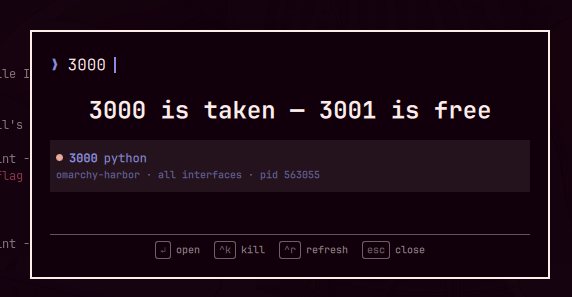
Is this port free? Harbor is a summonable Omarchy overlay that answers the
EADDRINUSE moment: press a key, type a port number, and it says
"3000 is free" — or "3000 is taken — 3001 is free", with the holder
named by project checkout rather than thread name and a verified kill one
keystroke away.
See docs/VISION.md for what Harbor is for and what it deliberately does not do.


The problem it solves
Error: listen EADDRINUSE: address already in use :::3000
The error names a port, not a process. lsof -i :3000 needs flags recalled
mid-frustration and answers node — which is every JavaScript project on the
machine. You have two ways out: free the port, or move your service to
another one. Harbor makes both a single keystroke.
Features
- Affirmative answers — type
8080and get "8080 is free", never an ambiguous empty list. Below the privileged-port floor the answer carries a "needs root" caveat. - Next free port — when 3000 is taken, Harbor says "3000 is taken — 3001 is free" so you can move instead of fight. Suggestions stay where the answer will still hold: never below the privileged floor, never inside the kernel's outbound source-port range.
- Occupied is not just "listening" — a process that pinned a port for an
outbound connection holds it as firmly as any server while appearing in no
listener table, and
SO_REUSEADDRwill not save you. Harbor counts those, so "free" means bindable rather than merely un-listened-to. - Named by project — a row reads
3000 nodewithmy-app · localhost · pid 1234beneath it, the project resolved by walking from the server's working directory to the nearest.git/package.json. Fournodeprocesses become four project names. No framework guessing. - Verified kills —
ctrl+ksends SIGTERM, says "3000 terminating…" while it re-checks the socket, then reports "3000 is now free" or "3000 still listening — ctrl+k again to force". The outcome rests on a fresh port-scopedsscheck, never on the signal having been sent. The signal itself is identity-checked (pid + uid + start time) against live/procimmediately before it goes out, narrowing to microseconds the window in which a recycled PID could catch a kill meant for its predecessor. - Refusals explained — a port held by another user's process says needs
sudo; a
docker-proxyport says docker stop frees this instead of offering a kill dockerd would undo. No silent no-ops. - Exposure at a glance — an urgent dot marks listeners reachable beyond
localhost; something bound to
192.168.1.5:3000still blocks your bind, so Harbor shows it. - Honest failure — a failed or hung probe says so. Harbor never renders a broken probe as "everything is free".
- Zero idle cost — nothing polls; the probe runs when you summon it.
Install
omarchy plugin add https://github.com/ki11e6/omarchy-harbor --enable
Set the keybinding
Harbor is meant to be summoned from the keyboard. Add to
~/.config/hypr/bindings.lua:
o.bind("SUPER + ALT + P", "Harbor", "omarchy-shell shell toggle io.github.ki11e6.harbor")
Keep "Harbor" in the description — the bar icon's hover tooltip looks the
binding up by that name and shows it on a second line (Harbor — is this port free? above SUPER+ALT+P).
Until a binding exists, the tooltip reminds you to set one. The lookup runs
once at bar load, so after adding or changing the binding, run
omarchy restart shell for the tooltip to catch up.
Keys
| Key | Action |
|---|---|
| type | Filter the list — or ask: a filter that is exactly a port number gets the free/taken answer |
enter / click |
Open the port in the browser — localhost for a wildcard bind, otherwise the address the listener actually holds |
ctrl+k |
Kill the owner (SIGTERM) and verify; press again on a survivor to escalate to SIGKILL |
ctrl+y |
Copy <host>:<port> to the clipboard, using the same host as enter |
ctrl+r |
Refresh the list |
arrows / ctrl+n / ctrl+p |
Move selection |
esc |
Clear the filter, then close |
Bar widget
Enabling Harbor also places a stateless anchor on the bar (no polling, no
idle cost) that toggles the same overlay; hovering it shows the plugin name
and your keybinding. omarchy plugin add --enable asks which section,
defaulting to right. Move it later with:
omarchy bar move io.github.ki11e6.harbor --section <left|center|right>
The bar entry doubles as the plugin's enable flag, so there is no
keyboard-only install: removing the button from the bar
(omarchy plugin disable) disables the overlay too.
Instant open/close (recommended)
Omarchy exempts its own overlays from layer animations, but that rule is
namespace-anchored and can't cover third-party plugins. Add one line to your
~/.config/hypr/looknfeel.lua so Harbor pops instantly instead of fading:
hl.layer_rule({ match = { namespace = "harbor" }, no_anim = true, animation = "none" })
How it works
The overlay runs list-ports.sh (a small ss -tanp wrapper) each time it opens or refreshes, and renders the result with the active Omarchy theme. One dump answers two different questions: the rows show listeners, because only a listener has a holder worth naming, while the free/taken answer counts every port the machine holds in a bind-refusing state — a socket pinned to a port by an outbound connection refuses your bind just as firmly and appears in no listener table. Only listeners pay for the per-row /proc walk.
Every listener is shown whatever address it holds — something on 192.168.1.5:3000 still blocks a 0.0.0.0:3000 bind — with its bind scope (localhost, all interfaces, or the literal address). Duplicates across address families collapse to one row per port, preferring the row whose owner is known and the widest bind scope. enter and ctrl+y target the address the listener actually holds; only a wildcard bind (or 127.0.0.1 itself) is reachable as localhost, so a server on 127.0.0.53 or 192.168.1.5 gets its literal address.
Rows are named by the project checkout the server was started from (the nearest ancestor of its working directory carrying .git, package.json, and similar markers), so four node processes read as four project names. No framework guessing: an honest node beats a wrong Next.js.
A probe that fails or times out says so — Harbor never renders a failed probe as "everything is free". The same rule holds for the bar tooltip: it nudges you to set a keybinding only when the lookup ran and found none, never when it merely failed.
Free claims carry a caveat where "free" is not a promise: below the kernel's unprivileged-port floor ("needs root"), and inside net.ipv4.ip_local_port_range, where the kernel draws outbound source ports and a free port can be claimed a moment later. Both ranges are read from the kernel, not hardcoded. Suggestions are held to a stricter bar than reports and never land in either — a recommendation that needs a caveat is not a recommendation.
Ports owned by other users (for example root services like CUPS) show ? for the process and omit the PID from the context line, since ss can't read their process info without root.
ctrl+k on those says owned by another user — needs sudo; on a docker-proxy row it says container port — docker stop frees this instead of sending a kill dockerd would undo.
Everything runs unprivileged as your user. ctrl+k re-checks the target's identity (pid, uid, start time) against live /proc before signaling, narrowing to microseconds the window in which a recycled PID could catch a signal meant for its predecessor — closing it entirely would need pidfd_send_signal, which is unreachable from shell. There is no confirmation step — the first press sends SIGTERM (polite), and only a deliberate second press on a survivor sends SIGKILL.
Configuration
None. Harbor has no options; the filter, keys, and theming (inherited from the active Omarchy theme) are the whole interface.
Dependencies
Everything ships with a stock Omarchy install:
iproute2—ssreads the socket table inlist-ports.sh, and re-checks the single port after a killjq— JSON assembly inlist-ports.shwl-clipboard— the copy actions (wl-copy)xdg-open— opening ports in the browserhyprctl— the bar tooltip's one-shot keybinding lookup
Development
./dev.sh              # sync into ~/.config/omarchy/plugins/, validate, restart the shell, enable
bash test/fixtures.sh # regression fixtures: probe, dedup, kill helper, answer logic
Beyond the runtime dependencies, dev.sh needs rsync, and the fixtures need
node and python3 — they start throwaway servers to exercise the project-name
walk against real /proc entries.
Uninstall
omarchy plugin remove io.github.ki11e6.harbor
Credits
Harbor began as a ground-up rewrite inspired by
SVIGHNESH/omarchy-portboard —
the first Omarchy plugin to put listening ports in a summonable overlay. The
architecture (a QML overlay over a small ss wrapper script) follows its lead;
the code was rewritten from scratch. Thank you!
License
MIT