
Tmpfs Monitor — Omarchy Quattro Plugin
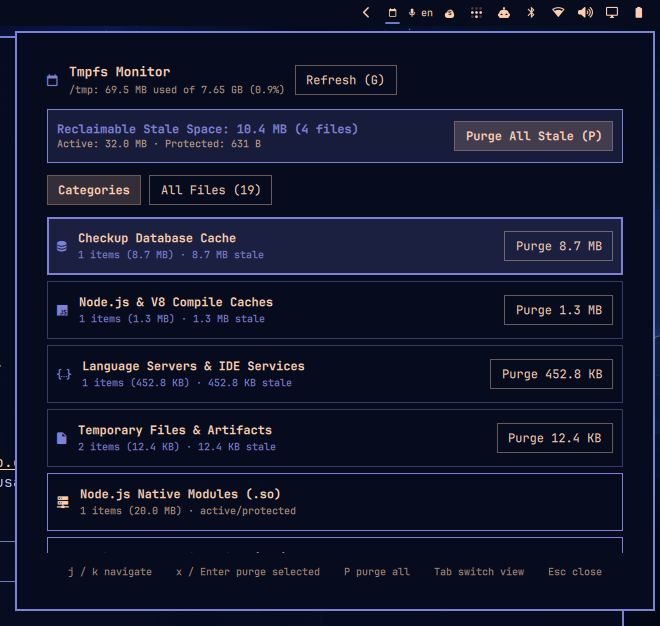
A native Omarchy Quattro top-bar plugin and diagnostic tool that gives you instant visibility into your Linux /tmp directory (which resides directly in RAM as tmpfs). Track down memory leaks, identify which applications are creating clutter, and safely reclaim memory with a single keystroke.
Why This Plugin?
On modern Linux systems, /tmp is typically mounted in volatile RAM (tmpfs). When applications write temporary files, they directly consume your physical memory.
In modern development environments, automated background tasks, bash scripts, AI coding assistants, compilers, and test runners frequently extract temporary files to /tmp and fail to clean them up on exit:
- AI Tools & Native Runtimes: AI coding agents, subagents, and tools built with Bun / Node often unpack embedded native dynamic libraries (e.g.
libopentui.so,ffffast file finder, hidden.<hash>-0.sobinaries) on every process invocation. Rapidly spawned workers can quietly leak gigabytes of RAM in minutes. - Automated Bash Scripts & CI Tasks: Scripts and background cron jobs generating unlinked temporary files, lockfiles, or dumps without
trap ... EXITcleanup handlers. - Browser & Electron Renderers: Dead Chromium/Electron renderers leaving orphaned
scoped_dir*scratch folders. - Compilers & Bytecode Caches: Build tools and language servers (
rust-analyzer,pyright,node-compile-cache,v8-compile-cache) accumulating stale AST and schema caches across runs.
Tmpfs Monitor solves this by continuously analyzing /tmp, cross-referencing Linux process memory maps (/proc/*/maps) and file descriptors (/proc/*/fd), and attributing files to active vs terminated applications so you can safely purge stale clutter without breaking running apps.
Key Features
- Real-Time
/tmp& RAM Footprint: Live monitoring of total tmpfs size, used memory percentage, and exact reclaimable stale space. - Process Memory-Map Protection: Inspects
/proc/[pid]/mapsand open descriptors before any cleanup. Files actively loaded or mapped by running processes are strictly protected and never deleted. - System Socket Shielding: Automatically protects critical system files and root sockets (
.X11-unix,.ICE-unix,.font-unix,systemd-private-*, user lockfiles). - Intelligent Categorization: Automatically categorizes files by runtime/type (Node/Bun native
.somodules, Chromium renderers, IDE/LSP caches, database caches, temp artifacts) with per-category purge controls. - Detailed File Explorer: Inspect every file in
/tmpwith its size, age, holding process name, and active PID. - Safe & Confirmed Cleanups:
- Press
P(or click Purge All Stale) to review and confirm reclaiming verified stale build debris. - Selective per-item (
x/Enter) and per-category purge buttons with confirmation. - Strict ownership & grace period checks (prevents deleting active user files or foreign processes).
- Press
- Keyboard-Driven Workflow: Full keyboard navigation with
j/klist scrolling,Tabview switching, and instant confirmation dialogs. - Status Color Alert: The top-bar icon glows red automatically when memory leaks exceed 500 MB or
/tmpexceeds 50% capacity.
Keyboard Shortcuts
When the panel is open:
| Key | Action |
|---|---|
j / Down |
Move selection down (auto-scrolls list) |
k / Up |
Move selection up (auto-scrolls list) |
x / Enter |
Purge currently selected category or file item (prompts confirmation) |
P |
Purge all safe stale files (confirms with Y / Enter, cancels with N / Esc) |
G |
Refresh / re-scan /tmp and active process mappings |
Tab |
Switch between Categories and All Files view |
Esc |
Close popup panel |
On the top bar:
- Left-Click / Click: Toggle the interactive monitor panel
CLI Engine (bin/omarchy-tmpfs-monitor)
The core inspection engine is also available as a standalone CLI tool:
# Scan /tmp and print formatted JSON analysis
./bin/omarchy-tmpfs-monitor scan

# Dry-run preview of what would be purged
./bin/omarchy-tmpfs-monitor purge --all-stale --dry-run

# Purge all stale, unmapped files
./bin/omarchy-tmpfs-monitor purge --all-stale

# Purge only a specific category (e.g. opentui_so)
./bin/omarchy-tmpfs-monitor purge --category opentui_so
Installation
From Marketplace / Git:
omarchy plugin add https://github.com/Kristijan-K/omarchy-tmpfs-monitor.git --enable
Manual Installation:
PLUGIN_ID="io.github.kkosu.tmpfs-monitor"
mkdir -p "$HOME/.config/omarchy/plugins/$PLUGIN_ID"
cp manifest.json BarWidget.qml Service.qml Model.js README.md LICENSE preview.png \
  "$HOME/.config/omarchy/plugins/$PLUGIN_ID/"
mkdir -p "$HOME/.config/omarchy/plugins/$PLUGIN_ID/bin"
cp bin/omarchy-tmpfs-monitor "$HOME/.config/omarchy/plugins/$PLUGIN_ID/bin/"
chmod +x "$HOME/.config/omarchy/plugins/$PLUGIN_ID/bin/omarchy-tmpfs-monitor"

omarchy plugin validate "$HOME/.config/omarchy/plugins/$PLUGIN_ID"
omarchy-shell shell rescanPlugins
omarchy plugin enable "$PLUGIN_ID"
omarchy bar put "$PLUGIN_ID" --section right
License
MIT.