
Voxtype Switcher for Omarchy

Repository: https://github.com/Kristijan-K/omarchy-voxtype-plugin
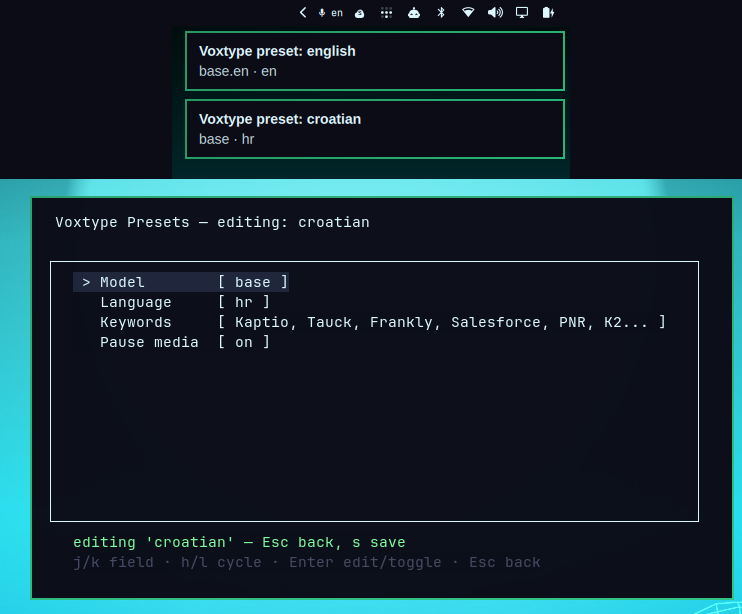
Additional screenshots:
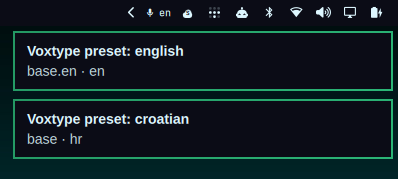
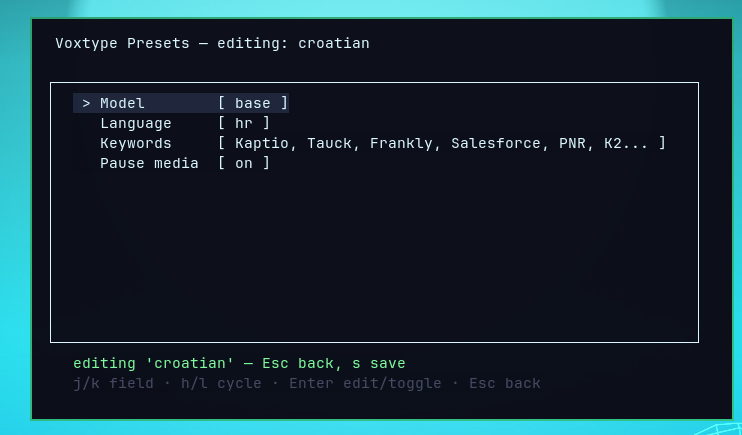
An Omarchy Quattro bar plugin for switching between user-defined Voxtype presets — a name, model, language, keyword prompt, and media-pause setting — with a real config reload.
This does not replace Voxtype's Dictation configuration or its normal configuration screen. It adds a quick way to switch between saved voice input presets, especially when changing languages or models during a call.
- Bar widget (
io.github.kkosu.voxtype-presets): shows the active preset's language code (e.g. en). Left click cycles to the next preset, right click opens the preset TUI. - One TUI for everything: right-click opens
voxtype-presetsin a compact floating presentation terminal — presets list, apply, add, edit (model, language, keywords, and media pause), and delete all in one window. - Default preset:
english(base.en/en) is the Omarchy Quattro default and cannot be deleted. - Keybind: optionally bind
SUPER + CTRL + ALT + Vto cycle quickly between voice presets during a call. - Presets are stored in
~/.config/voxtype/presets.json; applying one patches[whisper] model,[whisper] language,[whisper] initial_prompt, and[audio] pause_mediain~/.config/voxtype/config.toml(comments preserved, timestamped backup) and restarts thevoxtype.serviceuser daemon — the only reload voxtype currently supports. Keyword and media overrides are available on non-default presets; the default remains editable after its initial configuration is copied. - Missing models download automatically: switching to a preset downloads
the selected model (a fast no-op when it is already present). Whisper
models are fetched directly because Voxtype 0.7.5 incorrectly treats
Whisper
smallas the optional SenseVoice model. Other engine models usevoxtype setup --download --model <name>. The TUI does this inside the popup with a "downloading …" message; only when the model is available does it apply the config, reload the daemon, and close itself. On a download failure the popup stays open with the error and nothing is changed. The bar left-click and the cycle keybind download the same way.
TUI keys
| Keys | Action |
|---|---|
j k / ↑ ↓ |
Move between presets or editor fields |
h l / ← → |
Cycle the selected editor field |
Enter |
Apply the selected preset, or edit the selected editor field |
a |
Add a preset and open the editor |
e |
Edit the selected preset |
d |
Delete selected preset (y / n) |
s |
Save all drafts, download missing models, apply the selected preset, then close |
Esc |
Return from the editor, or close the popup |
q |
Quit; with changes choose y save or d discard |
The editor shows four fields: Model, Language, Keywords, and Pause media. Use Enter to type a model, language, or keyword value; use h/l to
cycle model/language values or toggle media pausing. The default preset is
also editable; only deletion is locked. Press Esc to return to the
preset list; continue editing other presets if needed, then press s there to
save all drafts and apply the selected preset. Exact duplicate model/language
combinations are rejected, while the same language may use different models.
Nothing is written until s, or until q is confirmed with the save option.
Requirements
- Omarchy Quattro with the shell plugin system
- Voxtype installed and configured (
voxtype.service) bash,python3,jq, and a terminal that supportsxdg-terminal-exec- A user systemd session; applying a preset restarts
voxtype.service
Install From GitHub
omarchy plugin add https://github.com/Kristijan-K/omarchy-voxtype-plugin.git --enable
The standard Omarchy installer validates the root manifest.json, clones the
repository into ~/.config/omarchy/plugins/io.github.kkosu.voxtype-presets/,
and enables the widget in the right side of the bar. The CLI and TUI remain in
the plugin directory; the widget invokes them there, so no separate installer
or files in ~/.local/bin are required.
On first use, the CLI seeds ~/.config/voxtype/presets.json from the active
Voxtype configuration. Existing preset files are migrated when migrate is
run. To update a git-installed plugin:
omarchy plugin update io.github.kkosu.voxtype-presets
Keybind
For quick language or voice-preset changes during a call, add this once to
~/.config/hypr/bindings.lua, then run hyprctl reload:
o.bind("SUPER + CTRL + ALT + V", "Cycle Voxtype preset", "bash -c '\"$HOME/.config/omarchy/plugins/io.github.kkosu.voxtype-presets/bin/omarchy-voxtype-presets\" cycle'")
Popup look and feel
The preset editor opens in a terminal window with the same presentation style
as Omarchy's Dictation configuration. The optional rule in
hypr/voxtype_presets.lua makes that window float, center itself, and use the
compact 700x400 size shown in the screenshots. It only affects the Voxtype
Switcher popup, not your other terminal windows.
To enable this compact layout, add the following line to your Hyprland configuration:
require("hypr.voxtype_presets")
Then reload Hyprland:
hyprctl reload
The editor still works without this rule, but Hyprland will use its normal
terminal placement and size. The standard marketplace installer does not
modify ~/.config/hypr, so this look-and-feel option is intentionally enabled
manually by the user.
Remove
Disable and remove the plugin with the standard Omarchy command:
omarchy plugin remove io.github.kkosu.voxtype-presets --yes
This removes the plugin code but intentionally leaves Voxtype configuration, preset data, backups, and the optional Hyprland rule or keybind for safety. Remove those manually only if you no longer need them.
CLI
PLUGIN="$HOME/.config/omarchy/plugins/io.github.kkosu.voxtype-presets"
CLI="$PLUGIN/bin/omarchy-voxtype-presets"

"$CLI" list          # presets.json
"$CLI" state         # active preset one-liner
"$CLI" cycle         # apply next preset
"$CLI" apply <name>  # apply specific preset
"$CLI" watch         # stream state (used by the bar widget)
"$CLI" seed          # first-run default preset
"$CLI" migrate       # normalize and preserve override fields
Debugging
omarchy plugin list --json | jq '.[] | select(.id == "io.github.kkosu.voxtype-presets")'
omarchy-shell shell rescanPlugins
qs log -p /usr/share/omarchy/shell --tail 100
If the widget is not visible after installation, run:
omarchy plugin enable io.github.kkosu.voxtype-presets right
omarchy-shell shell rescanPlugins
Publishing
This repository is structured for the Omarchy plugin marketplace: the root
contains manifest.json, README.md, LICENSE, BarWidget.qml, and all
runtime files referenced by the widget. Before submitting an issue to the
marketplace, validate the checkout with:
omarchy plugin validate .
qmllint -I "$OMARCHY_PATH/shell" BarWidget.qml
python3 -m py_compile bin/*.py