
YouTube Suggester — Omarchy Quattro Plugin
A native Omarchy bar plugin that mimics the useful parts of the YouTube Home page: it shows only unwatched videos, lets you configure the tags used for classification, and displays each video's default YouTube description in a plain-text popup.
On first install AI and Software are pre-configured as tags — change them with E in the panel.
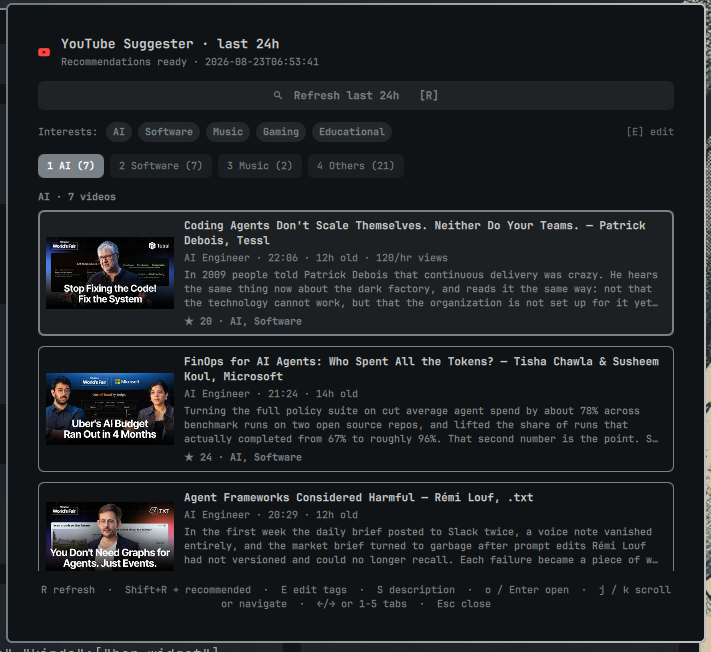
Features
- Unwatched Home-style feed —
Rshows fresh subscription videos from the last 24 hours;Shift+Radds 20 personalized Recommended videos (any age), while browser/account history and plugin-opened videos stay filtered out. - Configurable tags +
Others— edit up to five tags withE. Every unwatched video is scored (title 3×>tags 4×>description 1×, single incidental hits ignored). All matches per tag are sorted byage → views/hour → views;Otherscontains everything unmatched. - Title + description in list — title, description snippet (
320chars), thumbnail,duration·age·views/hour, channel. Fullmeta_descriptionavailable in popup. - Default description popup
S— shows the video's full YouTube description as plain text;j/kscrolls it, andS/Enter/Esccloses it. - Open —
o/Enter→omarchy-launch-webapp https://www.youtube.com/watch?v=ID(same asSuper+Shift+Y→uwsm-app -- <browser> --app=URL), keeps video visible until nextR(added toseen.json, hidden on next refresh viawatched = history|seen). - Auto-refresh on tag edit —
E→Enter→config set→loadStatus→refresh()if idle. - No per-tab limit, no
no-tagfallback — empty tab stays empty (checkOthers).
Flow
Eedit tags → autoR.R(orShift+Rfor +Recommended) →history → feed → metadata(done/total+candidates_seen).- Browse tabs
←/→/1-5, navigatej/k, openo. Sto read the selected video's description.
Keybinds
| Key | Action |
|---|---|
R |
Refresh last 24h subs |
Shift+R |
Refresh subs 24h + 20 Recommended |
E |
Edit tags (up to 5, Enter saves) |
S |
Show the selected video's description (j/k scroll) |
o / Enter |
Open via webapp |
j / k , ← / → , 1-5 |
Navigate list / tabs |
Esc |
Close popup → close panel |
| Middle-click bar icon | Refresh |
Manual installation
Manual install is required —
omarchy plugin addonly clones the repo and does not install system dependencies. Install them first:
Required:
yt-dlp—pacman -S yt-dlp(orpipx install yt-dlp)- Chromium cookie decrypt (for
browser: chromium):pacman -S python-secretstorage python-pycryptodomexorpip install --user secretstorage pycryptodomex(--break-system-packageson Arch if needed)
Browser must be logged into YouTube matching browser setting (chromium default).
Security
Plugin privilege: This plugin runs unsandboxed with your user privileges (same as the Omarchy shell process). Review bin/omarchy-youtube-suggester before enabling.
Browser credentials: Chrome, Chromium, Brave, and Edge cookies decrypted by the plugin are held in bounded process memory and passed to each yt-dlp process through an anonymous Linux memfd; they are never written to a named cache file. Browser databases and sidecars are opened without following symlinks, required to be user-owned regular files, backed up with byte limits into private runtime storage, and queried with row, value, profile, and time limits. Other supported browsers use yt-dlp's native browser-cookie support.
YouTube content is untrusted: Video titles and descriptions come from YouTube. QML rendering sets textFormat: Text.PlainText (and TextEdit.PlainText for the description popup) on every Text/TextEdit element, so remote HTML like <img src=…> is never interpreted and no remote resources are fetched via AutoText.
See tests/test_browser_security.py, tests/test_no_transcription.py, and tests/test_qml_safety.py for regression coverage of browser isolation, the metadata-only pipeline, and plain-text rendering.
Development & Tests
# Validate manifest + QML (same checks as the marketplace)
omarchy plugin validate .
qmllint -I /usr/share/omarchy/shell BarWidget.qml Service.qml

# Python tests (metadata-only pipeline and QML safety)
pytest -v
# or
python -m pytest tests -v
PLUGIN_ID="io.github.kkosu.youtube-suggester"
mkdir -p "$HOME/.config/omarchy/plugins/$PLUGIN_ID/bin"
cp manifest.json Service.qml BarWidget.qml Model.js README.md LICENSE \
  "$HOME/.config/omarchy/plugins/$PLUGIN_ID/"
cp bin/omarchy-youtube-suggester "$HOME/.config/omarchy/plugins/$PLUGIN_ID/bin/"
chmod +x "$HOME/.config/omarchy/plugins/$PLUGIN_ID/bin/omarchy-youtube-suggester"

omarchy plugin validate "$HOME/.config/omarchy/plugins/$PLUGIN_ID"
omarchy-shell shell rescanPlugins
omarchy plugin enable "$PLUGIN_ID"
omarchy bar put "$PLUGIN_ID" --section right