
Yr.no (unofficial) — Omarchy weather plugin
Unofficial yr.no weather for the Omarchy bar, built on the open API of MET Norway — the Norwegian Meteorological Institute, whose data powers yr.no. Not affiliated with MET or NRK.

Install
omarchy plugin add https://github.com/Knutsi/omarchy-yr-plugin.git --enable
--enable places the pill in the bar's center section. To put it somewhere
specific:
omarchy bar put io.github.knutsi.yr --after omarchy.clock
omarchy bar move io.github.knutsi.yr --section right --index 0
It can live next to the stock omarchy.weather pill or replace it
(omarchy bar put omarchy.weather brings the stock one back). Requires
Omarchy 4.0 or newer.
Updating
omarchy plugin update io.github.knutsi.yr
Omarchy fetches the repository's default branch, shows you the diff, and
fast-forwards the checkout in place. The plugin is re-validated afterwards and
rolled back if the new commit does not pass. The widget reloads itself within a
moment — no shell restart and no logout. Add --yes to skip the diff and the
prompt, or drop the id to update every git-managed plugin at once.
Your settings and pinned places survive: they live on the widget's entry in
~/.config/omarchy/shell.json, which the update never touches. Removing and
re-adding is not an upgrade path — omarchy plugin remove deletes that
entry, and the pinned places with it.
Two things make an update refuse:
- Local changes — the fast-forward fails with
cannot fast-forward. Commit or stash them in~/.config/omarchy/plugins/io.github.knutsi.yr. - A hand-installed copy — a folder without
.githas nothing to pull from.
The marketplace listing pins a verified commit, but omarchy plugin add and
omarchy plugin update both track the repository's current upstream HEAD, so
an update can bring code newer than the last verified snapshot.
Uninstall
omarchy plugin remove io.github.knutsi.yr
That deletes ~/.config/omarchy/plugins/io.github.knutsi.yr and the bar
entry. The plugin keeps no files of its own: the shared location file
~/.local/state/omarchy/settings/weather.json belongs to Omarchy's stock
weather widget (clear it with omarchy-weather-location --clear), and the
settings — together with the saved places list — live on the widget's entry
in ~/.config/omarchy/shell.json, which omarchy plugin remove deletes.
What you get
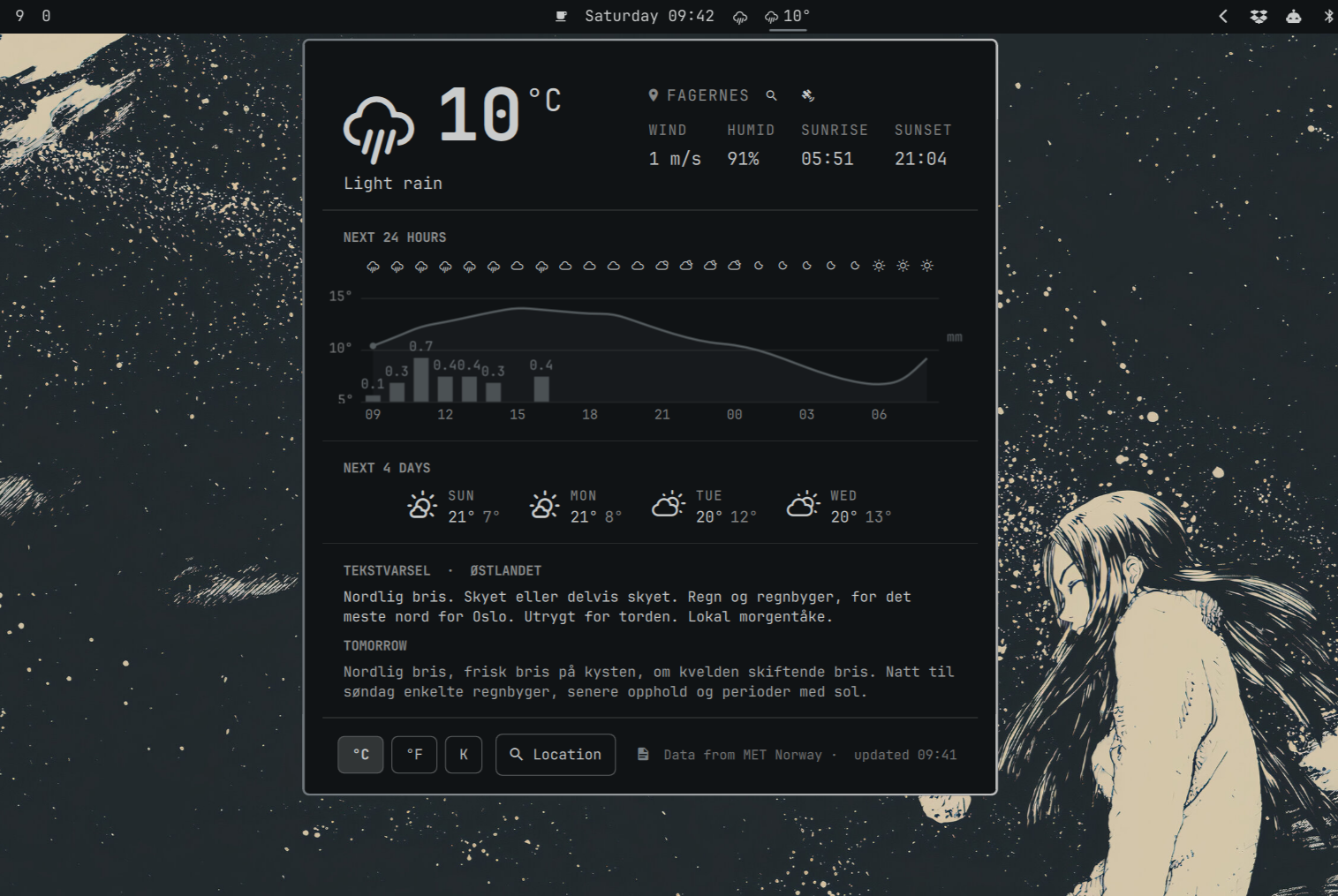
A theme-tinted Nerd Font glyph and the temperature in the bar; the popup, top to bottom:
- Current weather — glyph, temperature (click the unit to cycle °C → °F → K), condition, location with search, satellite and globe buttons (the globe opens the same forecast on yr.no), wind, humidity, sunrise and sunset (computed locally, no extra requests).
- Weather warnings (farevarsel) — MET's active alerts for the spot, coloured by level; click one for the description and advice. Shown in English unless your locale is Norwegian.
- Next N hours — symbols, temperature curve, precipitation bars with amounts, hour labels (24 h by default, 6–48 configurable). Shift + ← / → move a cursor along the curve and the current-weather block above reads out that hour.
- Next 4 days — symbol, day, high / low.
- Tekstvarsel — MET's written forecast for the Norwegian land region (today and tomorrow; scrolls when long). Norway only, Norwegian only; hides itself elsewhere. Toggle with the document button in the settings row.
- Settings —
°C | °F | K,Location(opens the search view in place of the whole popup), the tekstvarsel toggle, the MET attribution and the "updated HH:MM" stamp (click it to reload).
Using it
| Action | Result |
|---|---|
| Left click the pill | Open / close the popup |
| Middle click | Force a refresh of the forecast |
| Right click | Desktop notification with the current conditions |
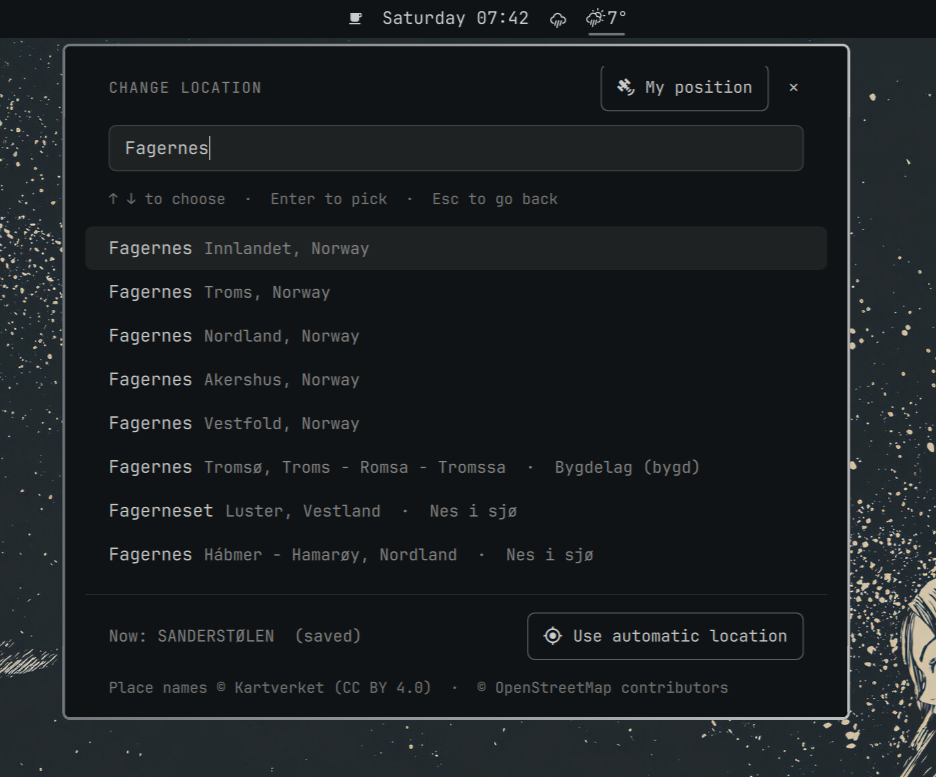
Click the location name, its magnifier, or the Location button |
Search view: the box opens empty with your saved places under it (pinned first, then the last five searches); pick one with ↑/↓ + Enter or a click, or type to search. Shift+Enter pins the highlighted place instead of opening it (and unpins it if it is already pinned) — this works on a search result too. Esc, ✕, or Backspace on an empty box goes back; "Use automatic location" returns to IP auto-detect |
| ← / → (or h / l) in the popup | Switch the location to the previous / next pinned place (recent searches are not included) |
| Shift + ← / → in the popup | Move an hour cursor along the hour-by-hour graph. The current-weather block reads out that hour — glyph, temperature and HH:00 · condition |
| Backspace in the popup | Leave hour-pan mode: the cursor and the read-out go back to now. Closing the popup does the same |
s in the popup |
Open the search / saved-places view (same as Enter, or the Location button) |
| Click the pin on a saved place | Pin it so it stays at the top of the list (up to five); click again to unpin. Recent searches beyond the last five fall off on their own |
| Click the globe button | Open the same location on yr.no in your default browser — the place's own page when yr's register knows it (looked up by the name in use, then by the nearest town), otherwise a coordinate page. Norwegian site for a Norwegian locale, English otherwise |
| Click the satellite button | Locate with GPS / Wi-Fi positioning through GeoClue — see docs/geoclue.md. Dimmed with an explanatory tooltip when the service is missing |
| Click the "updated HH:MM" stamp | Fetch again (at most once per 10 s) |
| Tab / Shift-Tab in the popup | Move to the neighbouring bar panel |
IPC, e.g. for keybindings (one handler serves every monitor):
omarchy-shell shell toggle io.github.knutsi.yr      # open/close the popup
omarchy-shell io.github.knutsi.yr refresh           # force refresh
omarchy-shell io.github.knutsi.yr edit              # open with the search view
omarchy-shell io.github.knutsi.yr locate            # GPS fix via GeoClue (if available)
omarchy-shell io.github.knutsi.yr toggleUnit        # °C → °F → K → °C
omarchy-shell io.github.knutsi.yr unit imperial     # set a unit directly
omarchy-shell io.github.knutsi.yr textForecast false  # hide/show the tekstvarsel
omarchy-shell io.github.knutsi.yr location          # print the location in use
omarchy-shell io.github.knutsi.yr nextPinned        # switch to the next pinned place (previousPinned goes back)
omarchy-shell io.github.knutsi.yr status            # JSON: location, save/GPS state, last fetch, errors
Settings
Settings are keys on the widget's entry in ~/.config/omarchy/shell.json,
set with omarchy bar set:
| Key | Default | Meaning |
|---|---|---|
refreshMinutes |
15 |
Minutes between forecast fetches, 10–180. MET Norway asks desktop clients not to poll more often than every 10 minutes. |
unit |
metric |
metric (°C, m/s, mm), imperial (°F, mph, in) or kelvin (K, m/s, mm). Always metric unless you change it — the system locale is deliberately ignored. |
barFormat |
icon-temp |
icon-temp shows glyph + temperature; icon shows only the glyph (vertical bars always use the glyph). |
graphHours |
24 |
Hours in the hour-by-hour graph, 6–48. |
textForecast |
true |
Show the tekstvarsel section (booleans need --json). |
textForecastArea |
(by location) | Force a text-forecast region, e.g. Fjellet i Sør-Norge — the mountain region overlaps the lowland ones and the smallest match wins by default. |
omarchy bar set io.github.knutsi.yr refreshMinutes 30
omarchy bar set io.github.knutsi.yr unit kelvin
omarchy bar set io.github.knutsi.yr graphHours 48
omarchy bar set io.github.knutsi.yr textForecast false --json
Location
The plugin shares Omarchy's weather location with the stock widget, so setting it once applies to both:
omarchy-weather-location                          # show the current location
omarchy-weather-location --set "Bergen" 60.3913,5.3221
omarchy-weather-location --set "Bergen"           # name only: geocoded once, coordinates stored
omarchy-weather-location --clear                  # back to auto-detect
The state lives in ~/.local/state/omarchy/settings/weather.json and is
watched, so edits take effect immediately.
Without stored coordinates the position is detected from your public IP address: the plugin asks ipwho.is (falling back to geojs.io) what city the request came from, which means those services see your IP address — that is all they are sent, and it happens automatically, once per shell session, for as long as no location is stored. City-level at best, and often off on CG-NAT or satellite connections; set the location explicitly if the forecast looks wrong, and nothing is looked up from the IP again. (It happens once per shell session, and again after "Use automatic location".)
Place search asks three services at once and merges the answers: Open-Meteo (towns and cities worldwide), Kartverket (Norway's official place-name register — this is what finds farms, hotels, ski areas and seters such as Sanderstølen), and Photon (OpenStreetMap, worldwide, typo tolerant). What you type is sent to all three as you type (from two letters, at most 100 characters); only a listed match can be saved.
Saved places. The last five places you picked are listed when the search
box is empty, and up to five can be pinned to stay at the top. The list is
stored as a places array on the widget's shell.json entry — name,
coordinates and a short description, nothing else — and is removed with the
plugin.
GPS / Wi-Fi positioning uses GeoClue when it is installed; the satellite button explains what is missing otherwise. After a fix the coordinates are sent to Photon (and, in Norway, Kartverket) once to find a place name — only when you press the button. Setup, privacy notes and the accuracy caveats are in docs/geoclue.md.
How it talks to MET Norway
- Forecast:
https://api.met.no/weatherapi/locationforecast/2.0/compact - Warnings:
https://api.met.no/weatherapi/metalerts/2.0/current.json?lat=&lon=&lang=(fetched with each forecast refresh) - Tekstvarsel:
https://api.met.no/weatherapi/textforecast/3.0/landoverview(every 3 h, only for positions in Norway; the region is resolved locally by point-in-polygon — yr.no itself no longer shows these texts, but MET still publishes them) - Coordinates are rounded to four decimals, the request identifies itself
(
User-Agent: omarchy-yr-plugin/<version> github.com/Knutsi/omarchy-yr-plugin), responses are gzip-compressed, and every refresh sendsIf-Modified-Sinceso an unchanged forecast costs a304with no body. - One shared service does the fetching no matter how many monitors show the
pill; refreshes are jittered by up to a minute so many installs never line
up;
403/429responses are not retried until the next interval; network failures retry three times, 2.5 s apart, while the last good forecast stays on screen (the pill shows a "not available" glyph with the error in its tooltip when nothing could ever be fetched).
Dependencies and privacy
Everything it needs ships with Omarchy: curl, sh, timeout, head,
grep, pgrep, omarchy-launch-browser and the Quickshell shell itself. No
packages are installed, no privileges are requested, and the only files
written are your own shell.json entry (settings via omarchy bar set,
the saved places through the shell's own config writer — both on a click)
and the shared location file (via omarchy-weather-location, on a click). Every helper is started with an argument list, never through a
shell string that contains data (the two GeoClue probes run fixed sh -c
scripts with no interpolated values), and each one the plugin waits for
runs under timeout. Everything that enters the shell is capped before it
is read: HTTP bodies at curl, the shared location file and GeoClue's output
through head -c, and then once more before parsing.
What leaves the machine, and when:
| Data | Goes to | When |
|---|---|---|
| Your position, rounded to four decimals (~11 m) | api.met.no | Every refresh (forecast, warnings, tekstvarsel) |
| The place name in use, then (if that finds nothing) the same rounded position | www.yr.no | Only when you click the globe button, once per place per session |
| Your public IP address (implicitly, as the requester) | ipwho.is, then get.geojs.io | Automatically, while no location is stored |
| The text you type in the search box | geocoding-api.open-meteo.com, api.kartverket.no, photon.komoot.io | As you type, from two letters |
| A GeoClue fix (coordinates) | photon.komoot.io; api.kartverket.no in Norway | Only after you press the satellite button |
No identifiers other than the User-Agent (plugin name, version, repository
URL — MET requires one) are sent anywhere.
The globe button, assessed. The yr.no link is fixed text plus either a
yr location id (accepted only if it is exactly <digits>-<digits>) or two
numbers — no name or other string from a server can enter it — and the URL
is handed to Omarchy's own browser launcher as an argument, so there is
nothing for a shell to interpret. The id comes from yr's own site API (the
one yr.no's pages use; not a published API, so if it changes or fails the
button falls back to the coordinate page within a few seconds). What it
discloses is the place name in use or the rounded position, to the same
organisation (MET Norway / NRK) that already receives the position for every
forecast, and only when you click.
Optional, user-installed: geoclue
enables the satellite button. The plugin only detects it; installing it is
your decision and command.
Network services used at runtime (all HTTPS, no keys): api.met.no (forecast, warnings, tekstvarsel), www.yr.no (the place's page id, on a globe click), geocoding-api.open-meteo.com, api.kartverket.no, photon.komoot.io, and for IP-based auto-detect ipwho.is / get.geojs.io.
Theme
Everything is drawn with the active Omarchy theme: the bar's foreground
colour and font for the pill and popup, accent for hover/selection. The
hourly graph — temperature curve, rain bars, axes — is painted in the
foreground colour at different opacities rather than in accent/urgent, so
it stays quiet even in themes with a loud accent or a bright red. Warning
banners use MET's own awareness colours (yellow/orange/red) on purpose. Glyphs come from the Nerd Fonts weather set, the same family the
stock weather pill uses. Switching themes restyles the widget instantly.
Development
node --test                                        # unit tests (Node ≥ 20)
omarchy plugin validate .                          # manifest/layout check
/usr/lib/qt6/bin/qmllint -I "$OMARCHY_PATH/shell" *.qml
qmllint cannot resolve the shell's qs.* modules or the untyped bar
object, so it reports "unqualified access" and "member not found" warnings
for every plugin, first-party ones included; treat new warning kinds as
the signal.
Layout (flat, as Omarchy expects):
manifest.json            plugin manifest (kinds: service + bar-widget)
Service.qml              the single shared instance: location, weather, search, settings, IPC
  LocationService.qml    weather.json, IP detection, GeoClue, persistence
  WeatherService.qml     forecast, warnings, tekstvarsel, derived views
  GeocodeSearch.qml      three-source place search (GeocodeSource.qml)
  CurlRequest.qml        one curl process, result from onExited
  MetFetcher.qml         MET request with If-Modified-Since and a request key
BarWidget.qml            per-monitor pill, binds to the service
Panel.qml                per-monitor popup: HeroSection, AlertBanner, HourlyGraph,
                         ForecastDaysRow, TextForecastSection, SettingsRow, SearchView
Model.js                 pure helpers, unit-tested (test/*.test.mjs, fixtures documented)
Cloning the repo straight into ~/.config/omarchy/plugins/io.github.knutsi.yr
is the quickest dev loop. The shell notices saved files and re-registers the
plugin, but an already mounted bar slot keeps its running instance (Omarchy
4.0) — run omarchy restart shell to see QML changes. See
CHANGELOG.md for releases.
Contact
Questions, ideas or bug reports: open an issue, or reach me on X at @knutsi.
Credits and licence
- Weather data, warnings and text forecasts from MET Norway, licensed under CC BY 4.0 / NLOD 2.0.
- Place search by Open-Meteo geocoding (CC BY 4.0), Kartverket place names (CC BY 4.0) and Photon — © OpenStreetMap contributors (ODbL). IP lookup by ipwho.is and geojs.io.
- Popup lifecycle and location handling adapted from Omarchy's stock weather plugin (MIT, notice in LICENSE).
This plugin is MIT licensed — see LICENSE.