
Salesforce Orgs — Omarchy Quattro Plugin
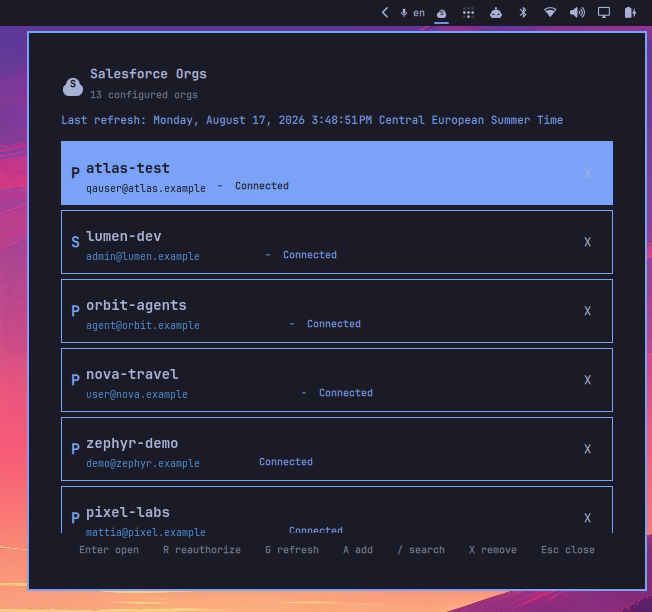
An Omarchy Quattro plugin that manages Salesforce CLI org connections from the bar: browse connected orgs, open them in a browser, reauthenticate, and add new orgs — all keyboard-driven from a bar popup.
Built for Salesforce developers who work across multiple orgs, the plugin reduces context switching by putting org access and authentication management a few keystrokes away. Quickly open the right org, reauthenticate a connection, refresh the org list, or add a new environment without leaving your desktop workflow.
The repository root is the plugin folder (manifest.json sits beside the entry points), so it validates with omarchy plugin validate exactly as published.
Features
- Lists all orgs returned by
sf org list --json - Sorts connected orgs first, then by name
- Shows alias, username, connection status, environment (production/sandbox), and the default-org marker
- Opens the selected org in a browser
- Reauthenticates the selected org with a live
sf org login webprocess - Adds production, sandbox, or custom-URL orgs
- Logs an org out of the local CLI after confirmation
- Loads the last cached snapshot instantly; refresh manually with
Gor middle-click - Full keyboard and mouse navigation
- Opens from the bar icon; an optional
SUPER CTRL ALT Sbinding is documented below
Keyboard shortcuts
Inside the panel:
| Key | Action |
|---|---|
↑ / ↓ or j / k |
Move through orgs |
Enter or o |
Open the selected org |
r |
Start browser login for the selected org |
g |
Refresh all orgs and update the cache |
a |
Add an org (choose environment, then enter an alias) |
/ |
Search by org name, alias, or username |
x |
Log the selected org out (confirm with y, cancel with n or Esc) |
Esc |
Close the popup |
On the bar icon: middle-click refreshes.
Requirements
- Omarchy Quattro
- Salesforce CLI (
sf) onPATH - A Salesforce CLI installation with permission to launch browser authentication
The plugin executes Salesforce CLI commands directly and does not store credentials itself.
Installation
The standard Omarchy installation process clones the public repository, validates its root manifest, and can enable the plugin in one command:
omarchy plugin add https://github.com/Kristijan-K/salesforce-omarchy-plugin.git --enable
Review the repository confirmation prompt and choose the bar placement when Omarchy asks. omarchy plugin install is an alias for the same command.
Optional keybinding
The Omarchy installer does not modify Hyprland keybindings. To open the panel with SUPER CTRL ALT S, add this line to ~/.config/hypr/bindings.lua:
o.bind("SUPER + CTRL + ALT + S", "Salesforce orgs", "omarchy-shell shell summon io.github.kristijan-k.salesforce-orgs '{}'")
Reload Hyprland after saving the file. The bar icon remains available without this optional binding.
For a manual installation from a checkout of this repository:
PLUGIN_ID="io.github.kristijan-k.salesforce-orgs"
mkdir -p "$HOME/.config/omarchy/plugins/$PLUGIN_ID"
cp manifest.json BarWidget.qml Service.qml Model.js SalesforceIcon.qml auth-web-login.sh README.md LICENSE \
  "$HOME/.config/omarchy/plugins/$PLUGIN_ID/"
omarchy plugin validate "$HOME/.config/omarchy/plugins/$PLUGIN_ID"
omarchy-shell shell rescanPlugins
omarchy plugin enable "$PLUGIN_ID"
omarchy bar put "$PLUGIN_ID" --section right
Removal
PLUGIN_ID="io.github.kristijan-k.salesforce-orgs"
omarchy plugin disable "$PLUGIN_ID"
omarchy plugin remove "$PLUGIN_ID"
Removing the plugin leaves the Salesforce CLI configuration untouched. To also drop the plugin's cache and login-state files:
rm -f "$HOME/.cache/omarchy/salesforce-orgs.json"
rm -rf "${XDG_RUNTIME_DIR:-$HOME/.cache/omarchy}/omarchy-sf-plugin"
How it works
The plugin provides two shell entry points:
Service.qml— a headlessservicethat owns allsfCLI interaction. It refreshessf org list --json, parses the output (Model.js), caches the snapshot in~/.cache/omarchy/salesforce-orgs.json, and runs open/logout actions with a 120 s timeout and generation-counted state reconciliation.BarWidget.qml— thebar-widgetentry point: a Salesforce cloud icon on the bar and the keyboard popup. It is pure UI; every action delegates to the service.
Browser authentication (sf org login web) runs detached via auth-web-login.sh in $XDG_RUNTIME_DIR/omarchy-sf-plugin/ so closing the popup or the shell cannot kill the OAuth listener. The service polls the login status file until the browser flow completes, then refreshes the org list.
Development
./run-tests.sh       # QML state-machine tests (offscreen qmltestrunner)
omarchy plugin validate .
The closest test of the default installer from a local checkout is:
omarchy plugin add "$PWD" --enable --yes
The local-add command clones the committed state of the checkout, so commit changes first when using it. Remove that test installation with:
omarchy plugin remove "io.github.kristijan-k.salesforce-orgs" --yes
Edit files at the repository root, run the tests, validate the manifest, and test from the bar icon or the optional keybinding above.
License
MIT. This plugin depends on Omarchy Quattro and the Salesforce CLI; neither is bundled or modified.