
Omahub
← All plugins
K

Laser Pointer

by kvm404

A simple laser pointer for presentations and screen sharing.

Security review

No obvious issues detected

Deterministic scan — not a security guarantee

None
Risk level
None
Analyzed commit
c870e4e
Scanned
4 weeks ago

No potentially dangerous behavior detected in the analyzed commit.

Automated analysis only — not a security guarantee.

AI advisory review

No obvious issues detected

Language-model assessment · ~deepseek/deepseek-v4-flash-latest — advisory only

None
AI risk level
None
Recommendation
install
Model
~deepseek/deepseek-v4-flash-latest
Analyzed commit
c870e4e
Reviewed
4 weeks ago

Manual review agrees with the deterministic scan: this is a straightforward presentation laser-pointer plugin with no install-time scripts, obfuscation, persistence, or credential access. Its effects are user-triggered and limited to drawing trails, temporarily hiding the cursor, and capturing left-click input while the pointer is explicitly enabled.

How this check works

This review combines the deterministic scan (the rule-based results above) with an independent look at the plugin's code by a language model. The model reads a trimmed sample of the repository's files, the manifest, and the README, then gives a plain-language risk level and a recommendation: install (no notable danger), review (look closer first), or avoid (clearly dangerous).

It runs on the same analyzed commit as the deterministic scan and is strictly advisory — it is not a security guarantee and never blocks a plugin by itself. A human moderator still reviews plugins before they are listed.

AI advisory only — automated analysis, not a security guarantee.

Install
$ omarchy plugin add https://github.com/kvm404/omarchy-laser-pointer --enable
Widgets #Hyprland #bar #quickshell

Laser Pointer

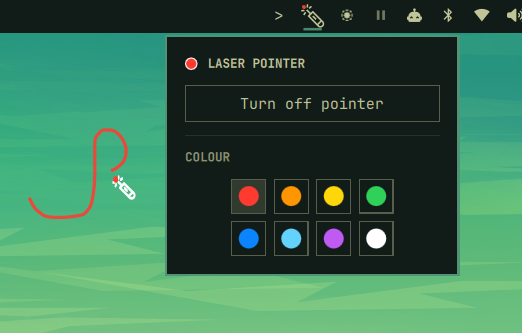
A simple laser pointer for presentations and screen sharing on Omarchy.
Laser Pointer preview

Features

  • Draw a trail while holding left-click
  • Trails fade after release
  • Choose from eight colors
  • Adjust trail thickness
  • Hides the normal cursor while active

Use

  1. Click the laser icon in the Omarchy bar.
  2. Choose a color and thickness.
  3. Turn on the pointer.
  4. Hold left-click and move to draw.
  5. Release the button to fade the trail.

Right-click the bar icon to toggle the pointer quickly.

Install

omarchy plugin add https://github.com/kvm404/omarchy-laser-pointer.git --enable

No extra setup or Hyprland bindings are required.

Remove

omarchy plugin remove io.github.kvm404.laser-pointer

License

MIT