
Mihomo
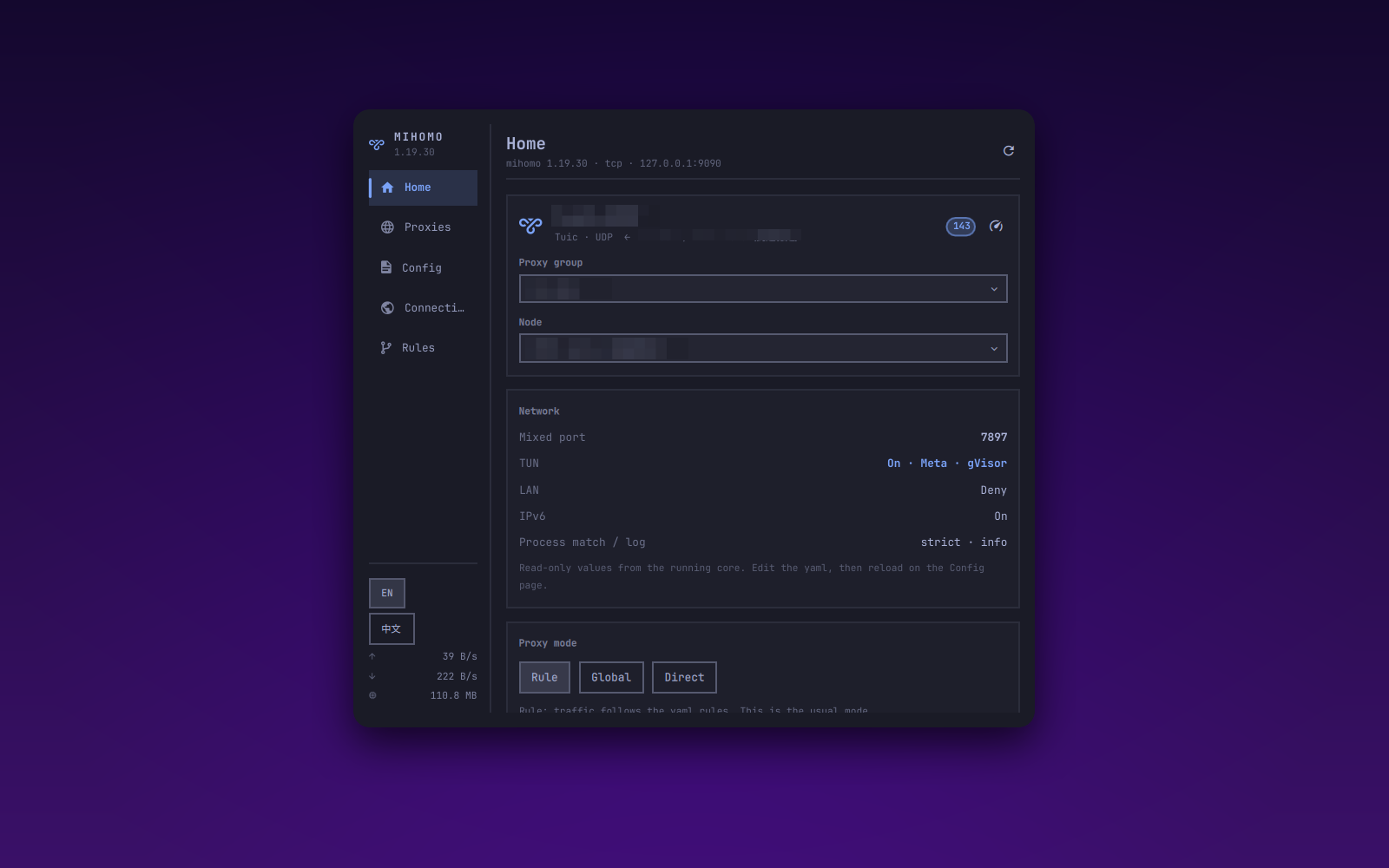
Omarchy bar plugin: a control panel for the mihomo core. Left nav rail plus a right-hand page, covering Home / Proxies / Config / Connections / Rules.
Talks to mihomo's external controller (REST API) directly. It does not depend on Clash Verge or any other GUI client. The core alone is enough.
The UI defaults to English. Switch to Chinese with the EN / 中文 buttons in the sidebar or on the Config page.
License: MIT. See LICENSE.
Install
omarchy plugin add https://github.com/lijiawei0305-pixel/omarchy-mihomo-plugin.git --enable
omarchy bar move io.github.lijiawei0305-pixel.mihomo --section right
That clones the repo, validates manifest.json, and enables the plugin. It
does not run an installer and does not ask for elevated privileges.
Remove
omarchy plugin remove io.github.lijiawei0305-pixel.mihomo
That disables the widget and deletes the plugin checkout. Language preference
in ~/.config/omarchy-mihomo/ui is left in place; delete that file yourself
if you want it gone.
Dependencies
bashandcurl(used bybin/mihomo-ctlto talk to the core)- A running mihomo core with its external controller enabled (the default)
The plugin does not install mihomo and does not write your yaml. It can switch system proxy (desktop + session environment) and TUN from the Home page. Those two toggles are independent: turning one off does not change the other.
Pages
| Page | What it shows | APIs |
|---|---|---|
| Home | Current node, system proxy / TUN capture, how to link the core, network overview, proxy mode, traffic | /version /configs /proxies /traffic /memory plus OS proxy |
| Proxies | Proxy groups, expand nodes, switch, group or single-node latency tests | /proxies /proxies/{name} /group/{name}/delay |
| Config | Hand-written yaml path / stats, reload the core, open the editor; rule providers can be refreshed | configinfo PUT /configs /providers/rules |
| Connections | Active connections, up/down, chain and matched rule; filter, close one, close all | /connections |
| Rules | Every rule from the config; filter by domain / type / target | /rules |
Writes (switch node, switch mode, latency test, close connections, update a
provider, enable TUN) go to the running core. Other front-ends see the same
state. System proxy is written to the OS, the same way
Clash Verge Rev does on
Linux (gsettings / dconf), plus the systemd user environment Hyprland
reads.
Language
Default is English. The EN / 中文 switch is in the sidebar footer and on the
Config page. The choice is stored in ~/.config/omarchy-mihomo/ui and survives
restarts:
language = en
sysproxy = off
Use zh for Chinese. sysproxy = on means this plugin last turned the OS
proxy on, so a mixed-port change can rewrite it.
Link the core
The panel does not start mihomo. Run your own core, then expose its API.
In the core yaml:
external-controller: 127.0.0.1:9090
# secret: your-secret
9090 (or whatever you set as external-controller) is only for this panel.
Apps use mixed-port or TUN. Home shows the live API, yaml path, and mixed
port, plus a one-line yaml example.
The panel never hardcodes an address. Every bin/mihomo-ctl call probes in
order and uses the first hit:
~/.config/omarchy-mihomo/config— manual override- Flags on the running core —
-ext-ctl/-ext-ctl-unix/-secret - The yaml that core was started with —
external-controller/external-controller-unix/secret 127.0.0.1:9090, no secret — mihomo's default
So it finds the core whether it listens on a TCP port or a Unix socket, with or without a secret.
If the port or secret is not the default, create
~/.config/omarchy-mihomo/config:
endpoint = 127.0.0.1:9090
# or a unix socket:
# socket = /run/mihomo/mihomo.sock
secret = your-secret
The yaml secret: and this file must match. Check what was resolved:
~/.config/omarchy/plugins/io.github.lijiawei0305-pixel.mihomo/bin/mihomo-ctl endpoint
Keyboard
With the panel open (Esc closes, Tab moves to the next panel):
| Key | Action |
|---|---|
1 – 5 |
Jump to Home / Proxies / Config / Connections / Rules |
← → h l |
Previous / next page |
↑ ↓ j k |
Scroll the current page |
/ |
Focus the filter (Connections, Rules) |
r |
Refresh the current page |
On the Proxies page, left-click a node to switch, right-click to test that node's latency.
Notes
- On Home, System proxy and TUN toggle on their own. Off clears both. TUN captures everything; system proxy only the apps that honour it. Ports, LAN and IPv6 stay read-only; edit the yaml and reload for those.
- System proxy points HTTP/HTTPS/SOCKS at the mixed port (or HTTP / SOCKS if
mixed is off) and bypasses
localhost,127.0.0.1, RFC1918 ranges and::1, matching Clash Verge's Linux default. - TUN is
PATCH /configswithtun.enable. The core needscap_net_admin(or to run as root). A failure shows as a toast; the plugin does not install a privileged helper. - Only
Selectorgroups accept a manual node.URLTest/Fallback/LoadBalanceare chosen by the core, and the API rejects a forced pick. - The Config page is that handwritten yaml. Nodes live under
proxies:; there is no subscription fetch. Rule providers can still be refreshed by hand. After you save the file, use Reload config — no service restart needed. - While the panel is closed it only does a light poll every 30 seconds. Opening
it starts the
/trafficand/memorystreams and fetches whatever the current page needs.
Development
The repo is the source of truth. After an edit:
./deploy
That validates the manifest, syncs to
~/.config/omarchy/plugins/io.github.lijiawei0305-pixel.mihomo/, and restarts
the shell. Hot reload is unreliable; a restart is the sure way.
omarchy plugin validate .
omarchy-shell io.github.lijiawei0305-pixel.mihomo open