
omaFrigate
Check your Frigate cameras from the Omarchy bar.
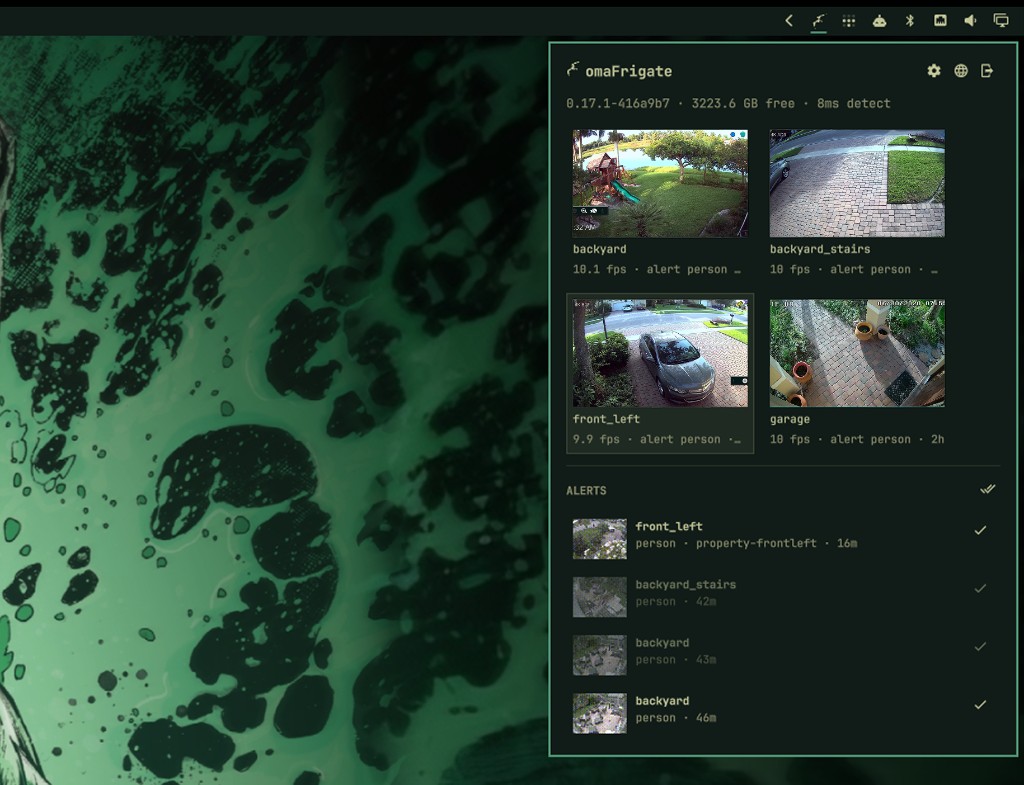
View latest stills, a floating live view, and review Frigate alerts without opening a browser. Click a toast or the bar icon to see what happened or enable live popup alerts to show a live stream of a detection as it happens.
Plugins run unsandboxed inside omarchy-shell with your user permissions. Read the code before you enable it.
Requirements
- Omarchy with shell plugin support
- A reachable Frigate instance (0.14+ for review alerts)
mpvonPATHfor live windows and clips
Install
omarchy plugin add https://github.com/luccast/omaFrigate.git --enable
The widget lands on the right side of the bar. Move it with:
omarchy bar move io.github.luccast.frigate
Update later with omarchy plugin update io.github.luccast.frigate.
Connect
Click the bar icon. The first time, you get a connection form.
| Frigate | URL | Username / password |
|---|---|---|
| Same machine, unauthenticated API | http://127.0.0.1:5000 |
Leave blank |
| Authenticated UI | http://HOST:8971 |
Frigate user |
The password is stored only in ~/.local/state/omarchy/frigate.json (0600). After a successful login, the form hides. Use the header logout button to sign out and clear credentials.
The header browser icon opens Frigate in your default browser.
Use
| Action | Result |
|---|---|
| Click the bar icon | Open or close the panel |
| Escape | Close the panel |
| Click a camera still | Open a floating mpv live view and close the panel |
| Click an alert | Play the clip (or go live if it is still in progress) and mark it reviewed |
| Check on an alert | Dismiss it |
| Mark all | Mark every listed alert reviewed |
The status line shows Frigate version, recordings disk free, and detector time. Each camera tile shows fps or offline, plus the last review object.
Stills refresh only while the panel is open.
Live windows
Each camera opens its own mpv window. Multiple cameras stack. Super-drag moves them; the window close button or q closes one.
By default the stream is Frigate's MJPEG endpoint (/api/<camera>). In the panel gear, Higher quality stream switches to the camera's RTSP main stream (H264). That needs the camera's own username and password, not the Frigate login.
Add this to ~/.config/hypr/hyprland.lua (after Omarchy's defaults) so the windows float instead of tiling:
o.window("^omaFrigate-live", {
  tag = "-default-opacity",
  float = true,
  pin = true,
  no_dim = true,
  opacity = "1 1",
  size = { 640, 360 },
  keep_aspect_ratio = true,
})
Hyprland reloads on save. If a window looks wrong, run hyprctl reload and check hyprctl configerrors.
Alerts
omaFrigate polls Frigate reviews and only toasts unseen severity=alert items. A camera that is temporarily muted in Frigate stays silent. Frigate's email/webpush notification service can stay off.
Click a toast to open the panel. Turn on Live popup on alerts in settings if you also want the floating camera to appear; that is off by default.
The Alerts list shows unreviewed alerts with thumbnails.
Settings
Open the gear in the panel header (visible after login).
| Setting | Default |
|---|---|
| Live popup on alerts | Off |
| 4:3 aspect ratio | Off (16:9) |
| Still refresh (seconds) | 2 |
| Higher quality stream | Off (MJPEG) |
Remove
omarchy plugin remove io.github.luccast.frigate
Develop
From this checkout:
PLUGIN_ID=io.github.luccast.frigate
PLUGIN_DIR="$HOME/.config/omarchy/plugins/$PLUGIN_ID"
mkdir -p "$(dirname "$PLUGIN_DIR")"
rsync -a --delete --exclude .git ./ "$PLUGIN_DIR/"
omarchy plugin validate "$PLUGIN_DIR"
omarchy plugin enable "$PLUGIN_ID"
Omarchy rejects plugin-folder symlinks, so copy rather than link. Saving files under ~/.config/omarchy/plugins/ reloads the plugin.
omarchy-shell shell summon io.github.luccast.frigate '{}'
omarchy-shell shell hide io.github.luccast.frigate