
omARR
The Omarchy Arr stack desktop plugin for homelabs.
omARR is an Omarchy bar plugin for homelab people who already run Sonarr, Radarr, Plex, Jellyfin, SABnzbd, or qBittorrent. Click the skull icon to see your *arr fleet on the left and a live content overview on the right. Now playing, on deck, recently added, and calendar. Add custom links and use as a homelab launcher, all without leaving the Omarchy desktop.
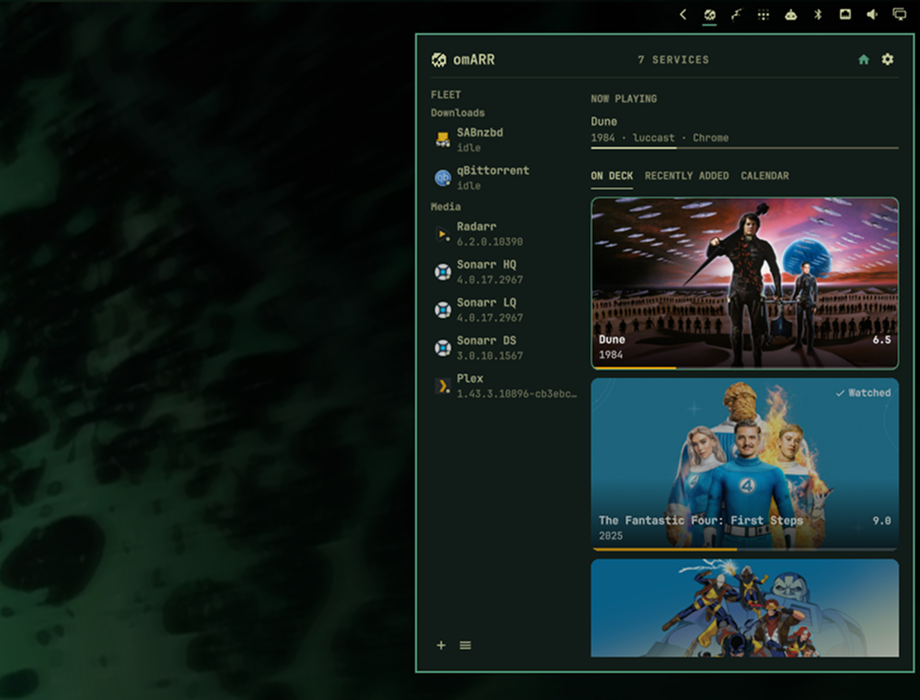
Top features
- Bar badge for active downloads and outages
- Fleet roster with live health for every service you add
- Overview: Plex and Jellyfin now playing and on deck, Sonarr/Radarr calendar, SABnzbd and qBittorrent queues
- Live download notification card that stays up while SAB or qBit is actually downloading
- Toasts for grabs, imports, finished or failed downloads, and services that drop or recover
- Pause and resume a job from the panel
- Scan local ports, or add any URL as a generic up/down tile
- Add custom links and use as a launcher
- Deeper support for more services coming soon

Plugins run unsandboxed inside omarchy-shell with your user permissions. Read the code before you enable it.
Install
omarchy plugin add https://github.com/luccast/omARR.git --enable
The widget lands on the right side of the bar. Move it with:
omarchy bar move io.github.luccast.omarr
Update later with omarchy plugin update io.github.luccast.omarr.
Use
| Action | Result |
|---|---|
| Click the bar icon | Open or close the panel |
j / k |
Move through the fleet |
| Enter | Open the selected service in the browser |
| Space | Open that service’s detail, or return to Overview |
s |
Settings |
| Escape | Close |
Toasts for grabs, imports, Plex and Jellyfin library adds, finished or failed downloads, and services going down or coming back. Click a toast to summon the panel.
While SABnzbd or qBittorrent is actually downloading, a progress card stays on screen (progress bar, title, client icon, poster when *arr has one). Those two clients poll every 2s so short jobs still get a card; everything else stays on the interval in settings. Seeding torrents are ignored. Dismiss it until that job finishes; turn the card off in settings.
Settings
First open is an empty overview. Add a service by kind, or Scan local ports to probe this machine (8989, 7878, 8080, 8096, 32400, 8123, 9696, 5055).
| Kind | Auth | Live data | Controls |
|---|---|---|---|
| Generic | none | Up / down | Open in browser |
| Sonarr | API key | Queue, history, 7-day calendar, missing | Open in browser |
| Radarr | API key | Queue, history, calendar, missing | Open in browser |
| SABnzbd | API key | Queue, history, speed | Pause / resume a job |
| Plex | token | Now playing, on deck, recently added | Open in browser |
| Jellyfin | API key | Now playing, resume, recently added | Open in browser |
| qBittorrent | username + password | Torrents, transfer speed | Pause / resume a torrent |
Overview shows a service’s queue or *arr calendar only when that service has the matching toggle on. SABnzbd and qBittorrent queues default on; Sonarr and Radarr queues default off.
Layout (names, URLs, groups, order, notification flags, poll interval, queue page size, density, download progress card) is stored in ~/.config/omarchy/shell.json. API keys, Plex tokens, Jellyfin keys, and passwords are stored only in ~/.local/state/omarchy/omarr/credentials.json (0600).
Icons
Fleet and settings tiles use Dashboard Icons from Homarr Labs (Apache 2.0). The colorful SVGs are bundled under icons/ so the panel never fetches a CDN at runtime. Kind tiles (Sonarr, Radarr, SABnzbd, qBittorrent, Plex) always get that icon; generic tiles match on the service name.
| Service | Icon |
|---|---|
| Sonarr | sonarr |
| Radarr | radarr |
| Lidarr | lidarr |
| Prowlarr | prowlarr |
| Bazarr | bazarr |
| Readarr | readarr |
| Whisparr | whisparr |
| SABnzbd | sabnzbd |
| qBittorrent | qbittorrent |
| NZBGet | nzbget |
| Transmission | transmission |
| Deluge | deluge |
| Jellyfin | jellyfin |
| Plex | plex |
| Emby | emby |
| Jellyseerr | jellyseerr |
| Overseerr | overseerr |
| Tautulli | tautulli |
| Kodi | kodi |
| Navidrome | navidrome |
| Audiobookshelf | audiobookshelf |
| Komga | komga |
| Kavita | kavita |
| Calibre-Web | calibre-web |
| Immich | immich |
| Home Assistant | home-assistant |
| Portainer | portainer |
| Grafana | grafana |
| AdGuard Home | adguard-home |
| Pi-hole | pi-hole |
| Uptime Kuma | uptime-kuma |
| Syncthing | syncthing |
| Nextcloud | nextcloud |
| Nginx Proxy Manager | nginx-proxy-manager |
| Traefik | traefik |
| Paperless-ngx | paperless-ngx |
Name a generic tile after one of those (or a close alias like pihole) and the matching icon shows up. Unknown names fall back to a letter tile. The bar keeps the omARR glyph.
Remove
omarchy plugin remove io.github.luccast.omarr
Develop
node tests/Model.test.js
omarchy plugin validate .
qmllint -I "$OMARCHY_PATH/shell" BarWidget.qml Panel.qml Service.qml SettingsView.qml OmarrIcon.qml ServiceIcon.qml CalendarCard.qml DownloadToast.qml