
Eye in the Sky
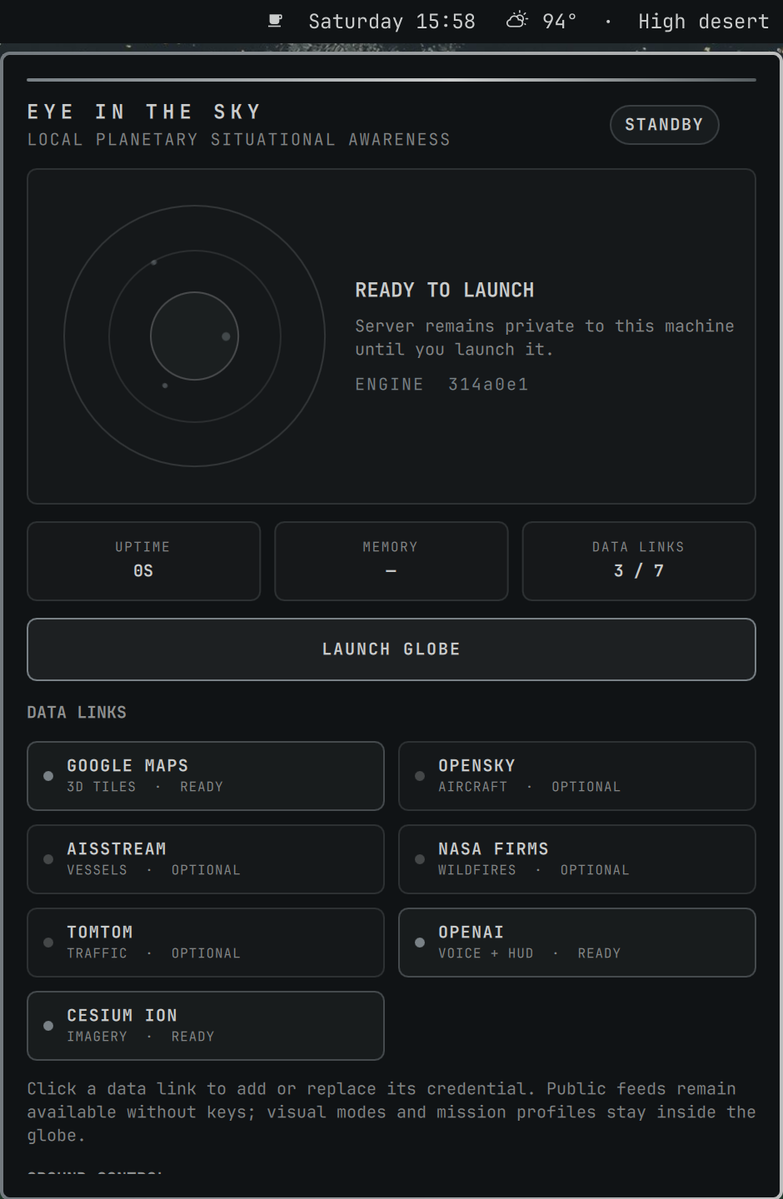
Eye in the Sky is a theme-aware Omarchy mission-control widget for God's Eye View by Bilawal Sidhu. It installs the upstream application at a release-pinned commit, runs it only on localhost, and keeps its required Google Maps key in GNOME Keyring.
The plugin is an independent companion project. It does not bundle, fork, or modify God's Eye View.
Features
- Compact radar button with live, starting, setup, and offline states.
- One-click launch or focus for the dedicated God's Eye View browser window.
- Theme-aware mission-control panel with uptime, memory, and data-link status.
- Controls for credentials, capture, URL copying, logs, restart, and stop.
- Google Maps and optional single-token credentials stored in GNOME Keyring.
- Reproducible engine install pinned to the upstream commit tested by this plugin release.
Requirements
- Omarchy 4 (Quattro) with
omarchy-shell. - Node.js 24.14.x or 26.x,
npm,git, Python 3, systemd, and GNOME Keyring'ssecret-tool. - Chromium is recommended for the dedicated app window; the default browser is used as a fallback.
- A Google Maps API key with Map Tiles API enabled. This is a metered service; restrict the key to the API and localhost referrers, set a quota, and create a billing alert before launching the globe.
The plugin checks the Node.js version before installing or starting the engine and reports a readable error when the runtime is incompatible.
Install
omarchy plugin add https://github.com/majesticio/omarchy-eye-in-the-sky.git --enable
The widget appears in the right bar section by default. Move it with:
omarchy bar move io.github.majesticio.eye-in-the-sky --section right
On first click, choose Install Engine. This explicitly downloads the
upstream God's Eye View source and its npm dependencies into
~/.local/share/gods-eye-view. The plugin pins the upstream source to the exact
commit tested for this release instead of executing a moving branch.
After installation, choose Add Maps Key and enter the restricted key in the
GNOME Keyring prompt. The key is injected into the local service at runtime and
is never written to the plugin directory or a plaintext .env file.
Add credentials with secret-tool
Mission control can open these same keyring prompts by clicking a data link. To
configure them directly in a terminal, run the command for each provider and
paste the secret only when secret-tool prompts for it. The value is read from
standard input, so it does not become part of the command or shell history.
Google Maps (required):
secret-tool store \
  --label="Eye in the Sky — Google Maps API key" \
  application io.github.majesticio.eye-in-the-sky.google-maps
OpenAI (optional voice and HUD features):
secret-tool store \
  --label="Eye in the Sky — OpenAI API key" \
  application io.github.majesticio.eye-in-the-sky.openai
Cesium ion (optional imagery):
secret-tool store \
  --label="Eye in the Sky — Cesium ion token" \
  application io.github.majesticio.eye-in-the-sky.cesium
Mission control reports each provider as Ready after its next refresh. If the globe is already running, restart the service after adding or replacing a credential so the new value is injected into the process.
Use
- Left-click launches or focuses the globe. Before setup, it opens mission control instead.
- Right-click opens or closes mission control.
- Middle-click refreshes service status.
- In mission control, press
Lto launch,Rto refresh,Cto capture,Uto sync the pinned engine,Sto stop, orEscto close.
The service binds to http://localhost:4173 and is started only when requested.
It is not enabled to start automatically at login.
Service controls
The Ground Control buttons cover normal operation. These terminal commands are useful for troubleshooting:
# Restart after changing credentials or configuration
systemctl --user restart gods-eye-view.service

# Inspect current state
systemctl --user status gods-eye-view.service --no-pager

# Read the latest service logs
journalctl --user -u gods-eye-view.service -n 100 --no-pager

# Stop the local globe
systemctl --user stop gods-eye-view.service
The service file is created during Install Engine. A restart before that step will correctly report that the unit does not exist.
Update
Update the plugin through Omarchy:
omarchy plugin update io.github.majesticio.eye-in-the-sky
Then use Update in mission control. Each plugin release identifies the upstream commit it supports; Update synchronizes the local engine to that pin and refreshes npm dependencies. It does not execute the latest unreviewed upstream branch.
Remove
Stop the companion service before removing the plugin:
systemctl --user stop gods-eye-view.service
omarchy plugin remove io.github.majesticio.eye-in-the-sky
This leaves the downloaded upstream app, private configuration, keyring items, and inactive service file in place so uninstalling the widget cannot destroy user data. To remove those separately, review and delete these exact locations:
~/.local/share/gods-eye-view/~/.config/gods-eye-view/~/.config/systemd/user/gods-eye-view.service- GNOME Keyring items whose application begins with
io.github.majesticio.eye-in-the-sky
Run systemctl --user daemon-reload after deleting the service file.
Privacy, security, and costs
- The Vite server binds only to
localhost:4173. - The required Google Maps key and optional single-token provider credentials are stored in provider-specific GNOME Keyring items.
- OpenSky's two-part OAuth configuration may be stored in the private
~/.config/gods-eye-view/envfile, which the plugin creates with mode0600. - The plugin never includes credential values in its JSON status or shell logs.
- Installing and updating performs network access to GitHub and npm. Launching God's Eye View contacts the upstream application's configured data providers.
- The plugin manages one user service, opens a browser and terminal, reads
Hyprland window metadata to focus/capture the globe, and can write screenshots
to
~/Pictures/Screenshots.
Like every Omarchy shell plugin, its QML and helper execute with your user
permissions. Review manifest.json, Service.qml, eye_control.py, and the
bundled systemd user unit before enabling it. God's Eye View remains subject to
its own license and third-party data terms.
Development
omarchy plugin validate .
python3 -m py_compile eye_control.py
python3 eye_control.py status
The plugin source can be linked at
~/.config/omarchy/plugins/io.github.majesticio.eye-in-the-sky for live QML
reloads. Inspect runtime errors with:
qs log -p "$OMARCHY_PATH/shell" --tail 100
License
Eye in the Sky is MIT licensed. God's Eye View is a separate upstream project under its own license.