
Omahub
← All plugins
M

Omaview

by Manas-Kenge

A combined calendar, media, and timezone overview for Omarchy.

Security review

No obvious issues detected

Deterministic scan — not a security guarantee

None
Risk level
None
Analyzed commit
d41da57
Scanned
1 month ago

No potentially dangerous behavior detected in the analyzed commit.

Automated analysis only — not a security guarantee.

AI advisory review

No obvious issues detected

Language-model assessment · ~deepseek/deepseek-v4-flash-latest — advisory only

Low
AI risk level
Low
Recommendation
install
Model
~deepseek/deepseek-v4-flash-latest
Analyzed commit
d41da57
Reviewed
1 month ago

The plugin is a straightforward calendar, media, and timezone widget with no obfuscated code, network calls, or destructive operations. The shell scripts are simple and only read system timezone and CPU/RAM data. The only minor concern is that the timezone list is loaded via a shell command, but it only runs `timedatectl` and `jq` with no user input, so the risk is minimal.

  • The `list-zones.sh` script pipes `timedatectl list-timezones` into `jq`, which is safe but relies on `jq` being installed; if missing, the timezone picker will silently fail.
  • The `get-times.sh` script uses `TZ="$zone"` with user-selected timezone strings, but the values are validated against the IANA timezone list before being passed, so command injection is not feasible.
  • The plugin reads system vitals (`/proc/stat`, `/proc/meminfo`) and runs `date` and `timedatectl`, which is expected behavior for a system monitor widget and poses no additional risk.
How this check works

This review combines the deterministic scan (the rule-based results above) with an independent look at the plugin's code by a language model. The model reads a trimmed sample of the repository's files, the manifest, and the README, then gives a plain-language risk level and a recommendation: install (no notable danger), review (look closer first), or avoid (clearly dangerous).

It runs on the same analyzed commit as the deterministic scan and is strictly advisory — it is not a security guarantee and never blocks a plugin by itself. A human moderator still reviews plugins before they are listed.

AI advisory only — automated analysis, not a security guarantee.

Install
$ omarchy plugin add https://github.com/Manas-Kenge/omaview --enable
Widgets #bar #quickshell #media

Omaview

A calendar-based Omarchy bar clock with a combined popup for calendar navigation, MPRIS media controls, and selectable IANA timezones.

This plugin is derived from Omarchy's built-in clock plugin and is intended for the Omarchy shell.
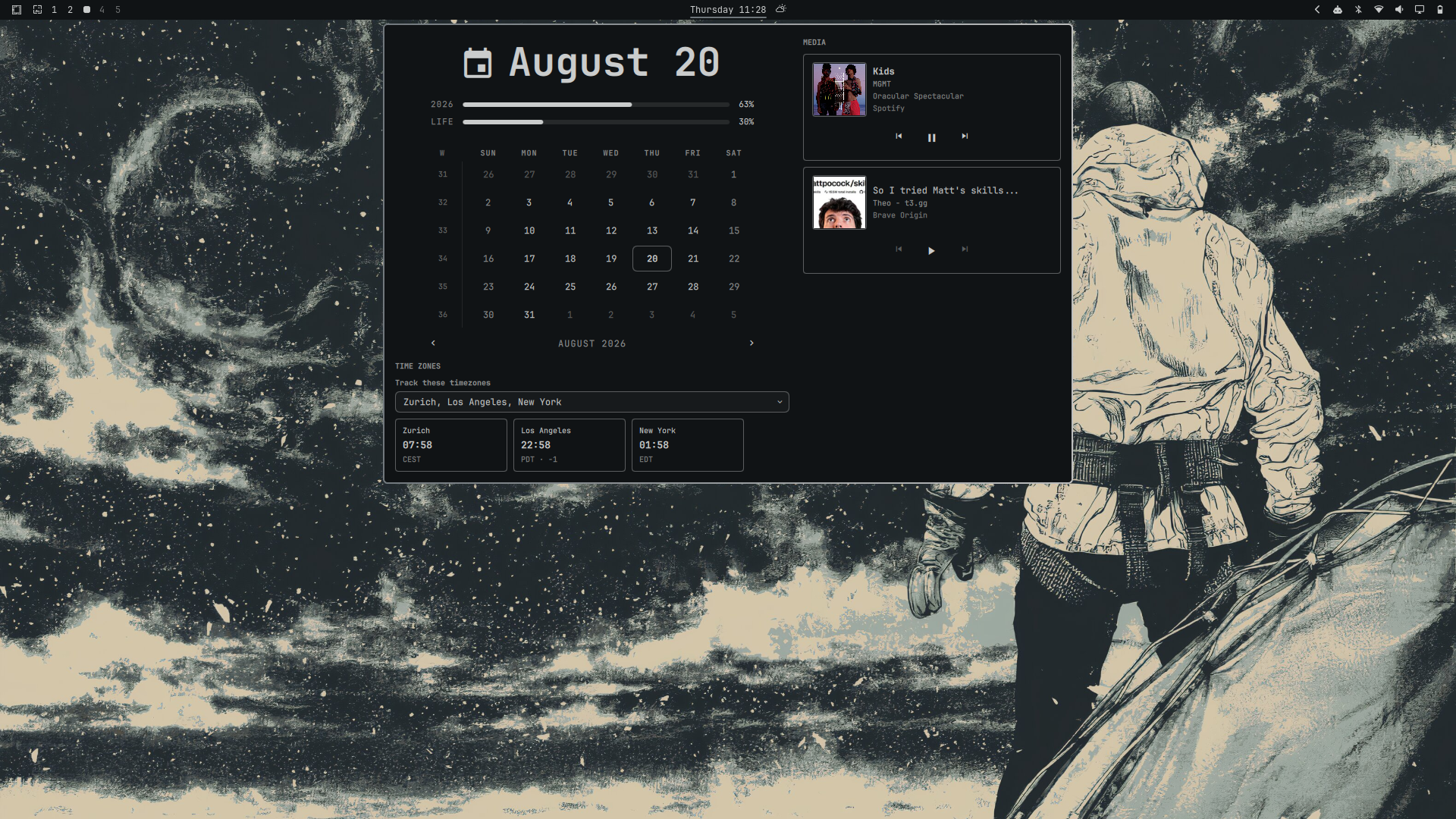
Omaview calendar, media, and timezone panel

Features

  • Calendar view with month navigation and the existing clock-format cycling.
  • One media card per detected MPRIS player, including Spotify, browser media, and other MPRIS-compatible players.
  • Track title, artist, album art, player name, and previous/play-pause/next controls when the player exposes them.
  • Searchable IANA timezone selection with persistent selected zones.
  • A compact horizontal row of selected timezone cards below the calendar.
  • The system's local time is not repeated in the timezone section; only selected custom timezones are shown.

Requirements

  • Omarchy with the Quickshell-based shell.
  • Omarchy's built-in omarchy.media service.
  • Bash, coreutils date, timedatectl, and jq.
  • Browser media must be exposed through MPRIS to appear in the popup.

No separate Spotify or YouTube integration is included. Media visibility and controls depend on what each player exposes through MPRIS.

Installation

Replace the placeholder repository URL with your public GitHub repository:

omarchy plugin add https://github.com/Manas-Kenge/omaview.git --enable

Development and validation

From the plugin repository root:

omarchy plugin validate .
qmllint -I "$OMARCHY_PATH/shell" BarWidget.qml Panel.qml MediaSection.qml TimezoneSection.qml
bash -n *.sh

Click the clock to open the popup. Right-click cycles the existing clock format; middle-click keeps Omarchy's existing timezone picker behavior. Selected custom timezones are stored on this widget's bar entry in shell.json and survive a shell reload.

Removal

omarchy plugin remove io.github.manas-kenge.omaview

Security and permissions

Omarchy shell plugins run with the permissions of the user session and are not sandboxed. This plugin's scripts invoke standard local commands for timezone data, while media access is provided by Omarchy's existing media service.

The repository URL and plugin ID use the Manas-Kenge GitHub namespace.