
Porthole
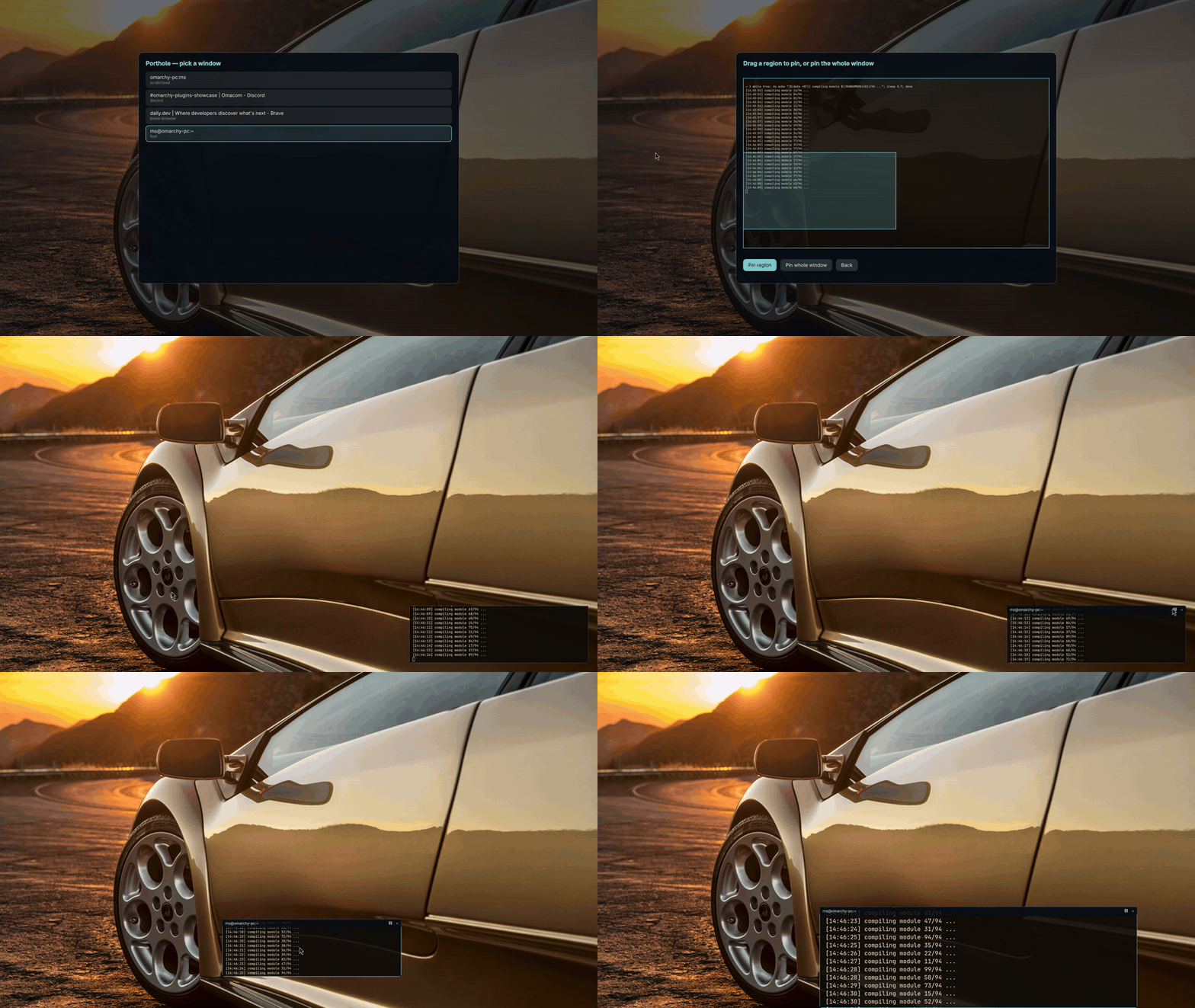
Pin a live, cropped view of any window as a small always-on-top porthole. It stays on every workspace and keeps updating even while the source window sits on a hidden one. PowerToys Crop and Lock, native to Omarchy.
You park a build, a CI log, or a render on workspace 5, then flip back every minute to check on it. Porthole ends the flipping: crop the two lines that matter and keep them in the corner of your screen while you work.
Install
omarchy plugin add https://github.com/marko-builds/porthole --enable
Remove it the same way:
omarchy plugin remove io.github.marko-builds.porthole
Use
Plugins cannot register keybinds, so bind the picker yourself in
~/.config/hypr/bindings.lua:
o.bind("SUPER + ALT + P", "Porthole", "omarchy-shell shell summon io.github.marko-builds.porthole")
- Pick a window. Arrows and Enter work, so does the mouse.
- Drag a rectangle over the live preview and click Pin region, or press Enter to pin the whole window.
- The porthole appears bottom right. ESC steps back. Summoning the picker again lists every pinned porthole with an Unpin button.
On the porthole itself:
- Drag moves it. It stops at the screen edges.
- Scroll resizes it, 200 to 1400 px wide.
- A plain click jumps to the source window.
- Hover shows the title bar with pause and close.
- When the source window closes, the porthole says so. Click it to unpin.
How it works
Hyprland keeps rendering a window for capture even when it sits on a hidden workspace;
screen sharing depends on the same mechanism. Porthole requests that capture through
Quickshell's ScreencopyView with the picked toplevel as its source, then shows only
the rectangle you drew: the full frame is drawn at crop scale inside a clipping item,
shifted so your region lands at the origin.
Each porthole is a fullscreen transparent layer-shell window whose visible card is an inner item. Drag becomes plain item math instead of a feedback loop through the compositor, and an input mask keeps every pixel outside the card click-through. The card never takes keyboard focus.
Limits, stated
- A shell restart (theme change, plugin update) drops all pinned portholes. Re-pin by hand; persistence is not in v1.
- The crop is fixed buffer pixels. If the source window resizes, the region can slide off the content it was aimed at.
- SUPER+W cannot close a porthole. Layer surfaces are not windows to Hyprland. Use the click, the close button, or the picker's Unpin list.
- Sources on hidden and special workspaces keep updating (verified in the selftest). Minimized windows are untested.
Dev harnesses
selftest.qml drives the whole flow headless: it spawns a target window, pins a crop,
moves the source to a hidden workspace, proves the frames still advance, kills the
source, and checks the dead state. probe/probe.qml is the original capture
feasibility probe. Both run standalone beside the live shell and need alacritty for
the throwaway target window:
quickshell -p selftest.qml
Output lands under $XDG_RUNTIME_DIR (porthole-selftest/ and porthole-probe/).
License
MIT