
Circle of Fifths for Omarchy
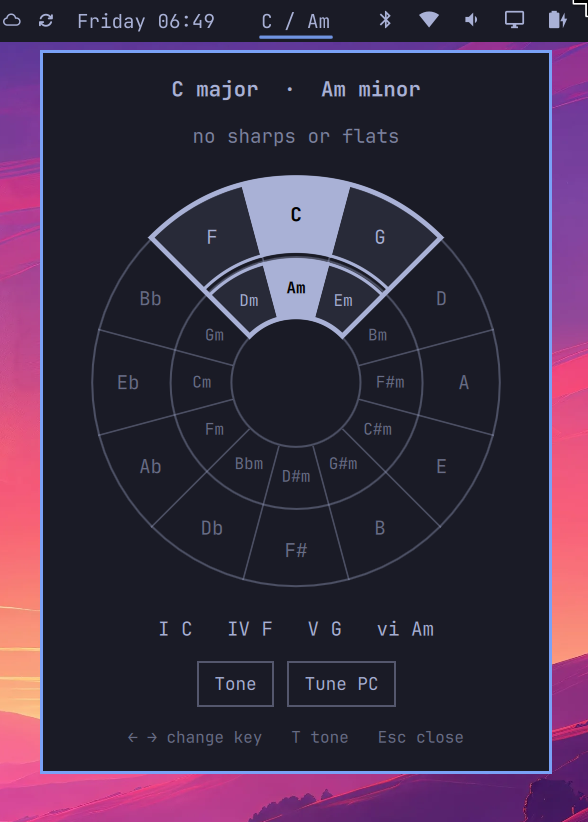
Bar widget that opens a key picker on the circle of fifths.
Plugin id: io.github.markschellhas.circle-of-fifths
Install
omarchy plugin add https://github.com/markschellhas/omarchy-circle-of-fifths.git --enable
omarchy bar move io.github.markschellhas.circle-of-fifths --section right
Left-click the bar chip to open the panel. The outer ring is major keys, the inner ring is relative minors. Click a wedge or use the arrow keys to change key.
Keyboard shortcut
Omarchy does not load Hyprland binds from plugins, so add this to ~/.config/hypr/bindings.lua after install. Super+Ctrl+Alt+5 is free on a stock Omarchy keymap (Super+5 / Super+Shift+5 / Super+Ctrl+5 / Super+Alt+5 are already workspace, move, bar-panel, and group).
o.bind("SUPER + CTRL + ALT + code:14", "Circle of fifths", "omarchy-shell shell toggle io.github.markschellhas.circle-of-fifths")
Tone mode (T, or the Tone button) makes clicks play the triad on that wedge instead of changing the key. Arrow keys cycle I–ii–iii–IV–V–vi inside the current key wedge. Number keys 1–6 jump to those degrees and play them.
Tune PC is off by default. Turn it on to tune this machine to the selected key: notifications play a short triad in-key (I for normal, vi for low, V for critical). Turn it off to restore silent notifications. The selected key is remembered as the system tonic.
Sound is a placeholder sine-wave triad via play-triad.py.
Esc closes the panel.
Remove
omarchy plugin remove io.github.markschellhas.circle-of-fifths
Develop locally
omarchy plugin validate ~/.config/omarchy/plugins/io.github.markschellhas.circle-of-fifths
omarchy-shell shell rescanPlugins