
Omarci
Local CI in the Omarchy bar.
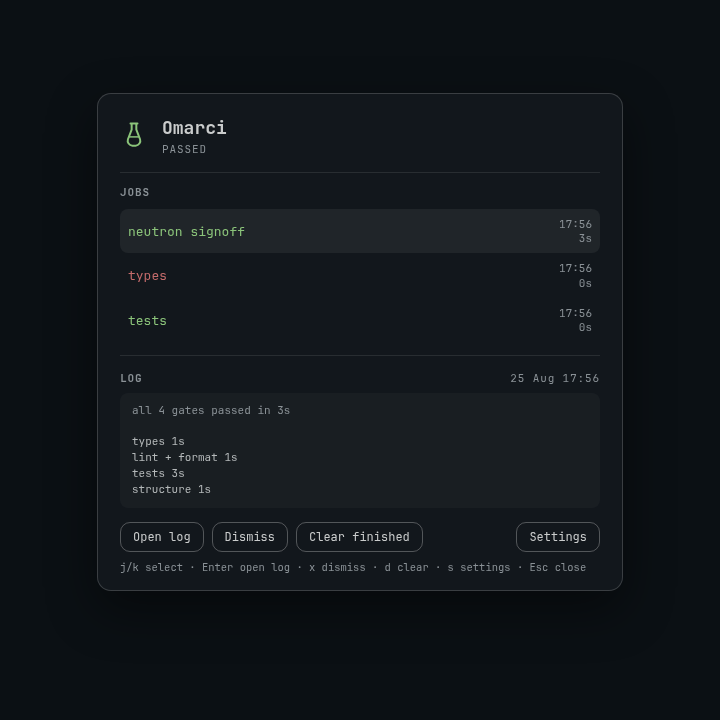
Scripts start a job. It passes or fails. The bar shows a test-tube pill — green for the latest pass, red for a fail, a spinner while it runs. Click the pill for the job list, a log tail, and desktop notifications.
Install
omarchy plugin add https://github.com/matiacone/omarci.git --enable
ln -sf ~/.config/omarchy/plugins/io.github.matiacone.omarci/bin/omarci ~/.local/bin/omarci
The widget lands on the right. Move it if you want:
omarchy bar move io.github.matiacone.omarci --section right --before omarchy.agents
Use
# Wait for a command. Exit status is the command's. The bar tracks it live.
omarci run --name "neutron signoff" -- ./scripts/signoff.sh

# Fire and forget. Prints a job id. Notification when it finishes.
omarci run --bg --name types -- bun run check-types

# Status bus for a script that already runs the work:
id=$(omarci start --name types)
bun run check-types >"$(omarci show "$id" | jq -r .log)" 2>&1
omarci pass "$id" -m "ok"
# or: omarci fail "$id" -m "tsc exited 1"
| Key | Action |
|---|---|
j / k |
Select a job |
Enter |
Open the full log in a terminal |
x |
Dismiss the selected job |
d |
Dismiss all finished jobs |
s |
Settings |
Esc |
Close settings, or close the panel |
Settings is bottom-right. Turn notifications off there to stop notify-send from the CLI as well.
omarci list
omarci logs <id>
omarci dismiss <id>
omarci clear          # dismiss finished jobs
omarci clear --prune  # drop dismissed jobs and their logs
OMARCI_NOTIFY=0, --no-notify, or the widget toggle skips toasts. OMARCI_DIR overrides the state directory ($XDG_STATE_HOME/omarci).
A successful omarci run exits 0, so compose a follow-up yourself:
omarci run --name signoff -- ./scripts/signoff.sh && gh pr merge
There is no built-in hook on pass.
Update
omarchy plugin update io.github.matiacone.omarci
Uninstall
omarchy plugin remove io.github.matiacone.omarci
rm -f ~/.local/bin/omarci
Job history in ~/.local/state/omarci/ is left in place.
Security
Omarci runs unsandboxed inside omarchy-shell when enabled. Review the source before installing.
- Files: reads and writes
$XDG_STATE_HOME/omarci/(job index, logs, notify preference). Toggling notifications may update this plugin's entry in~/.config/omarchy/shell.json. - Commands:
notify-sendon pass/fail;omarchy-launch-tui lesswhen you open a log;omarci runexecutes the command you pass it. - Network: none of its own.
omarci runonly does what the wrapped command does. - Privilege: no sudo, no install hooks.
License
MIT