
Clockify for Omarchy
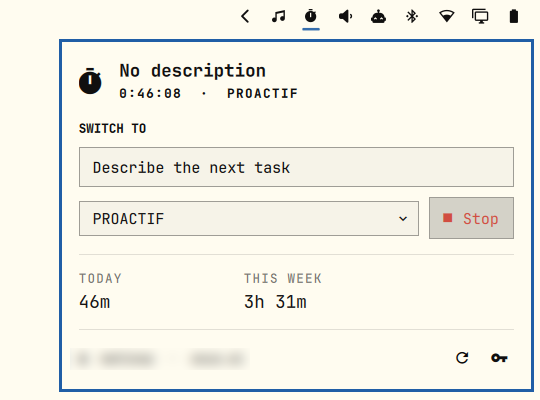
A Clockify timer in the Omarchy bar. The pill is one glyph -- bold while a timer runs -- and the panel starts and stops it, picks a project, and totals the day and the week.
← bar pill: bold while timing, dimmed when no timer runs
Hover it for the running task, its elapsed time, and today's total.
Install
omarchy plugin add https://github.com/matyssxdxd/io.github.matyssxdxd.clockify.git --enable
Or, while developing it locally, drop the folder in
~/.config/omarchy/plugins/io.github.matyssxdxd.clockify/ and enable it:
omarchy plugin validate ~/.config/omarchy/plugins/io.github.matyssxdxd.clockify
omarchy plugin enable io.github.matyssxdxd.clockify
Needs python3 (Omarchy ships it) and nothing else.
Connect
Click the pill, paste your API key, press Connect. The key comes from Clockify → Preferences → Advanced → API.
It is stored in ~/.config/omarchy/clockify.json with mode 0600, and the
plugin validates it against Clockify before writing it. $CLOCKIFY_API_KEY is
used instead when set, so a key you already manage elsewhere (a password
manager, an age-encrypted env file) needs no copy on disk. The key is never
passed as a command-line argument — it reaches the helper over stdin and is read
back from the config file — so it does not show up in ps for other users.
The trailing key button in the panel footer forgets a stored key again.
Use
| Action | Mouse | Keyboard (panel open) |
|---|---|---|
| Open/close the panel | Left-click the pill | Esc closes |
| Start / stop the timer | Right-click the pill, or Start/Stop | s |
| Refresh from Clockify | Middle-click the pill, or the footer ↻ | r |
| Describe the next task | Click the text field | d, then Enter to start timing it |
| Pick a project | Click the dropdown | p |
| Move the cursor | Hover | j / k or arrows |
| Activate the cursor row | Click | Enter |
| Switch to the neighbouring bar panel | — | Tab / Shift+Tab |
Starting a timer while one runs switches: the old entry is stopped at that instant and the new one begins, the same as Clockify's own web UI. The selected project is remembered as the default for the next start.
Today and This week count closed entries plus the live elapsed time of
the running one, so they keep moving between refreshes. The week starts on
Monday; set "weekStart": "sunday" in ~/.config/omarchy/clockify.json for the
other convention.
Configure
Widget settings live on the bar entry (edit them in the bar settings panel, or
in ~/.config/omarchy/shell.json under the widget's entry):
| Setting | Default | Meaning |
|---|---|---|
refreshIntervalSec |
60 | How often the bar re-reads Clockify |
hideWhenIdle |
false | Hide the pill when no timer runs (it still appears while unconnected) |
Move the widget:
omarchy bar move io.github.matyssxdxd.clockify --section center
Shell commands
omarchy-shell shell summon io.github.matyssxdxd.clockify '{}'   # open the panel
omarchy-shell shell hide io.github.matyssxdxd.clockify
omarchy-shell io.github.matyssxdxd.clockify toggleTimer
omarchy-shell io.github.matyssxdxd.clockify startTimer "Writing docs" ""
omarchy-shell io.github.matyssxdxd.clockify stopTimer
omarchy-shell io.github.matyssxdxd.clockify status                # one-line summary
omarchy-shell io.github.matyssxdxd.clockify debug                 # JSON state of one widget
status/debug answer from whichever monitor's widget owns the IPC target —
debug names that screen, and reports the last fetch time and error, which is
the first thing to look at when the pill disagrees with Clockify.
How it works
| File | Role |
|---|---|
manifest.json |
bar-widget plugin, entry point Panel.qml, settings schema |
Panel.qml |
Bar glyph, popup, keyboard cursor, IPC surface |
Service.qml |
State, refresh timers, and the only caller of the helper |
Model.js |
Payload parsing and every string the UI renders |
clockify.py |
The whole REST conversation, one JSON object per run |
test/test_clockify.py |
Offline tests for the helper's date and payload logic |
The QML never speaks HTTP. clockify.py makes the three or four calls a refresh
needs and prints one snapshot, so the panel has a single shape to bind to and a
single place (error) to read failures from. It exits 0 even when Clockify
refuses, because a non-zero exit would only tell the shell that something
broke.
Two details worth knowing if you hack on it:
- Per-monitor instances. A bar exists per screen, so this widget — and its service — exists per screen. Their first refreshes are jittered so a shell start does not open every connection at once.
- Address failover.
api.clockify.meresolves to several CloudFront addresses, and on some networks one of them accepts the connection and then answers nothing, which looks exactly like an outage every other refresh. The helper resolves the host itself, moves to the next address when one stops answering, reuses the connection that worked, and remembers it inclockify.jsonasapiHostso the next refresh starts there. Delete that field if Clockify's addresses ever change under you; it is re-learned.
Run the helper directly while developing:
./clockify.py status --projects | jq
./clockify.py start --description "Writing docs" --project <project-id>
./clockify.py stop
python3 -m unittest discover -s test
After editing any file the shell reloads the plugin on its own; a stale IPC
handler can survive a few reloads, so omarchy-restart-shell is the honest way
to check a change.
Publishing
The id is namespaced to match the repository, so it needs no rename before publishing. To list it on omarchyplugins.com:
- Push this folder to a public GitHub repo,
manifest.jsonat its root. omarchy plugin validate .— the marketplace runs the same check against whichever commit you submit.- File the submission issue form linked from omarchyplugins.com/publish.html, with the repo link, a category, and tags.
The marketplace validates listings, not security — plugins run unsandboxed, so the code, assets, docs, and license here are mine to stand behind.
Remove
omarchy plugin disable io.github.matyssxdxd.clockify   # keep it installed, off the bar
omarchy plugin remove io.github.matyssxdxd.clockify    # and delete the folder
rm ~/.config/omarchy/clockify.json       # and forget the API key
MIT licensed.