
Keycap
Your keybindings, where you already look.
Omarchy ships a keybindings list behind Super+K, but that is a place you have
to go. Keycap puts the answer in the menu you open anyway: press Super+Space,
type three letters, and the shortcut is sitting next to the name.
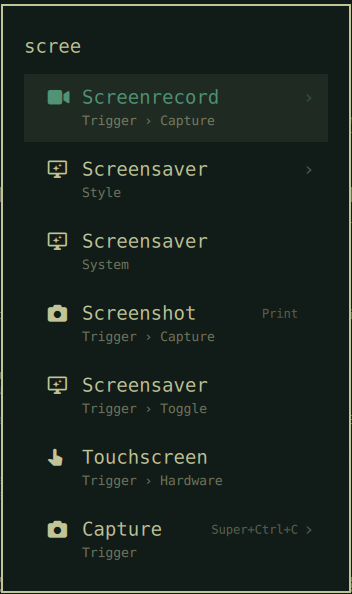
Chromium              Super+Shift+B
Screenshot                    Print
Capture                Super+Ctrl+C
Apps                Super+Alt+Space
You stop looking things up, and you start noticing the shortcut for the thing you just clicked. That is how a keybinding gets learned.
What it covers
Applications, settings panels, submenus and one-shot actions — anything the Omarchy menu lists that a Hyprland binding actually reaches. Rows without a binding simply show nothing.
How it finds them
hyprctl binds reports every Omarchy binding as dispatcher __lua with an
opaque argument, so the command behind a key is not visible there. Keycap
recovers it the way omarchy-menu-keybindings does: bin/keycap-resolve
replays ~/.config/hypr/hyprland.lua through a shim that records nothing but
the bind calls. The shim is lifted out of the installed Omarchy script at run
time rather than copied, so it keeps tracking upstream.
Each binding is then matched against the row it belongs to, most precise first:
| Map | Keyed on | Reaches |
|---|---|---|
byApp |
desktop entry id | Chromium, Files, Docker, YouTube, WhatsApp, Google Maps |
byCmd |
the exact command the row runs | Screenshot, Transcode, Lock, Keybindings |
byRoute |
the submenu a binding opens | Apps, System, Capture, Theme, Share |
byName |
the binding's own description | everything else, by name |
Web apps match on the URL their .desktop entry and their binding share.
omarchy-launch-browser and omarchy-launch-terminal are resolved through
xdg-settings and xdg-terminals.list, so the hint lands on Chromium and
foot rather than on a row named "Browser".
Run the resolver on its own to see what Keycap will show:
~/.config/omarchy/plugins/io.github.maxmad75.keycap/bin/keycap-resolve | jq
First run takes about a second and a half. After that it answers in ~50 ms from
a cache keyed on hyprctl binds plus your application directories, so a rebind
shows up the next time you open the menu.
Install
omarchy plugin add https://github.com/MaxMad75/omarchy-keycap.git --enable
omarchy restart shell
The restart is required, not optional. Bar widgets hot-reload; a menu plugin
does not — the shell logs "Local plugin changed, reloading" and keeps running
the old code until it restarts.
What enabling changes
Keycap is a fork of Omarchy's own menu plugin and declares
omarchy.clonedFrom: "omarchy.menu". Enabling it therefore does what any
Omarchy clone does: omarchy.menu moves to disabledPlugins in
~/.config/omarchy/shell.json, and Super+Space routes here instead. Nothing
else in your configuration is touched, and Keycap itself never writes to it.
Remove
omarchy plugin remove io.github.maxmad75.keycap
omarchy restart shell
That restores omarchy.menu and your original Super+Space. The only other
thing Keycap leaves behind is its cache:
rm -f ~/.cache/omarchy/keycap-*.json
Know before you install
Keycap replaces the Omarchy menu with a fork of it. The menu is roughly
1,400 lines of Quickshell QML, and this repository carries a copy taken from
Omarchy 4.0.0. Improvements Omarchy makes to its own menu will not reach you
while Keycap is enabled, and after a large omarchy update the fork can drift.
If the menu misbehaves after an update, diff it against
/usr/share/omarchy/shell/plugins/menu/ before assuming Keycap is at fault —
or remove Keycap, which restores the shipped menu in one command.
This is the honest cost of the feature: Omarchy's menu rows have no extension point for a trailing column, so there is no way to add one without forking.
How it handles its own inputs
Everything Keycap reads is local, but the shell process it runs inside is long-lived and shared, so local input is still treated as untrusted:
- All cache I/O goes through
bin/keycap-cache.py, because the guarantees needed here are open flags the shell cannot express. Reading opens withO_NOFOLLOW|O_NONBLOCKand decides everything fromfstaton that one descriptor — regular file, owned by this user, within 1 MiB, parsing to the expected shape. Checking a pathname and opening it afterwards would leave a window in which the name can be swapped for a symlink; there is no window here, because the kernel refuses the symlink at open time. Writing creates its temporary withO_CREAT|O_EXCL|O_NOFOLLOWand holds that descriptor through write, verification andfsyncwithout ever reopening the name, then publishes withos.replace, which swaps the directory entry atomically and replaces a symlink at the destination rather than following it. - The cache lives in
~/.cache/omarchy/keycap/, created0700and verified bylstatto be a directory this user owns with no group or other access. That is defence in depth; the open flags above are the actual control. - The whole resolve runs under a 20 s deadline and every external step under
8 s, so a wedged
hyprctlcannot stall the menu. - Bindings, desktop entries, matches and total output are capped, and
Menu.qmlenforces its own 512 KiB ceiling on what it will accumulate from the resolver.
Any of these limits being hit yields an empty result, and the menu renders exactly as it did before.
Requirements
Omarchy 4 (Quattro) with omarchy-shell. The resolver uses hyprctl, lua,
jq, xdg-settings and omarchy-menu-keybindings, and the cache helper uses
python3 — all of which a stock Omarchy install already has (uwsm, which
launches everything on the desktop, depends on python itself). No network
access, no other external dependencies. If python3 is missing the cache is
skipped and every menu open pays the full resolve; if anything else is missing,
the resolver returns empty maps and the menu renders exactly as it did before.
License
MIT — see LICENSE. Menu.qml, MenuModel.js and BarWidget.qml
are derived from the Omarchy menu plugin,
Copyright (c) David Heinemeier Hansson, also MIT; see NOTICE.