
Omaports
Open dev ports on localhost, in the Omarchy bar.
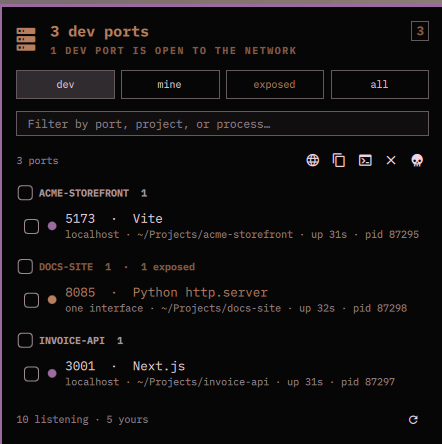
The widget is a count of what you are running. The panel is the list, and its
whole trick is naming things properly: ss reports a port as a pid and a
thread name, so a Vite server shows up as MainThread and every JavaScript
project on the machine shows up as node. Omaports reads the command line,
the working directory and the project root behind each pid, and reports
3000 · Vite under the heading nexahubtech instead.
From there the actions are the four things anyone actually does with a dev port: open it, copy it, open a terminal where it lives, or kill it.
Install
omarchy plugin add https://github.com/mich-nduka/omaports.git --enable
Everything it needs is already on an Omarchy box:
| Dependency | Used for | Required |
|---|---|---|
ss (iproute2) |
reading the listening sockets | yes |
/proc |
naming the process behind a port | yes |
xdg-open |
opening a port in the browser | for the open action |
wl-copy |
the copy action | for the copy action |
xdg-terminal-exec |
opening a terminal in the project | for the terminal action |
No sudo, no polkit, no daemon. The plugin runs as your user inside
omarchy-shell and reads exactly what you could read from a shell. That is
also its one limit: a port owned by another user is visible, but the process
behind it is not, because only root can see whose it is. Those ports are
named from a table of well-known services instead — 5432 · PostgreSQL —
and never offer a kill.
Nothing here writes to your configuration, and the only thing it ever does to another process is send it the signal you asked for.
Remove
omarchy plugin remove io.github.mich-nduka.omaports
That takes the widget out of the bar and deletes the plugin directory. To keep it installed but off the bar, disable it instead:
omarchy plugin disable io.github.mich-nduka.omaports
Neither leaves anything behind. The only thing this plugin ever writes is its
own entry in ~/.config/omarchy/shell.json, which remove takes with it.
Usage
Click the icon to open or close the panel. Press Escape to close it. Right-click refreshes.
The number next to the icon counts dev ports — what you are running, rather
than every socket on the machine. It turns urgent when a dev port is bound
beyond loopback, which is the one thing here worth interrupting you over: a
server on 0.0.0.0 is reachable from every machine on the network you happen
to be on, coffee shop included. Hover for the full count and the reason.
Four chips switch what the list shows.
| Chip | Rows |
|---|---|
| dev | ports in a dev range, ports held by a dev runtime, and anything you named in settings |
| mine | every port owned by your user, dev or not |
| exposed | every port reachable from beyond this machine |
| all | everything listening |
Rows are grouped by project — the checkout the server was started from, found
by walking up from its working directory to the nearest .git, package.json,
Cargo.toml, go.mod, composer.json, pyproject.toml, Gemfile,
mix.exs, pom.xml, build.gradle or deno.json. That is why a Laravel
server started in public/ lands under the name of the app rather than under
public. Ports with no readable owner share one system group at the bottom.
Each row reads port · what it is, then where it is reachable from, which
checkout it belongs to, how long it has been up, and its pid. The dot on the
left is the summary: accent for a dev port, urgent for a dev port open to the
network, dim for everything else.
A dev server that binds both 127.0.0.1 and ::1 is one row, not two.
Actions
Tick rows to act on several at once. With nothing ticked, the action applies to the row under the cursor.
| Action | Icon | Key | What it does |
|---|---|---|---|
| Open | | o |
xdg-open http://localhost:<port>, for ports that look like they serve HTTP |
| Copy | | y |
the address, one per line for a multiple selection |
| Terminal | | t |
xdg-terminal-exec in the directory the server runs from |
| Kill | | x |
the signal set in settings, TERM by default |
| Force kill | | K |
SIGKILL |
Kill asks first, unless you turn that off. Only your own processes can be killed; a row that is not yours leaves the action disabled and says so.
Keyboard
The panel takes keyboard focus when it opens.
| Key | Does |
|---|---|
↑ ↓ ← → or hjkl |
move the cursor between chips, the filter field and the list |
Return |
tick the row under the cursor, or take the chip under it |
/ |
jump to the filter field |
v |
tick or untick everything visible |
1 2 3 4 |
dev, mine, exposed, all |
r |
refresh |
Escape |
close |
Filtering matches the port, the project, the runtime, the process, and the
command line — so 3000, vite, and the name of the checkout all find the
same server.
Settings
Everything below lives in the widget's entry in
~/.config/omarchy/shell.json and can be edited there or from the bar's own
settings panel.
| Setting | Default | What it does |
|---|---|---|
refreshIntervalSec |
5 |
how often the socket table is read |
barLabel |
Dev ports |
the number next to the icon: dev ports, everything, or nothing |
warnExposed |
true |
turn the icon urgent when a dev port is open to the network |
showSystemPorts |
true |
include ports owned by other users |
includeUdp |
false |
include UDP sockets, which are mostly discovery chatter |
devPorts |
"" |
extra ports to always count as yours: 7788, 9100-9110 |
ignorePorts |
"" |
ports to drop from every list and count |
httpsPorts |
"" |
ports whose links should open as https |
killSignal |
TERM |
the signal the kill action sends |
confirmKill |
true |
ask before killing |
A port counts as a dev port when it sits in a range dev servers take
(3000-3010, 4200, 5173-5180, 8000-8010, 8080-8090, 19000-19010 and friends),
when the process holding it is a recognised runtime, or when you listed it in
devPorts. A well-known service port is deliberately not one: Postgres on
5432 is infrastructure, and counting it would make the number on the bar
useless.
IPC
The plugin answers on its own IPC target, so a script or a keybinding can reach it:
omarchy-shell io.github.mich-nduka.omaports toggle
omarchy-shell io.github.mich-nduka.omaports refresh
omarchy-shell io.github.mich-nduka.omaports count   # 4/11 — dev ports of total
omarchy-shell io.github.mich-nduka.omaports list    # JSON, one object per port
list is the useful one for scripting:
omarchy-shell io.github.mich-nduka.omaports list \
  | jq -r '.[] | select(.dev) | "\(.port)\t\(.project)\t\(.name)"'
Development
Model.js holds every pure function — the ss parser, the /proc merge, the
dev-port classifier, the grouping, and every string the panel shows. It has
no Qt in it, so the whole thing runs under node:
node test/model-test.js
The fixture in that file is a real capture, threaded-runtime naming and all.
Service.qml owns every process the plugin starts; Panel.qml is
declarative and starts none.
License
MIT.