
Pgmarchy
PostgreSQL and pgAdmin 4 status in the Omarchy bar.
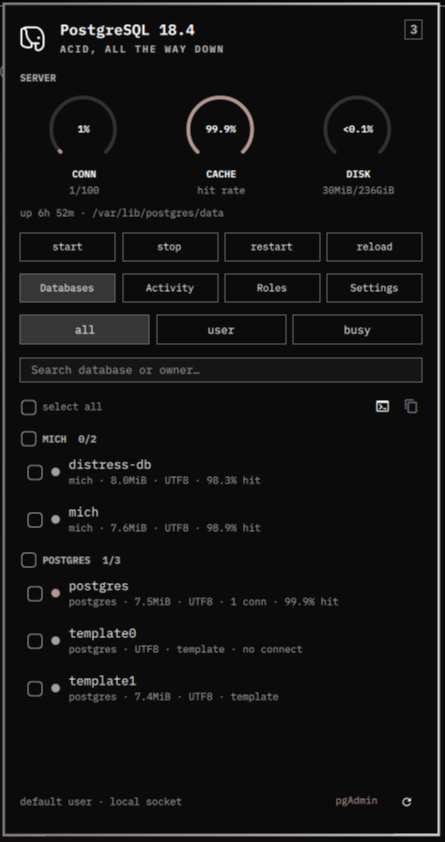
The bar widget is the elephant. The panel is the catalog: databases, live backends, roles, and settings, each grouped and searchable, over three dials for connections, buffer cache, and disk. psql opens in a terminal, pgAdmin 4 opens from the footer, and the systemd unit starts and stops from the panel.
Install
omarchy plugin add https://github.com/mich-nduka/pgmarchy.git --enable
Requires psql on PATH — the postgresql-libs package on Arch, or
postgresql if you also run the server locally. Everything else is already
on an Omarchy box:
| Dependency | Used for | Required |
|---|---|---|
psql |
every query the panel runs | yes |
xdg-terminal-exec |
opening an interactive psql | for the psql action |
wl-copy |
the copy action | for the copy action |
pkexec, systemctl |
the start/stop/restart/reload row | for service control |
| pgAdmin 4 | the footer button | no |
No sudo. The plugin runs as your user inside omarchy-shell and connects the
way psql would from your shell, so peer authentication over the local socket
works with no configuration. The one exception is the service control row,
which shells out to pkexec systemctl and raises a polkit prompt; turn it off
in settings if you would rather it not be there at all.
Nothing here writes to your configuration. The panel reads the server, and
the only statements it ever issues on your behalf are pg_cancel_backend and
pg_terminate_backend, against rows you have explicitly ticked.
Usage
Click the elephant to open or close the panel. Press Escape to close it.
The icon is lit while the server answers and dim while it does not. It turns
urgent when a backend is waiting on a lock, when a setting needs a restart,
or when connections pass 90% of max_connections. Hover for version,
sessions, database count and total size, cache hit rate, uptime, and whether
pgAdmin 4 is running. Right-click refreshes; middle-click opens psql on the
maintenance database.
The dials read against real ceilings: CONN is sessions against
max_connections, CACHE is the buffer cache hit rate across
pg_stat_database, and DISK is every database's bytes against the
filesystem holding the data directory. Cache is the one dial where low is the
bad news, so it turns urgent below 90% rather than above it.
Four chips switch what the list shows. All four are server-wide, so the panel holds one connection no matter which is open.
| Kind | Rows | Grouped by | Filters |
|---|---|---|---|
| Databases | every database | owner | all / user / busy |
| Activity | every backend | database | clients / active / all |
| Roles | every role | superuser, login, group, system | all / login / super |
| Settings | every pg_settings row |
category | all / changed / restart |
Search then narrows within the kind, and reaches past the name: a backend matches on its pid, database, user, application, or query text; a setting matches on its value, category, or description.
Check rows (or a whole group) and use the command bar. On Databases that is
psql, which opens one terminal per selected database. On Activity it is
cancel — pg_cancel_backend, which stops the running query — and terminate —
pg_terminate_backend, which ends the session. Copy works on every kind and
puts something pasteable on the clipboard: a database or role name, a
backend's query, or a setting as name = value. With nothing checked, an
action applies to the row under the cursor.
Rows carry a status dot: urgent for trouble, accent for in use, dim otherwise. On Activity, trouble means blocked on a lock or running longer than the slow query threshold. On Settings it means the value needs a restart to take effect.
| Action | Mouse | Keyboard |
|---|---|---|
| Open / close | Click the elephant | Esc closes |
| Refresh | Right-click the elephant, or the footer icon | r |
| Kind | The four chips | d a o g |
| Filter | The three chips | 1 2 3 |
| Search | The search field | / |
| Select | Checkbox or row | Space, v for all visible |
| psql | Command bar, or middle-click the elephant | p |
| Cancel query | Command bar | x |
| Terminate backend | Command bar | k |
| Copy | Command bar | y |
| pgAdmin 4 | Footer | b |
| Move | Hover | arrows or hjkl |
While the panel is closed only one status query runs, so the bar stays cheap. Opening it adds the list for the visible kind, the filesystem probe, and the pgAdmin check; switching kinds fetches that kind on demand.
Configure
Every setting lives in the widget's settings panel.
| Setting | Default | Notes |
|---|---|---|
| Refresh interval | 15s | How often the server is polled |
| Host | empty | Empty means the local Unix socket |
| Port | empty | Empty means 5432 |
| Role | empty | Empty means your login name |
| Maintenance database | postgres |
Only has to be a database you can reach |
| systemd unit | postgresql |
What the service row acts on |
| Show service controls | On | Off hides the start/stop/restart/reload row |
| pgAdmin 4 command | empty | Falls back to /usr/pgadmin4/bin/pgadmin4, then pgadmin4 |
| pgAdmin 4 URL | empty | For a pgAdmin server; used only when the command is empty |
| Slow query threshold | 30s | An active backend past this is flagged |
| Query timeout | 5s | Connect and statement timeout for every query |
A role without pg_monitor still works. PostgreSQL just shows it less: the
data directory line disappears, pg_settings returns fewer rows, and other
users' query text is withheld from Activity. None of that surfaces as an
error — grant pg_monitor to see everything.
To move the widget:
omarchy bar move io.github.mich-nduka.pgmarchy --section right
Remove
omarchy plugin remove io.github.mich-nduka.pgmarchy
Development
node test/model-test.js     # parsers, filters, grouping, gauges, quoting
omarchy plugin validate .   # manifest against the shell's schema
Model.js has no Qt in it — the queries, the parsers, the list engine, and
every command string are plain JavaScript, so the whole thing runs under
node. Panel.qml only paints state and Service.qml owns every process.
Editing this plugin needs a shell restart. The shell logs
Local plugin changed, reloading on save, but that has not been enough to
re-execute changed QML here; omarchy-shell shell rescanPlugins does not
help either. Use:
omarchy restart shell
While hacking on a checkout elsewhere, copy it into the user plugin directory (the shell refuses a symlink there):
rsync -a --delete --exclude .git --exclude test \
  ./ ~/.config/omarchy/plugins/io.github.mich-nduka.pgmarchy/
omarchy restart shell
omarchy plugin enable io.github.mich-nduka.pgmarchy right
The elephant in Icon.qml is line art on the source 24x24 grid, scaled to
its ink rather than its box so a 13px bar icon spends every pixel on the
mark. Redrawing it means changing four path strings and nothing else.
MIT. See LICENSE.