
Mayar — balance & transactions for Omarchy
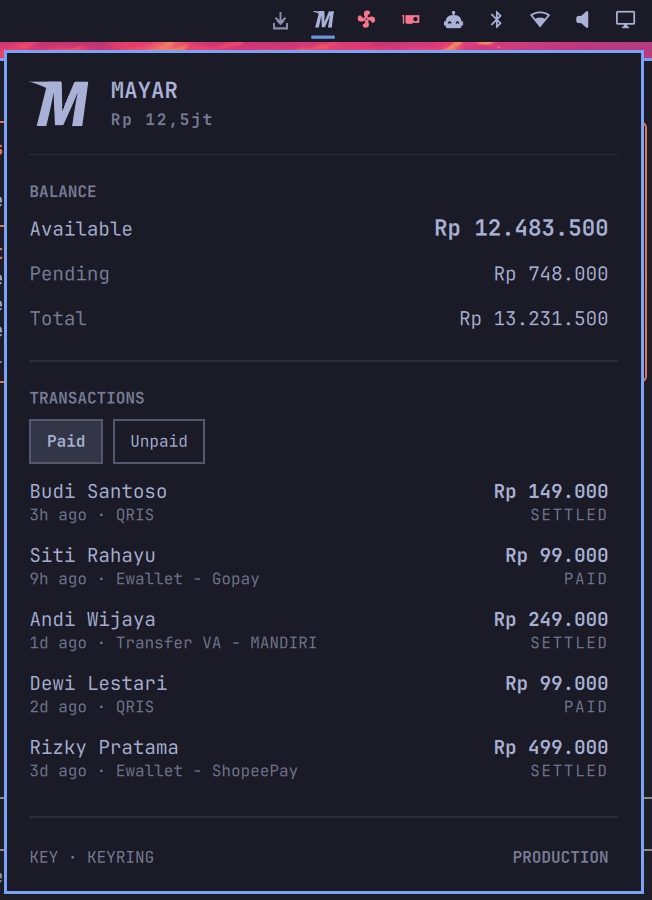
A bar widget for Mayar merchants: your available balance in the bar, and paid / unpaid transactions one click away.
An Omarchy port of mayar-chrome-ext, moved to API v2.
| Paid | Unpaid |
|---|---|
 |
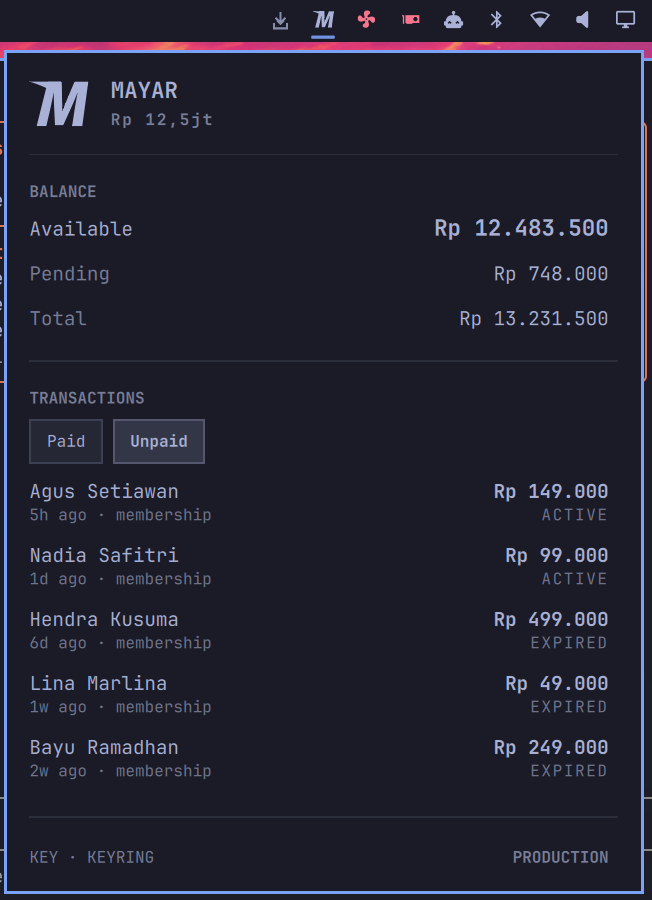 |
<sub>Screenshots use made-up merchant data. The theme is whatever yours is — the widget takes its colours from the bar.</sub>
Install
omarchy plugin add https://github.com/moerdowo/omarchy-mayar.git --enable --yes
Then click the Mayar mark in the bar and paste an API key into the panel. There is no terminal step and no login command — see The key.
This plugin asks for no elevated rights and installs no setup step: it reads an HTTP API and touches no hardware. The only thing it needs is a key.
Uninstall
~/.config/omarchy/plugins/io.github.moerdowo.mayar/bin/mayarctl logout
omarchy plugin remove io.github.moerdowo.mayar --yes
Run logout first, while the helper still exists — it is what removes the key
from the keyring, and plugin remove deletes the helper along with everything
else. If the plugin is already gone, secret-tool clear service mayar account api-key
does the same job.
Two things live outside the plugin folder and are not removed with it: the
response cache at ~/.cache/omarchy-mayar and, if you used the file fallback
rather than the keyring, the key at ~/.config/omarchy/mayar/apikey. Delete
both to leave nothing behind. Nothing else on the system is touched — there is
no privilege setup to undo, and no file outside these paths is ever written.
The key
Mayar has no login endpoint. API v2 authenticates with
Authorization: Bearer <api-key> and nothing else — the only "login" in the
docs is a magic link that signs your customers into their own portal. There
is nothing to log in to, so there is no login command: there is just a key, and
three places it can come from.
1. The panel (recommended)
Open the widget and paste the key into the field. It is checked against
/balances first and only stored if it works, so a mistyped key tells you so
instead of being saved and then failing on every refresh. Storage is your login
keyring, via secret-tool — the key never lands in a dotfile, your shell
history, or this repo. The ⊗ in the panel footer removes it again.
Headless, or scripted, the same path without a prompt:
printf %s "$KEY" | mayarctl set-key
2. An API key in the environment
export MAYAR_API_KEY=...
For machines with no keyring daemon, or a one-off against a different account:
MAYAR_API_KEY=... mayarctl paid -n 5
3. A config file
~/.config/omarchy/mayar/apikey — one line, chmod 600. Last in precedence,
for machines where no keyring is unlocked.
Precedence: MAYAR_API_KEY → keyring → config file. If you store a key in
the panel while MAYAR_API_KEY is set, the panel says so rather than letting
the save look like it did nothing.
Get a key at Integrasi › Api Keys & Token (web.mayar.id/integration/apikey). A Read Only key is enough — this plugin never issues a POST.
Where the key is not
The key is never passed as a command-line argument — not to mayarctl, not to
curl, not to secret-tool. /proc/<pid>/cmdline is world-readable, so an
argument is readable by every other user on the machine for as long as the
process lives. It travels on stdin in all three directions: the panel writes it
to mayarctl set-key, mayarctl hands curl the Authorization header
through --config -, and secret-tool store reads the value the same way. It
is never written to a temporary file and never put in the environment of
anything mayarctl runs.
Cached responses under ~/.cache/omarchy-mayar carry customer names and
amounts, so they are written 0600 inside a 0700 directory.
Paths that could have been got to first
The key file and every cache entry sit at paths another process could reach
before mayarctl does — including a process running as you, which is the
case a 0700 directory says nothing about. A symlink or a FIFO left in one of
those paths is enough to send the key somewhere, wedge the bar, or redirect a
cache write.
Checking a path and then opening it does not stop that, however careful the
check. They are two operations against a name, and in between the name can be
made to mean something else — the entry replaced, or any directory on the way to
it — so what gets opened is never provably what was approved. Bash cannot close
that gap: it has no O_NOFOLLOW, no O_NONBLOCK, and no openat, renameat
or unlinkat.
So the filesystem lives in bin/mayarfs, and nothing there resolves a name
twice. A path is walked once, a component at a time, each step an openat on
the descriptor of the component before it and each descriptor checked with
fstat — a component swapped after its check is a descriptor that still points
at what was checked. Files are opened O_NOFOLLOW | O_NONBLOCK and then
validated on the descriptor the open returned, so a symlink fails outright, a
FIFO returns instead of hanging the bar, and a file's age comes from the same
fstat as its ownership rather than a later look at the name. The cache
directory is opened once and held for the run: every entry after that is read,
written, replaced with renameat and removed with unlinkat relative to that
one descriptor, and the directory is never named again.
A cache directory that cannot be made private is not used at all — every read then simply misses and the panel goes to the network.
Nothing is read without a ceiling
An API response is refused past 256 KiB, and the ceiling is enforced while it
is still arriving rather than after: curl writes into a head -c, so the
transfer is cut and the connection dropped at the limit even if the server
never declared a length or intended to stop. Real Mayar payloads are around
12 KiB. Override with MAYAR_MAX_BYTES (bytes, 1 KiB – 8 MiB).
The panel applies the same idea to mayarctl itself, which it runs under
timeout -s KILL 20 … | head -c 1M. Quickshell's StdioCollector has no size
limit and Process has no deadline of its own, so a helper that ran away or
hung would otherwise be collected in full, or waited on forever.
Sandbox
export MAYAR_ENV=sandbox
Points everything at api.mayar.io instead of api.mayar.id. Sandbox and
production are separate accounts with separate keys, so the panel labels which
one it is showing rather than leaving it ambiguous.
The panel
- Balance — available (withdrawable), pending, and total, in IDR.
- Paid — recent settled transactions: who paid, how much, when, by what method.
- Unpaid — outstanding payment requests with their status (
active/expired). - Click or press <kbd>Enter</kbd> on a row to copy its payment URL — or its transaction id, for paid rows that have no URL.
- With no key stored, the panel is a key field instead, focused and ready to paste into.
Everything the API sends is drawn as plain text. Customer names and payment
link titles are typed by other people, and Text in QML defaults to
AutoText, which hands anything that looks like markup to the rich-text
parser — one that fetches <img src="https://…">. A customer could otherwise
name themselves a tracking pixel and have the panel phone home on sight, so
every Text here sets textFormat: Text.PlainText and every API string is
stripped on the way in.
In the bar the widget is just the Mayar mark, drawn in your theme's foreground so it sits with the rest of the row rather than shouting brand colours at it. Hover for the balance; the mark fades when something needs you — no key, a rejected key, or numbers it could not refresh.
CLI
bin/mayarctl is the whole implementation — the panel only renders its JSON.
Everything the widget shows is available in a terminal:
mayarctl status          # everything the panel needs, one JSON object
mayarctl balance         # {"data":{"balanceActive":…,"balancePending":…,"balance":…}}
mayarctl paid -n 20      # up to 50
mayarctl unpaid
mayarctl auth            # where the key is coming from, and which environment
mayarctl set-key         # read a key on stdin, verify it, store it
mayarctl logout          # remove the stored key
mayarctl refresh         # drop the response cache
Add -f to bypass the cache on any read.
Requires curl, jq and python3 (for bin/mayarfs, which does every file
open, read, write, replace and delete on descriptors rather than on names);
secret-tool (from libsecret) only for set-key / logout.
Caching
Responses are cached for 60s under ~/.cache/omarchy-mayar, so the bar's poll
cadence is decoupled from how often the API is actually hit — Mayar does not
publish a rate limit, and a widget that polls should not be the thing that
finds it. Override with MAYAR_CACHE_TTL (seconds).
If a request fails but a cached response exists, the panel keeps showing the last known numbers and labels them STALE, rather than blanking out.
API endpoints used
All documented at docs.mayar.id, base
https://api.mayar.id/hl/v2:
GET /balancesGET /transactions?limit=GET /transactions/unpaid?limit=
Project layout
manifest.json     # Omarchy plugin manifest
Panel.qml         # bar widget + panel — rendering, plus the key field
                  #   (which only pipes what is typed to mayarctl)
MayarIcon.qml     # the brand mark, as themed Shape paths
bin/mayarctl      # API, credentials, caching, JSON for the panel
bin/mayarfs       # the filesystem, done on descriptors: the key file and
                  #   the response cache
docs/             # screenshots used by this README
preview.png       # marketplace listing preview
License
MIT