
My Journal for Omarchy
A stream-of-consciousness journal for the Omarchy Quattro bar. Click the notebook to start a new dated note. Add a ToDo when you want a checkable task. Search previous sessions by id, time, text, or todo / done. Autosave writes JSON plus a readable notes.txt.
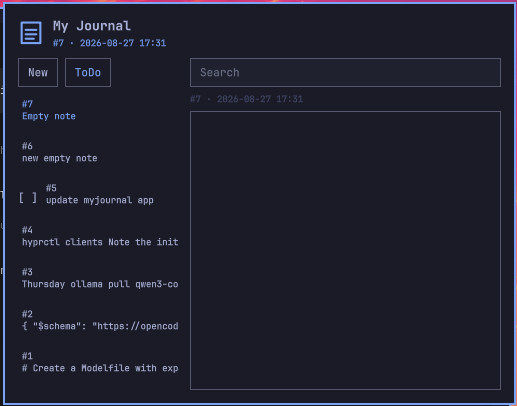
Plugin id: io.github.mohuddle.myjournal
What it does
- Opening the panel creates a new empty note, stamps it with the current date and time, and puts the cursor on a blank line.
- New starts another journal session. ToDo starts a checkable task in the same index.
- Search filters the index. Click a row to reopen that entry. Click
[ ]/[x](or Done / Reopen) to toggle a todo. - Autosave (about a second after typing, and again on close) writes the full entry list to
journal.jsonandnotes.txtthrough a small Python helper. Files are mode0600in a0700directory. - The window stays pinned on top across workspaces until you click the notebook icon again.
No Omarchy keybindings are changed. No network. Encryption is not included in this release. Python 3 (stdlib only) is used to read and write the journal files.
Data
~/.local/state/omarchy/myjournal/journal.json
~/.local/state/omarchy/myjournal/notes.txt
The JSON is an append-only list of sessions. Notes default to kind: "note". Todos add done:
[
  {
    "id": "1",
    "timestamp": "2026-08-19T10:10:00.000Z",
    "content": "Had a great brainstorming session about my new TUI app today.",
    "kind": "note"
  },
  {
    "id": "2",
    "timestamp": "2026-08-27T12:00:00.000Z",
    "content": "Buy milk",
    "kind": "todo",
    "done": false
  }
]
Blank sessions are dropped on close so the file does not fill with empty opens. Entries saved before 0.3.0 (no kind) still load as notes.
Install
omarchy plugin add https://github.com/mohuddle/omarchy-myjournal.git --enable
Move the widget:
omarchy bar move io.github.mohuddle.myjournal --section right
Usage
- Left-click the notebook: open a pinned journal and start a new dated note. Click the icon again to close and save.
- New: another empty journal session.
- ToDo: a checkable task in the same list. Toggle it from the index mark or the Done / Reopen button.
- Search box: filter by id, timestamp, content,
todo,done, oropen. - Click an index row: open that entry.
Remove
omarchy plugin remove io.github.mohuddle.myjournal
That removes the widget. Journal files are kept:
~/.local/state/omarchy/myjournal/journal.json
~/.local/state/omarchy/myjournal/notes.txt
Development checks
omarchy plugin validate .
node tests/model.test.js
python3 tests/test_store.py
License
MIT. See LICENSE.