
Omahub
← All plugins
M

Drop Shelf

by Mark Ranallo

A persistent floating shelf for dragging files between applications

Security review

No obvious issues detected

Deterministic scan — not a security guarantee

None
Risk level
None
Analyzed commit
28ca24d
Scanned
1 month ago

No potentially dangerous behavior detected in the analyzed commit.

Automated analysis only — not a security guarantee.

AI advisory review

No obvious issues detected

Language-model assessment · ~deepseek/deepseek-v4-flash-latest — advisory only

Low
AI risk level
Low
Recommendation
install
Model
~deepseek/deepseek-v4-flash-latest
Analyzed commit
28ca24d
Reviewed
1 month ago

The plugin is a straightforward QML shelf that stores file URI references and downloads browser images into a private data directory. The only notable risk is that it downloads arbitrary remote URLs from drag-and-drop content and writes them to disk, but it does so only in response to explicit user drops and never executes the downloaded files.

  • Shelf.qml downloads remote image candidates from drag-and-drop data and writes them to $XDG_DATA_HOME/omarchy-dropshelf; the downloaded bytes are never executed, but a malicious URL could be fetched without the user seeing the exact destination.
  • The plugin invokes bash via Process commands (anchorWriter, imageWriter) with shell quoting for paths; the paths are derived from XDG environment variables and the payload is JSON-stringified, so injection risk is low but a human may want to confirm the quoting.
  • State and anchor files are written with umask 077, which is good, but the shelf.json contains file:// URIs that could reveal local file paths to any process able to read the user's state directory.
How this check works

This review combines the deterministic scan (the rule-based results above) with an independent look at the plugin's code by a language model. The model reads a trimmed sample of the repository's files, the manifest, and the README, then gives a plain-language risk level and a recommendation: install (no notable danger), review (look closer first), or avoid (clearly dangerous).

It runs on the same analyzed commit as the deterministic scan and is strictly advisory — it is not a security guarantee and never blocks a plugin by itself. A human moderator still reviews plugins before they are listed.

AI advisory only — automated analysis, not a security guarantee.

Install
$ omarchy plugin add https://github.com/mranallo/omarchy-dropshelf --enable
Productivity #bar #quickshell

Drop Shelf

A persistent floating shelf for Omarchy. Drop files or images onto it, then drag them into any application that accepts file drops.

Drop Shelf stores file URI references only. It never moves, copies, or deletes the original files. Browser images are downloaded into a private local data directory so they can be dragged out as normal file drops.
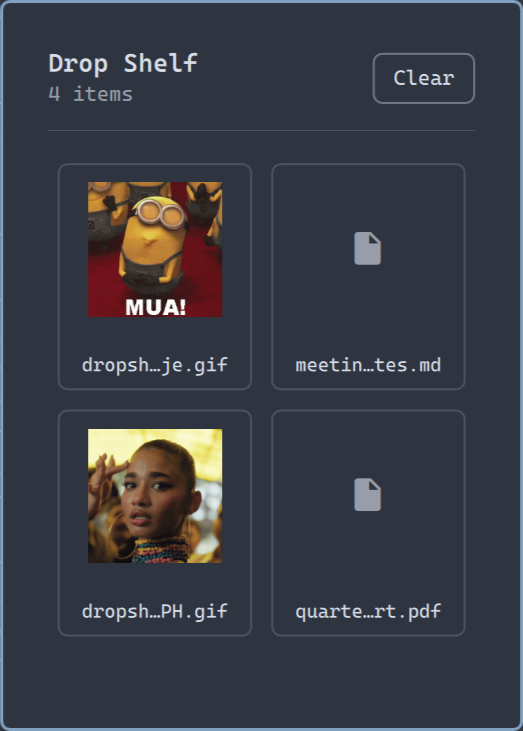
Drop Shelf

Install

omarchy plugin add https://github.com/mranallo/omarchy-dropshelf.git --enable

The Drop Shelf icon is added to the right side of the Omarchy bar. Click it to open the shelf beneath the icon. The shelf follows the icon when it is moved between the left, center, or right bar sections.

Use

  1. Click the shelf icon in the Omarchy bar.
  2. Drag local files onto the window — or drag images straight from the browser, including Google Images results and Giphy.
  3. Drag a shelf item into another application. The item is removed from the shelf after the drag; press Undo to restore it if the drop didn't land.
  4. Remove an individual reference with its x button, or use Clear.

Removing an item never touches the original file.

Keyboard shortcut (optional)

The shelf can be toggled from the command line, so you can bind it to a key. In ~/.config/hypr/bindings.lua:

o.bind("SUPER + D", "Drop Shelf", "omarchy shell shell toggle io.github.mranallo.dropshelf '{}'")

When opened this way the shelf reuses the position from the last time it was opened via the bar icon (falling back to the top-left corner if the icon has never been clicked).

Configuration

Drop Shelf needs no configuration. Its data lives at:

  • Shelf contents: $XDG_STATE_HOME/omarchy-dropshelf/shelf.json (default ~/.local/state/omarchy-dropshelf/shelf.json)
  • Downloaded browser images: $XDG_DATA_HOME/omarchy-dropshelf (default ~/.local/share/omarchy-dropshelf)

Remove

omarchy plugin remove io.github.mranallo.dropshelf

Optionally delete the state and data directories listed above.

Development

Validate the plugin and run the model tests:

omarchy plugin validate .
node tests/model.test.js

To install a development checkout, link or copy this directory to:

~/.config/omarchy/plugins/io.github.mranallo.dropshelf

Plugin files hot-reload while Omarchy Shell is running.

License

MIT