
Prayer times — Omarchy shell plugin
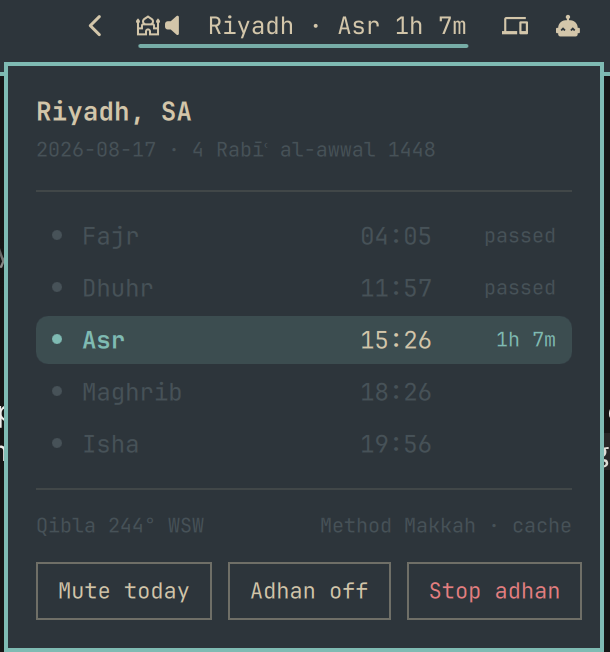
Next-prayer countdown in your Omarchy 4 bar, with a panel showing the five daily prayers, qibla direction, and adhan controls.
Requires omarchy-prayer
This plugin is a front-end. It renders what the omarchy-prayer CLI
computes — prayer times, hijri date, qibla bearing — and it does nothing on its
own. Install the package first:
yay -S omarchy-prayer     # or: paru -S omarchy-prayer
omarchy-prayer            # first run: geolocates, downloads adhans, enables timers
That first run also installs and places this plugin for you, so installing the AUR package is normally all you need — this repository exists so the widget can be listed and inspected on its own.
Without the CLI the widget says so plainly:
omarchy-prayer is not installed — run: yay -S omarchy-prayer
Install the plugin by itself
Only useful if you already have omarchy-prayer and removed the widget:
omarchy plugin add https://github.com/mrCode/omarchy-prayer-plugin --enable
Or by hand:
git clone https://github.com/mrCode/omarchy-prayer-plugin \
  ~/.config/omarchy/plugins/io.github.mrcode.prayer-times
omarchy-shell shell enablePlugin io.github.mrcode.prayer-times '{"section":"right","index":0}'
Removal
omarchy plugin remove io.github.mrcode.prayer-times
Or by hand — take it off the bar, then delete it:
omarchy-shell shell setPluginEnabled io.github.mrcode.prayer-times false
rm -rf ~/.config/omarchy/plugins/io.github.mrcode.prayer-times
Removing the widget leaves the omarchy-prayer package, its timers and your
config untouched; prayer notifications keep working without the bar widget.
Re-running omarchy-prayer setup will not put the widget back — placement
happens once and a removal is respected.
To remove everything, uninstall the package as well: yay -Rns omarchy-prayer.
What it shows
The pill renders {city} · {prayer} {countdown} and turns amber inside the
"soon" threshold (10 minutes by default). A muted-speaker glyph appears when
the adhan is switched off.
| Click | Action |
|---|---|
| Left | Open the prayer times panel |
| Right | Stop a playing adhan |
| Middle | Open the TUI in a floating terminal |
The panel lists the five prayers with the next one highlighted, plus qibla bearing, calculation method, and time source, with Mute today, Adhan on/off, and Stop adhan buttons.
Two controls that are easy to confuse:
| Control | Scope |
|---|---|
| Mute today | Suppresses notification + adhan until midnight, then auto-clears |
| Adhan on/off | Standing setting — whether the adhan ever plays |
Configuration
Everything is configured in ~/.config/omarchy-prayer/config.toml, not in
shell.json — one file drives this widget and the waybar module alike:
[bar]
format                 = "{city} · {prayer} {countdown}"
soon_threshold_minutes = 10
Placeholders: {city}, {prayer}, {time}, {countdown}.
How it works
The widget spawns omarchy-prayer status --json on load, every 5 minutes, when
the panel opens, when the next prayer's timestamp elapses, and whenever the
scheduler pokes it over IPC. Between those, the countdown ticks locally by
subtracting timestamps.
No prayer-time calculation happens in QML. Times, hijri conversion, and qibla bearing all come from the CLI, so this widget and the waybar module can never disagree.
Compatibility
Requires Omarchy 4 (Quickshell shell) and omarchy-prayer 0.2.1+. On an older CLI the widget names the mismatch instead of failing silently.
Source
Developed in the main repository — the canonical copy of these files lives at
share/omarchy-shell-plugin/
in mrCode/omarchy-prayer. Please
file issues there.
MIT licensed.