
Cursor Usage
Adds Cursor to Omarchy's existing AI toolbar widget — the AI icon already on the top bar. It does not add a second icon.
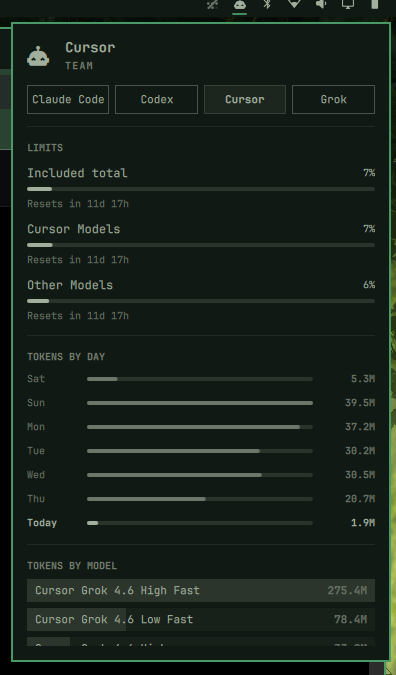
After install, click that same AI button. You get a Cursor chip next to Claude Code (and Codex / Grok / Fireworks if you use them): plan meters (Included / Cursor Models / Other Models) and token charts from Cursor's dashboard APIs.
Install
omarchy plugin add https://github.com/mrlarsendk/omarchy-cursor-usage.git --enable
Requires:
- Omarchy with the stock AI widget enabled (
omarchy.agents, on by default) - Python 3 on
PATH(stdlib only) - Cursor IDE signed in, or Cursor Agent signed in (
cursor-agent login)
Leave the built-in AI icon where it is. After the first scan, click it and switch to Cursor.
Update
Version 1.0.1 restores collection on Omarchy versions that omit internal paths from third-party plugin manifests. It also works with older Omarchy versions.
omarchy plugin update io.github.mrlarsendk.cursor-usage --yes
omarchy restart shell
The shell restart loads the updated collector service, which stays loaded during ordinary plugin rescans.
Usage
- Left click the existing AI icon: usage panel
- Switch to Cursor with the chip in the panel (or middle-click the icon)
ror Enter in the panel: refresh (Cursor follows the stock update)- Cursor also refreshes about every 5 minutes
This plugin is a headless service. It only writes a Cursor usage record for the stock panel to display.
Plan meters come from Cursor's GetCurrentPeriodUsage / GetPlanInfo APIs. Day and model charts come from paged GetFilteredUsageEvents. Auth is read from the Cursor IDE state.vscdb, or from ~/.config/cursor/auth.json after cursor-agent login.
Remove
omarchy plugin remove io.github.mrlarsendk.cursor-usage
Removal deletes the plugin checkout and drops ~/.local/state/omarchy/agents/usage/cursor.json, so the Cursor chip leaves the stock AI panel. It does not change Cursor login files or agent sessions.
Privacy
The collector reads the local Cursor sign-in, then calls Cursor's dashboard usage endpoints. It never logs tokens. Expired tokens are not refreshed; open Cursor or run cursor-agent login to renew them.
License
MIT. See LICENSE.