
OmaVault — Omarchy Configuration Backup
Back up and restore your Omarchy 4 configuration, custom plugins, themes, hooks, and selected tool settings. OmaVault stores only files you changed or created as plain files you can read, diff, archive, and restore.
OmaVault is not a general file-backup tool. It does not back up Documents, Downloads, photos, videos, or arbitrary personal folders.
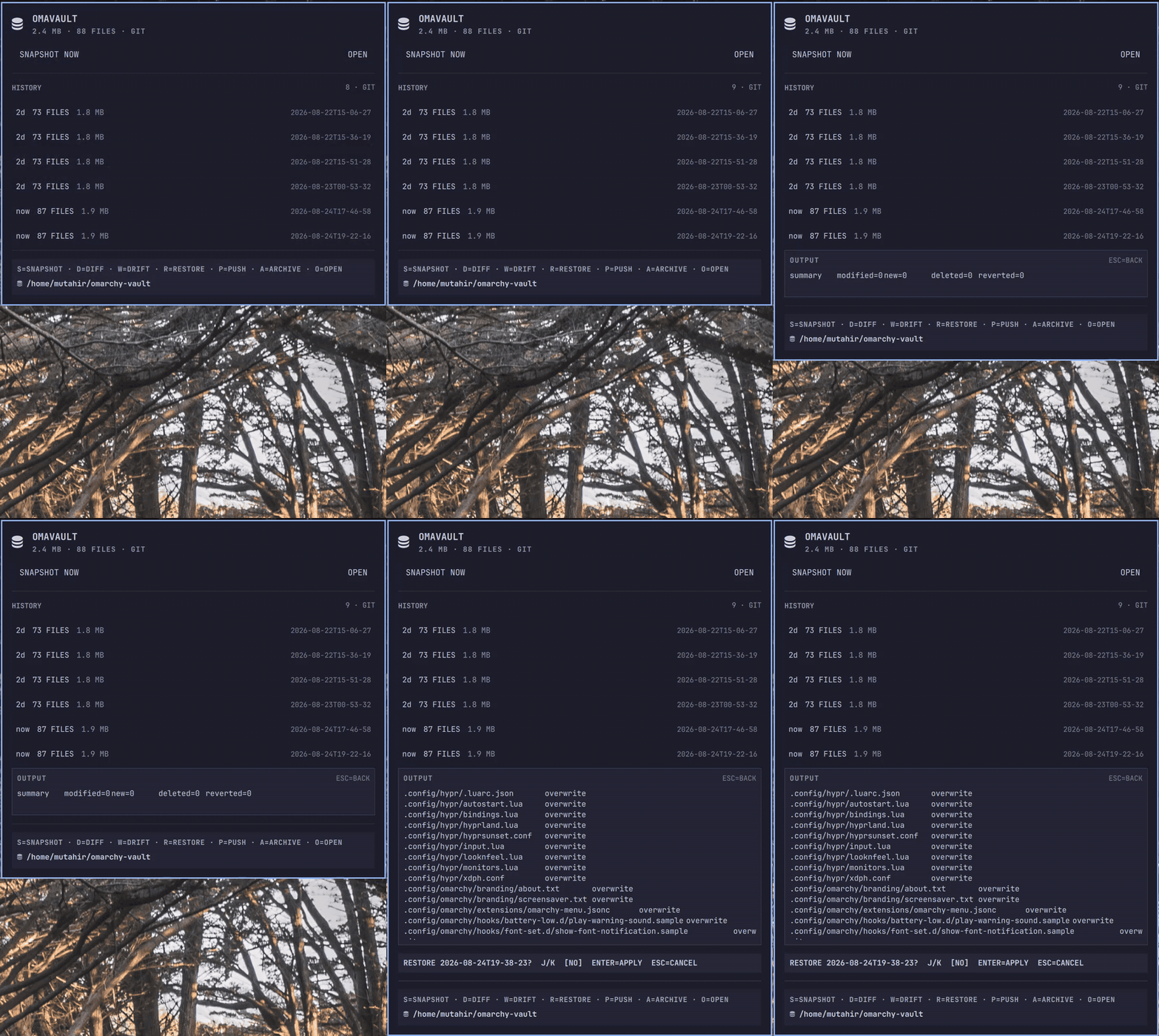
For Omarchy 4.x (Quickshell bar). Snapshots are stamped with the running Omarchy version and restoring across major versions is a declared non-goal (config formats differ between majors).
What it backs up
Everything under these paths in your home directory (defaults — edit via the map file):
| Path | Typical contents |
|---|---|
~/.config/hypr/ |
Hyprland + Omarchy Lua configs |
~/.config/omarchy/ |
shell.json bar layout, themes, hooks, your plugins |
~/.config/fastfetch/ |
fastfetch config |
~/.config/gtk-3.0/, ~/.config/gtk-4.0/ |
GTK settings |
~/.config/foot/, ghostty, kitty, alacritty |
terminal configs |
~/.config/starship.toml, btop, tmux, git, lazygit |
CLI tool configs |
~/.XCompose |
custom compose-key input |
Diff-vs-defaults: each tracked file is compared against its stock copy
in /usr/share/omarchy/default. Unmodified stock files are listed in the
manifest but not copied — the vault holds what you changed or created.
Symlinked plugin repos inside your home directory (for example plugins you
develop under ~/dev) are captured as real files. Symlinks resolving outside
your home are skipped. Common credential and key filenames are excluded by
policy, but filename rules cannot recognize every secret; review the bundled
map before the first remote push.
High-risk locations such as ~/.config/environment.d and ~/.bashrc are not
included by default because they commonly contain tokens. You may add them to
your user map after reviewing their contents and accepting that snapshots are
plain, unencrypted files.
Every time you press S, OmaVault scans all configured sources again. New
custom plugins and files changed since the previous snapshot are discovered
automatically. OmaVault does not continuously watch files or schedule
snapshots in the background; creating a snapshot is always user-triggered.
Where it keeps things, and in what format
~/omarchy-vault/
├── 2026-08-22T14-30-00/            # one folder per snapshot
│   ├── files/                      # your changed/user files, home-relative
│   │   └── .config/hypr/input.lua
│   ├── manifest.json               # every file: state, size; omarchy version
│   └── omavault-<ts>.tar.gz   # same content, single archive
├── <ts>-restore-backup/            # pre-restore safety copy (per restore)
└── .last-push                      # marker for remote sync
The vault folder is git-initialized automatically when git is available:
every snapshot becomes a commit, so you can browse history with plain git.
Generated archives, restore backups, and push markers are excluded from Git to
avoid storing duplicate payloads. Rotation keeps the last N visible snapshots
(default 10); ordinary Git history may retain older loose-file versions until
you expire that history yourself. Use snapshot --no-git when a strict storage
ceiling matters more than Git history.
Install
omarchy plugin add https://github.com/mutahir/omavault --enable
Or clone into ~/.config/omarchy/plugins/io.github.mutahir.omavault and run:
omarchy plugin enable io.github.mutahir.omavault
omarchy-shell shell rescanPlugins
Removal
omarchy plugin remove io.github.mutahir.omavault
Or manually: delete ~/.config/omarchy/plugins/io.github.mutahir.omavault, then run
omarchy-shell shell rescanPlugins. Snapshots under ~/omarchy-vault/ are
yours — deleting the plugin never touches them; remove that folder yourself
if you want the backups gone too.
Use
Click the vault icon in the bar:
| Key | Action |
|---|---|
S |
snapshot now |
j / k / arrows |
walk history |
D |
diff selected snapshot vs stock defaults |
W |
drift — what changed on disk since the snapshot |
R |
restore (confirm with j/k → Enter; dry-run runs first) |
P |
push the whole vault to the default remote |
A |
export the snapshot's tar.gz |
O |
open the vault folder |
Esc |
peel back one layer — confirm banner → output view (ESC=BACK) → close panel |
Every key can be remapped per widget in shell.json, e.g.:
{ "id": "io.github.mutahir.omavault",
  "settings": { "keymap": { "drift": "c", "push": "u" } } }
The engine is also a standalone CLI:
python3 vault.py snapshot          # also: list, info, diff, drift,
python3 vault.py push nas          #       restore, push, pull, archive
Restore semantics
- Pressing
Rruns a dry-run and shows the preview before offering the confirmation that applies it. - Restores overwrite/create files from the snapshot; it never deletes files created after the snapshot.
- Before overwriting anything, the current file is copied to
<snapshot>-restore-backup/. - If the snapshot was taken on a different Omarchy version, the dry-run prints a loud warning. Cross-major restores are unsupported: review the diff instead of blind-copying old-format files over new defaults.
/usr/share/omarchy/is never touched.
Remote sync
Keep an off-machine copy of your vault with rsync using an SSH key, a per-transfer password, or a mounted local destination. Edit the map:
// ~/.config/omarchy/vault.map.json
{
  "remotes": { "nas": "ada@nas.local:backups/omarchy-vault" },
  "defaultRemote": "nas"
}
Then vault.py push (or P in the panel) mirrors ~/omarchy-vault/ to
the remote — excluding pre-restore backups — without deleting anything
unless you pass --delete. vault.py pull brings a remote vault back
(useful on a fresh install: install this plugin, pull, restore).
Manage remotes without hand-editing JSON:
python3 vault.py remote add nas --host nas.local --user ada \
    --path backups/omarchy-vault                # SSH keys
python3 vault.py remote add nas --host nas.local --user ada \
    --path backups/omarchy-vault --auth password   # password per push
python3 vault.py remote add usb --path /run/media/mutahir/BACKUP
python3 vault.py remote list
python3 vault.py remote remove nas
Remotes are written to your user map
(~/.config/omarchy/vault.map.json) only; the bundled map is never
modified. With --auth password, the password is asked at each push —
in the panel it gets its own masked input field; in the terminal you get
a standard prompt. The panel passes the password over the child process's
standard input; it is never written to disk, environment variables, or process
arguments. SSH keys remain the
recommended setup: connect once with ssh ada@nas.local, verify the host
fingerprint, then run ssh-copy-id ada@nas.local. OmaVault never accepts an
unknown SSH host key for you.
Plain local paths (USB drives, mounted shares) need no SSH at all.
Bar placement and panel position
Move the widget with omarchy bar move io.github.mutahir.omavault --section left|center|right. By default ("auto") the panel centers when the widget
is in the center section and anchors to the icon otherwise; pin it with
"settings": { "panelPlacement": "center" }.
Customizing what gets backed up
Copy vault.map.json to ~/.config/omarchy/vault.map.json and edit
sources (paths under your home), exclude (globs), remotes,
defaultRemote, keep, or vaultDir.
Requirements
- Python 3 (stdlib only — no pip packages)
- rsync (only for push/pull)
- git (optional, for snapshot history)
- Standard Omarchy commands:
diff,bash, andxdg-open
Development
node --test                                          # model unit tests
python3 -m unittest discover -s test -p "test_*.py"  # engine tests
omarchy plugin validate .
License
MIT (see LICENSE).