
Garmin for Omarchy
Today's Garmin health at a glance: Body Battery in the bar — or steps, sleep or readiness, your pick — and a click-away panel of the metrics you care about.
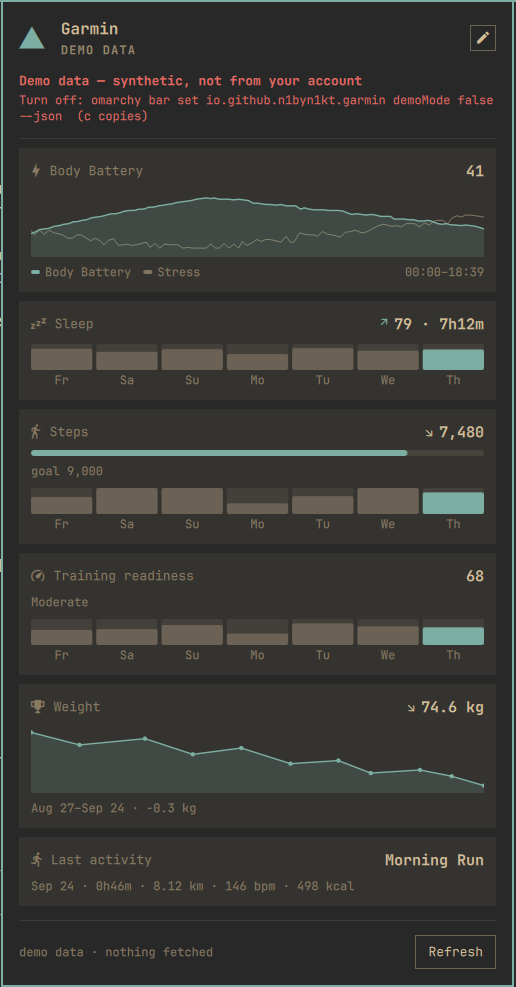
What it shows
In the bar — a glyph and one number. Body Battery by default; barMetric
switches it to steps, sleep score or training readiness, and the glyph follows.

The number is coloured by the reading, not by the plumbing: accent when it is
good news, urgent when it is bad news, plain in between. Body Battery and sleep
score use ≥ 60 / < 30, readiness ≥ 75 / < 35, and steps only ever go accent —
once you pass your goal. Being short of a step goal at 11am is not an emergency,
so steps have no urgent band at all. Anything degraded — stale data, an
unreachable API, a session that needs a new login — goes plain and dim, so a
broken helper never looks like a health alarm. A trailing · marks data that is
no longer fresh. Hover for a tooltip with the state, the last error (if any),
and the timestamp.
In the panel — a stack of cards, in the order panelMetrics asks for them:
the day's Body Battery and stress curve, sleep score and duration, steps against
your Garmin step goal, training readiness, resting HR, and more (full list under
Settings). A seven-day strip is drawn on the battery, sleep,
steps, readiness, resting HR, HRV and calories cards — hover a bar for that
day's value — and each day's steps bar is scaled against that day's own Garmin
goal; a ↗ ↘ → delta is drawn on sleep, steps, resting HR and weight. The
weight card (opt-in — see below) is a 30-day timeline of weigh-ins rather
than a seven-day strip, since weigh-ins skip days as a matter of course. The
rest of the cards (curve, intensity, floors, activity, custom) show a figure
only. Every card gets a footer timestamp and a Refresh button.
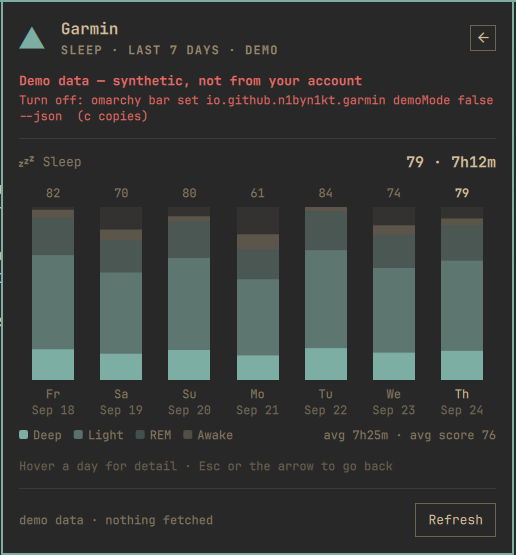
Click a card for its week. Battery, sleep, steps, readiness, resting HR,
HRV and calories — and the day curve, which opens the week's stress — each
have a detail page: a full-width chart of the last seven days with a value
over every column, a hover tooltip per day, and a line of week statistics.
Sleep stacks deep/light/REM/awake, stress stacks rest/low/medium/high
minutes, calories stack resting under active, Body Battery draws each day's
low-to-high range, steps carry each day's own goal as a tick, and HRV shades
your balanced band. Escape or the arrow in the header goes back. Cards that
have no week behind them (intensity, floors, weight, activity, custom) do not
open — weight has its own 30-day timeline drawn on the card itself instead.
The pencil in the header rearranges the whole deck without leaving the panel —
see Rearranging the cards.
Deltas compare the two newest cached entries that actually have that
field, which is normally today against yesterday — but skips a day the
field is missing from rather than comparing against it. No arrow is shown if
those two entries are more than two days apart; an arrow against a reading
from last week is not a trend. Weight is the exception: weigh-ins are sparse
by nature, so its arrow is against the previous weigh-in in the 30-day
series, however many days sit between them. Deltas and strips (and the
weight timeline) are drawn from cached history, not from the live fetch, so a
stale payload still shows you a real comparison — just an older one; the
footer's · stale is what tells you so. Before your watch has synced for the
day, today's own figures show —, while the seven-day strips keep drawing
from cache as usual.
That history is re-fetched, not accumulated. On the first successful fetch of each calendar day — and on every manual refresh — the helper asks Garmin for the whole trailing week, one ranged call per metric, and merges the answer over what it already has: a real value always wins, and a day Garmin has nothing for (or an endpoint that failed) leaves the cached number alone. A laptop that was shut over the weekend therefore has no holes in its strips on Monday, and a figure Garmin has since corrected is corrected here too. Every other poll that day fetches today only — unless the day's one ranged attempt came back with nothing at all (every source down, e.g. a rate limit), in which case the day is not marked done and the very next poll tries the whole week again, rather than waiting until tomorrow with a gap still in the strips.
"Today" and the seven-day window both follow the laptop's own clock and timezone, not the timezone your Garmin account or watch is set to. If you are travelling, the calendar day the panel calls "today" is wherever this machine thinks it is, which can disagree with Garmin's own app for a few hours around midnight in either timezone.
Interactions
| Action | Result |
|---|---|
| Left click the chip | Open / close the panel — opening also retries a failed or stale fetch (a live state is left alone) |
| Left click a card | Open that metric's seven-day detail page, or the activity list for the activity card (see above) |
| Arrow icon (panel header, detail page) | Back to the cards (or from an activity's detail page, back to the list) |
| Middle click the chip | Force a refresh — today's numbers and the whole week's history |
| Pencil icon (panel header) | Enter / leave edit mode |
Escape (panel focused) |
Leave the detail page, else leave edit mode, else close the panel |
e (panel focused) |
Enter / leave edit mode |
r (panel focused) |
Refresh today and the week (ignored while in edit mode) |
c (panel focused) |
Copy the suggested command to the clipboard (only when a guidance command is shown) |
↑ ↓ / j k (edit mode) |
Walk the rows — arrow keys and their j/k equivalents work interchangeably |
← → / h l (edit mode) |
Reorder the current row (or pick the bar-chip metric on the top row) — arrow keys and their h/l equivalents work interchangeably |
space / Enter (edit mode) |
Show or hide the row — the two keys are equivalent |
↑ ↓ / j k (activity list) |
Move the list's cursor |
Enter / → / l (activity list) |
Open the cursored activity's detail page |
← / h / Escape (activity detail, activity list) |
Back a level — detail → list → cards |
Tab / Shift-Tab (panel focused) |
Switch to the next / previous bar-widget's panel (multi-monitor setups) |
omarchy-shell garmin refresh|open|close|toggle |
Same, from a script or a keybind |
omarchy-shell garmin detail sleep |
Open the panel straight onto one metric's week (battery, sleep, steps, readiness, rhr, hrv, calories, curve for stress, or activity for the activity list) |
omarchy-shell garmin detail activity:<id> |
Open the activity list and jump straight to that activity's detail page; an unrecognised id just opens the list |
Rearranging the cards from the panel
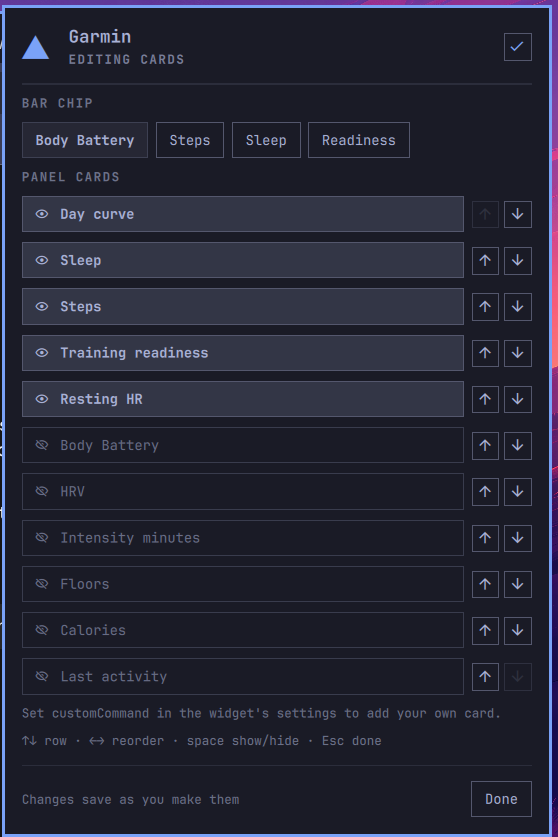
The pencil in the panel header opens edit mode, and everything about which
cards you see lives there — you never edit shell.json by hand:
- the bar chip metric as four chips at the top (Body Battery, Steps, Sleep, Readiness), the current one highlighted;
- every card below it with an eye toggle to show or hide it and ↑ ↓ arrows to move it. Hidden cards sink to the bottom of the list.
Changes apply the moment you make them — the panel behind re-renders and the
chip in the bar changes with it. Escape, the Done button, or the check icon
in the header leaves edit mode. From the keyboard: ↑ ↓ walks the rows, ← →
reorders the row you are on (or picks the chip metric on the top row), and
space shows or hides. The last visible card cannot be turned off.
Edits are written by the helper to ~/.config/garmin-widget/prefs.json
(0600, atomically replaced — QML never writes files itself), and they
override the barMetric and panelMetrics settings:
prefs.json > shell.json setting > built-in default
So the settings below are the starting point, and edit mode is the last word.
Delete prefs.json and the widget goes back to your shell.json settings —
but only after a shell restart (omarchy restart shell); it is not picked up
live.
Your own card
customCommand puts anything you can print on the panel. The command runs on
the same cadence as the Garmin poll (and on every manual refresh), and must
print one JSON object:
{"title": "Disk", "value": "888G free", "caption": "7% used",
 "meter": {"value": 7, "max": 100}, "tone": ""}
title and value are required; caption, meter and tone are optional.
tone is accent, urgent or empty — the same colours the health cards use.
A meter with a positive max draws the progress bar.
A worked example — free space on /, saved as ~/garmin-card-disk.sh and
chmod +x:
#!/usr/bin/env bash
set -euo pipefail
read -r pct avail < <(df --output=pcent,avail -h / | tail -1)
pct=${pct%\%}; pct=${pct// /}
tone=""
[ "$pct" -ge 90 ] && tone="urgent"
printf '{"title":"Disk","value":"%s free","caption":"%s%% used","meter":{"value":%s,"max":100},"tone":"%s"}\n' \
  "$avail" "$pct" "$pct" "$tone"
Then set customCommand to ~/garmin-card-disk.sh and turn the Custom
command row on in edit mode (it only appears once a command is set). Turning
that row off stops the command from running at all, not just from being drawn.
The card is deliberately unable to hurt the rest of the widget. It runs in its
own process with a 9-second timeout, output over 8 KB is ignored, and
anything that is not a well-formed object with a title and a value — garbage, a
hang, valid JSON of the wrong shape — simply hides the card and puts the
reason in the chip's tooltip, prefixed custom card:. What decides that is the
output, not the exit status: your command's own pipelines are none of the
widget's business, so a command that prints a good card is drawn whatever it
exits with, and a non-zero exit is only ever mentioned as extra detail on a
message the output had already earned. The Garmin fetch, the chip's number and
every other card carry on untouched. The timeout runs your command under
timeout, which kills its whole process group — the command and everything it
spawned. The one exception is a child that deliberately leaves the group
(setsid, a daemonising nohup … &): that escapes, so write commands that
finish on their own. A hang is reported as command timed out after 9s only
when nothing was printed; partial output is judged like any other.
Two things it is not: it is not a shell you should put secrets in (the command
line sits in shell.json in plain text), and it is not a scheduler — a command
that takes seconds delays nothing, but it also does not get to run more often
than the poll interval.
Demo mode
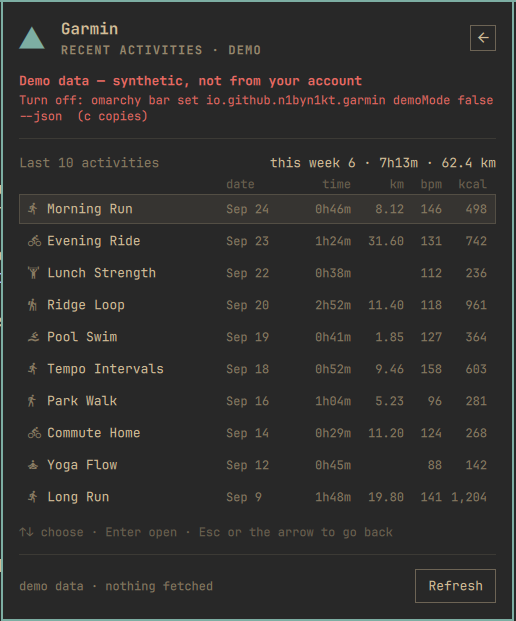
demoMode runs the whole widget on synthetic, deterministic data — no
account, no network, no venv, and nothing written to or read from disk.
Turn it on from a terminal:
omarchy bar set io.github.n1byn1kt.garmin demoMode true --json
(false to leave, or use the settings UI — it's a plain boolean toggle
there.) It is meant for trying the widget before you have an account
connected, and for screenshots.
What it guarantees:
- Nothing is fetched, nothing real is touched. The helper never talks
to Garmin in demo mode, and never reads or writes
last.jsonorhistory.json— your real cache is exactly as it was before you toggled. - Marked everywhere. The bar chip gets a trailing
demo; the panel's hero line readsDemo dataand a two-line urgent-coloured banner sits under it on every page (ccopies the command that turns it back off); every detail and list page's meta says· demo; the footer readsdemo data · nothing fetchedinstead of a timestamp. "Open in Garmin Connect" is hidden, since demo activity ids are fabricated. - Deterministic per day. The same calendar day always produces the same numbers — good for a reproducible screenshot, bad if you're hoping demo mode will show you something new tomorrow.
- Primary-only. On a multi-monitor setup only the primary bar instance owns the setting; every other monitor's panel follows it, so you can't end up with one bar showing real data and another showing fiction.
- Edit mode keeps working in demo — it rearranges cards, not health data —
and the
customcard is skipped while demo is on, since it isn't Garmin data to begin with.
Activities
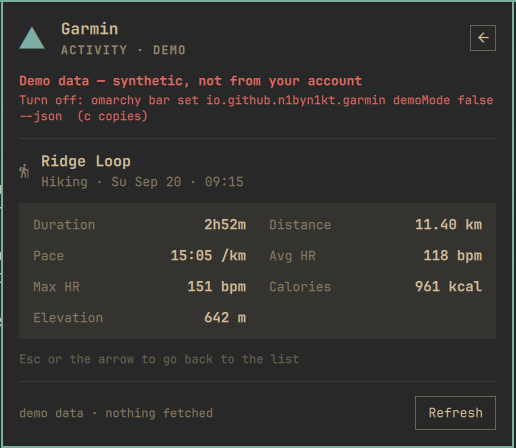
Click the activity card (or omarchy-shell garmin detail activity) for a
list of your last 10 activities: type glyph, name or type, date,
duration, distance, heart rate and calories, with a "this week" summary
line when the list actually reaches back that far. ↑↓ / j k move the
list's cursor, Enter / → / l opens the highlighted row, ← / h or
Escape goes back. Opening a row shows its detail page — duration,
distance, pace (running/walking/hiking) or speed (cycling — Garmin's own
average speed, so stops don't drag it down), heart rate,
calories, elevation — and a bordered Open in Garmin Connect button
(hidden for a demo activity, or one with no usable id).
Only ten fields per activity are ever kept: id, type, name, start time,
duration, distance, average/max heart rate, calories and elevation gain.
Never stored, on principle: GPS coordinates, location names, device
ids, or your Garmin account/owner ids — all present in Garmin's raw
response and all dropped before the whitelist even runs. The one caveat
is the name itself: Garmin often auto-names an activity after a place
("Kraków Running"), and that name is kept because it's the one thing you
chose or saw as the activity's title. If you'd rather not have that on
disk, turn it off:
~/.config/omarchy/plugins/io.github.n1byn1kt.garmin/bin/garmin-widget prefs set activityNames false
(default: on). Turned off, it also applies to the list already cached —
including one shown stale or carried forward after a failed poll. Unlike
the settings above, this one lives only in prefs.json, not the bar
widget's settings UI.
If the activities endpoint fails on a given poll but a previous list is
cached, the card and the list page keep showing that cached list, marked
stale, rather than going blank — the same per-domain carry-forward rule
covers readiness, HRV, intensity minutes and weight. A carried value is
only ever shown, never written into that day's seven-day history: the day
stays empty there until Garmin actually answers for it.
Weight
An opt-in card — add weight to panelMetrics or turn its row on in edit
mode — showing a 30-day weigh-in timeline with a ↗ ↘ → delta against
your previous weigh-in. It's opt-in because it's fetched only when it's
actually on: get_weigh_ins is never called otherwise, and turning the
card off stops the calls and the caching going forward. Toggling it in
edit mode refetches straight away rather than at the next poll. Units (kg or lb)
follow your Garmin account's own measurement-system setting, not a switch
of the widget's own. Weight card contributed by @xshatx (PR #1).
What's new in 0.5.0
- Activities. The activity card now opens a list of your last 10 activities, each with its own detail page and a guarded link to open it in Garmin Connect. See Activities above.
- Per-domain carry-forward. A secondary endpoint (readiness, HRV,
intensity minutes, activities, weight) that fails on one poll now keeps
showing its last cached value, marked
stale, instead of blanking that one card. - Training readiness backfill. On the weekly burst, any of the seven
window days still missing a readiness score gets one extra
get_training_readiness(date)call, so a laptop that slept through a weekend fills in both days' readiness the next time it wakes, at the cost of one call per still-missing day rather than waiting a day at a time. A day Garmin has no score for is asked at most once per calendar day, and the backfill is skipped entirely when thereadinesscard isn't in your deck. - Weight card (opt-in, fetched only when enabled, kg/lb from your Garmin account's own unit setting) — contributed by @xshatx (PR #1). See Weight above.
- Demo mode.
demoModeruns the widget on synthetic, clearly-marked data with no account and no network — see Demo mode above. get_activities(0, 20)replaces the oldget_last_activity()call (same endpoint, a bigger limit; no change to the call budget).
What's new in 0.4.2
Bugfixes only, found in a quality-control pass on 0.4.1 — no new cards or settings:
- Training readiness picks the newest reading, not just the first one.
get_training_readinessis not reliably newest-first, and a duplicate poll can append a stub entry with no score at all. The helper now prefers a scored entry and, among those, the one with the latest timestamp. - A failed weekly burst retries on the very next poll instead of waiting until tomorrow. Previously any burst attempt — even one where every ranged call raised (a rate limit, say) — marked the day as "done," so a gap in the strips from a bad burst stuck around for a full day.
- A stale reading now says why. The panel and bar tooltip already showed the specific error (its exception class only, never a raw message) when there was nothing cached at all; now the same detail rides along on a stale-but-cached payload too.
- The custom card publishes to other monitors as soon as it finishes,
rather than waiting for the next Garmin poll to carry it along — a command
that takes a few seconds no longer shows stale or blank on a second screen
for up to
pollMinutes. - A promoted primary instance (e.g. after unplugging the old primary's monitor) polls immediately instead of waiting out the rest of the old primary's interval; IPC ownership is also now rechecked on a 10-second timer as a backstop between polls.
- Week-view charts no longer draw a missing value as zero. A day with no Body Battery low reading, no charged/drained figure, a sleep score but no duration, an incomplete calorie split, or a missing stress bucket now leaves that specific thing off the chart and out of its average — instead of quietly drawing (and averaging in) a number Garmin never reported. A negative Body Battery reading (Garmin's own "no valid reading" sentinel) is also dropped from a ranged day's high/low, matching how the day curve already treats it.
What's new in 0.4.1
Hardening and housekeeping, no new cards:
- Hash-locked dependencies.
requirements.txtpinsgarminconnectand every transitive package by SHA-256; the install one-liner (and the panel's copy button) now usespip install --require-hashes. Existing venvs keep working — re-run the one-liner to switch to the locked set. - Custom-card timeout kills the whole command. A hung
customCommandwas stopped only at its wrapper and could outlive the 10s watchdog, one more orphan per poll. It now runs undertimeout, which takes its entire process tree down at 9s. - Typed settings. The manifest declares
barMetricas an enum and the numeric settings as bounded integers, plus search aliases — for Omarchy's settings UI as it grows typed fields.panelMetricsstays an ordered list.
What's new in 0.4.0
- Click a card for its week. Every card with history behind it opens a
full-width seven-day page: stacked sleep stages, stacked stress minutes,
resting-under-active calories, Body Battery low-to-high ranges, steps with
each day's goal tick, HRV against its balanced band, resting HR and
readiness as plain bars — each with per-day labels, hover tooltips and a
week summary.
Escapeor the header arrow returns.omarchy-shell garmin detail <metric>opens one from a keybind. - A week on every card. The seven-day strip now sits under readiness, resting HR, HRV and calories as well as battery, sleep and steps, and the steps bars are scaled against each day's own goal. Hover a bar for the date and value.
- History that heals. The trailing week is re-fetched from Garmin's ranged endpoints on the first fetch of each day and on every manual refresh, then merged over the cache — so a closed laptop no longer leaves permanent gaps. Each row now carries steps and goal, sleep score, duration and stages, resting HR, HRV with its balanced band, Body Battery high/low/charged/ drained, stress level and durations, calories, and readiness — the raw material for richer week views later. Later polls the same day still make exactly the calls they did before.
- Manual refreshes (middle-click, the panel button,
r, the IPC call) fetch the week too and get a 120-second watchdog; the poller keeps its 45 seconds.
What's new in 0.3.1
Fixes: customCommand runs via argv rather than a shell string, the custom
card's output is capped by content rather than by a fixed byte count, card
rows are height-equalized, the week view no longer breaks on an empty
morning, and screenshots/docs got a refresh.
What's new in 0.3.0
- Edit mode. The pencil in the panel header turns the card list into a
reorderable, toggleable list, with the bar chip's metric as a row of chips at
the top. Changes apply live and persist in
prefs.json, which overrides the matching settings. - A card of your own.
customCommandruns anything that prints a small JSON object and shows it as a card — it runs as your own user (no sandbox), bounded by a 9s timeout (the command's whole process tree is killed), an 8KB output cap and a defensive parser, so a broken script costs you that card and nothing else. prefssubcommand.garmin-widget prefs get|set KEY VALUEis the only writer ofprefs.json; the panel calls it rather than touching disk itself.
What's new in 0.2.0
- The bar chip is yours to choose.
barMetricputs steps, sleep score or training readiness in the bar instead of Body Battery, with its own glyph and its own sensible threshold colours. - The panel is a deck of cards you order yourself.
panelMetricspicks from eleven metrics (twelve withcustomsince 0.3.0) — including a day-long Body Battery + stress curve, HRV status, weekly intensity minutes, floors, calories and your last activity — and shows them in the order you list. - Seven days of context. Cards carry a seven-day strip and a
↗ ↘ →delta against the previous cached day, kept in a small local history file. - More of your day fetched, none of it fatal. Each new Garmin endpoint is asked for separately; one failing endpoint nulls its own card and never takes the rest of the panel down with it.
Existing settings keep working unchanged, and nothing about the failure states, the tokens or the cache moved.
Requirements
- Omarchy with the Quickshell-based bar (plugin schema v1).
- Python 3 — the helper itself is stdlib-only, but the
garminconnectlibrary it talks to requires Python 3.12+. Omarchy's system Python is newer than that, so this is normally already satisfied. - A Garmin Connect account. No Garmin developer key is needed.
wl-clipboard— for the panel's copy button. Usually already installed on Omarchy.
External dependency: garminconnect
This plugin has one external dependency, and it is not installed for you.
Arch (and every other PEP 668 distro) refuses pip install into the system
Python, so the helper uses a dedicated virtualenv it knows how to find —
this is the same one-liner the panel shows (and its copy button copies) when
the dependency is missing:
python3 -m venv ~/.local/share/garmin-widget/venv && ~/.local/share/garmin-widget/venv/bin/pip install --require-hashes -r ~/.config/omarchy/plugins/io.github.n1byn1kt.garmin/requirements.txt
requirements.txt pins garminconnect 0.3.11 and every package it pulls
in (curl_cffi, requests, urllib3, certifi, …) by SHA-256, and
--require-hashes makes pip refuse anything that doesn't match. This process
holds your Garmin refresh token, so a compromised upstream release should not
be able to reach it on a fresh install. If you'd rather track newer releases,
pip install garminconnect into the same venv still works. Newer releases normally work — the
calls this plugin makes — Garmin(), login(), get_user_summary(),
get_sleep_data(), get_body_battery(), get_stress_data(),
get_hrv_data(), get_training_readiness(), get_intensity_minutes_data(),
get_activities(0, 20) (replaces the old get_last_activity() one call for
one — same endpoint, a bigger limit), get_weigh_ins(start, end) (only when
the weight card is turned on — see below), and the ranged get_daily_steps(),
get_rhr_daily(), get_sleep_daily(), get_body_battery(start, end),
get_hrv_data_range(), get_calories_daily() plus one raw connectapi()
call to the daily stress summary for the week — have been stable for a long
time, and each one is asked for separately so a renamed endpoint costs you a
card (or one field of the week) rather than the widget — but 0.3.11 is the
version the widget was tested on. There's no ranged/history version of
get_training_readiness() in 0.3.11, so on a burst (the once-per-day
window fetch, or --week) the widget also makes one extra
get_training_readiness(date) call per window day that doesn't already
have a readiness score cached — so a laptop that slept through a whole
weekend still ends up with readiness for both of those days the next
time it wakes up, at the cost of one call per still-missing day rather
than one per poll forever. A day that comes back without a score (or
fails) is remembered in history.json and not asked again until the next
calendar day, and none of these calls are made when the readiness card
isn't in your deck (the Service passes --no-readiness-backfill).
Nothing is installed system-wide, and nothing outside your home directory is
touched. The helper re-execs itself into that venv automatically when
garminconnect is not importable from the interpreter it started under — you
never have to activate anything.
Until the venv exists the bar chip shows the bolt glyph and an em dash, dimmed, and the panel says HELPER DEPENDENCY MISSING, with the one-liner above in a copyable box.
Install
omarchy plugin add https://github.com/n1byn1kt/omarchy-garmin.git --enable
Then install the dependency (see above) and connect your account (below).
Updating later: omarchy plugin update io.github.n1byn1kt.garmin.
Since Omarchy 4.0.4, add, update and remove ask for confirmation even
when given arguments, and refuse outright without a terminal. From a script
(or an agent), pass --yes — after you have read what it is about to install.
Connect your Garmin account
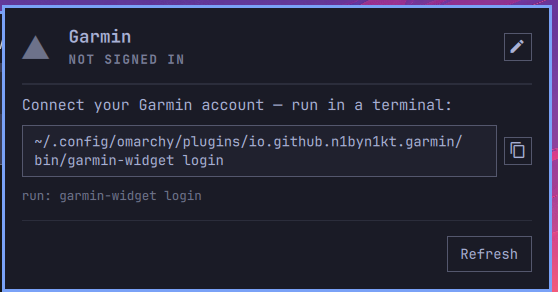
Run the helper's login subcommand in a terminal:
~/.config/omarchy/plugins/io.github.n1byn1kt.garmin/bin/garmin-widget login
It prompts for your Garmin Connect email and password (the password is not echoed), and for an MFA code if your account has multi-factor auth enabled — MFA is fully supported, you just type the code when asked.
Two things worth knowing about the first login:
- Garmin often rate-limits the first attempts. You may see one or two lines
like
mobile+cffi returned 429: GarminConnectTooManyRequestsError. This is harmless — the library retries with a different login strategy internally, and the MFA path usually goes through right after. Let it finish. - On success it prints one line of JSON:
{"ok": true, "tokens": "/home/you/.config/garmin-widget/tokens.json"}. Give the bar up topollMinutesto notice, or middle-click the chip to refresh immediately.
Only OAuth tokens are stored. Your password is never written to disk.
Settings
Configured per bar-widget instance in Omarchy's bar settings (or in
~/.config/omarchy/shell.json):
| Setting | Type | Default | What it does |
|---|---|---|---|
pollMinutes |
integer | 30 |
How often the helper asks Garmin for new data. Floored at 5 minutes; 0 (or anything non-numeric) falls back to the 30-minute default instead of being floored — Garmin's numbers move slowly and polling harder mostly buys you rate limits. |
barMetric |
enum | bodyBattery |
Which number the bar chip carries: bodyBattery, steps, sleep (score) or readiness (training readiness). Case-insensitive; anything unrecognised falls back to bodyBattery rather than blanking the chip. The glyph changes with it. Overridden by the panel's edit mode (see above). |
showSteps |
boolean | false |
Also show today's steps as a second figure in the bar (e.g. the bolt glyph and 61 followed by 8.0k). Ignored when barMetric is steps — the same number twice is not worth the width. |
stepsGoalFallback |
integer | 10000 |
Step goal used in the panel when Garmin does not return one for the day. |
panelMetrics |
string | curve,sleep,steps,readiness,rhr |
Which cards the panel shows, comma-separated. The order you write is the order they appear. Tokens: curve (Body Battery + stress for the day), battery, sleep, steps, readiness, rhr, hrv, intensity (weekly intensity minutes), floors, calories, weight (30-day weigh-in timeline — see Weight below), activity (your last 10 activities — see Activities below), custom (your own command — see Your own card). Unknown tokens are skipped — a typo costs you one card, not the panel — and a card whose data Garmin did not return is left out. Past six visible cards the panel switches to a dense layout: the seven-day strips are dropped and metric cards pair up two to a row, to keep the panel a sane height. Overridden by the panel's edit mode (see above). |
Weight is opt-in, and fetched only when it's on. Body weight is more
sensitive than a step count, so the helper never asks Garmin for it unless
weight is actually in the effective deck (your panelMetrics setting or
the panel's edit-mode override) — turning the card off again refetches
without calling get_weigh_ins, nothing is cached going forward, and a
payload with the card off simply has "weight": null (a series cached
while it was on is not served even from a stale cache). The
card shows kg or lb, whichever your Garmin account's own unit setting says
(metric/statute) — the widget follows Garmin's choice rather than having a
setting of its own to get out of sync.
| customCommand | string | "" (off) | A command line whose stdout is one JSON object {title, value, caption, meter:{value,max}, tone}, rendered as the custom card. Empty means the card does not exist and nothing is ever run. See Your own card for the contract and the safety rails. |
| demoMode | boolean | false | Runs the widget on synthetic, clearly-marked data — no account, no network, nothing written or read. Primary-only on a multi-monitor setup. See Demo mode above. |
On a multi-monitor setup the widget appears on every bar, and it is designed so that only one instance polls, fanning the result out to the others — one Garmin session regardless of bar count. (Developed and verified on a single-monitor setup; multi-monitor reports welcome.)
Privacy
Your credentials go to Garmin only. Tokens are stored locally in
~/.config/garmin-widget/ with 0600 permissions. The helper connects to Garmin
Connect only — no telemetry, no other hosts.
That Garmin-only claim is scoped to the helper. The plugin's QML runs
unsandboxed inside the shell process, with whatever access that process has,
and the helper — along with any customCommand you configure — runs as your
own user: a customCommand can reach anything your own scripts can reach. See
Your own card for the safety rails around that.
Everything this plugin writes lives under your home directory:
| Path | Contents |
|---|---|
~/.config/garmin-widget/tokens.json |
Garmin OAuth tokens, mode 0600. No password. |
~/.config/garmin-widget/prefs.json |
What you chose in the panel's edit mode — the card list and the bar metric, mode 0600. Delete it to fall back to your shell.json settings. |
~/.cache/garmin-widget/last.json |
Last successful reading, so the bar can show yesterday's numbers while offline. |
~/.cache/garmin-widget/history.json |
Up to seven daily rows — steps and goal, sleep score, duration and stages, resting HR, HRV, Body Battery high/low/charged/drained, stress, calories, readiness — the source of the panel's strips and deltas. Re-fetched whole from Garmin's ranged endpoints on the first fetch of each day and on manual refresh (windowFetchedOn records when); other polls only update today's row. Older files are read and upgraded in place. |
~/.local/share/garmin-widget/venv/ |
The dedicated virtualenv holding garminconnect. |
Troubleshooting
The widget has five failure states, and each one asks you for exactly one thing. Open the panel to see which you are in.
| Panel says | What happened | What to do |
|---|---|---|
| HELPER DEPENDENCY MISSING | garminconnect is not importable and no venv was found. |
Run the one-liner under External dependency. |
| NOT SIGNED IN | No ~/.config/garmin-widget/tokens.json yet. |
Run garmin-widget login (path in the panel, copyable). |
| SESSION EXPIRED | Garmin rejected the stored tokens. | Run garmin-widget login again. Tokens do expire; this is normal every so often. |
| OFFLINE / GARMIN API ERROR | The network or Garmin Connect is unavailable and nothing is cached yet. The specific error (its exception class, e.g. ConnectionError) is shown. |
Wait and hit Refresh. |
Rows shown, footer · stale |
Last fetch failed but a previous reading is cached. | Nothing — the numbers are real, just old. The tooltip and the panel footer both carry the same specific error the uncached case would have shown. Refresh when you are back online. |
Nothing appears in the bar at all. Check the widget is enabled and placed:
omarchy plugin list. After enabling, omarchy restart shell.
The chip shows the bolt glyph and an em dash, and never updates. Run the helper by hand — it always prints one JSON object and always exits 0, so the error is in the output:
~/.config/omarchy/plugins/io.github.n1byn1kt.garmin/bin/garmin-widget fetch
~/.config/omarchy/plugins/io.github.n1byn1kt.garmin/bin/garmin-widget status
The shell dies right after you add or update the plugin. Known upstream
issue, not fixed here: Quickshell 0.3.0 can segfault in
IpcHandler::updateRegistration when plugin files change underneath a shell
that is already restarting — which is exactly what omarchy plugin add and
omarchy plugin update do. We saw it in roughly 30% of rapid redeploy cycles
during development. It is always the outgoing process that dies; the
incoming one comes up clean, and the shell normally restarts itself. If it does
not:
omarchy restart shell
Your data is unaffected — nothing is lost but a few seconds of bar.
Removal
omarchy plugin remove io.github.n1byn1kt.garmin
That removes the plugin only. Your tokens, prefs, cache and venv are deliberately left behind, so removing and re-adding the plugin (or moving to a newer version) does not make you log in again or lose your card layout. To clear them out as well:
rm -rf ~/.config/garmin-widget ~/.cache/garmin-widget ~/.local/share/garmin-widget
Development
python3 -m pytest tests/ -v          # helper unit tests, no network
omarchy plugin validate .            # manifest schema check
The plugin is manifest.json, Service.qml (poller and state machine),
BarWidget.qml (the chip), Panel.qml (the detail panel) with its
MetricCard.qml / Meter.qml / CurveCard.qml / WeekView.qml / WeightCard.qml pieces, and the Python helper
in bin/garmin-widget. The helper's contract is that every
subcommand prints exactly one JSON object to stdout and exits 0 — errors are
data, never a non-zero exit, so a failed fetch can never blank the bar.
The Python side is covered by a pytest suite under tests/, run with
python3 -m pytest tests/ -v from the repo root.
License
MIT — see LICENSE.