
Feishin for Omarchy
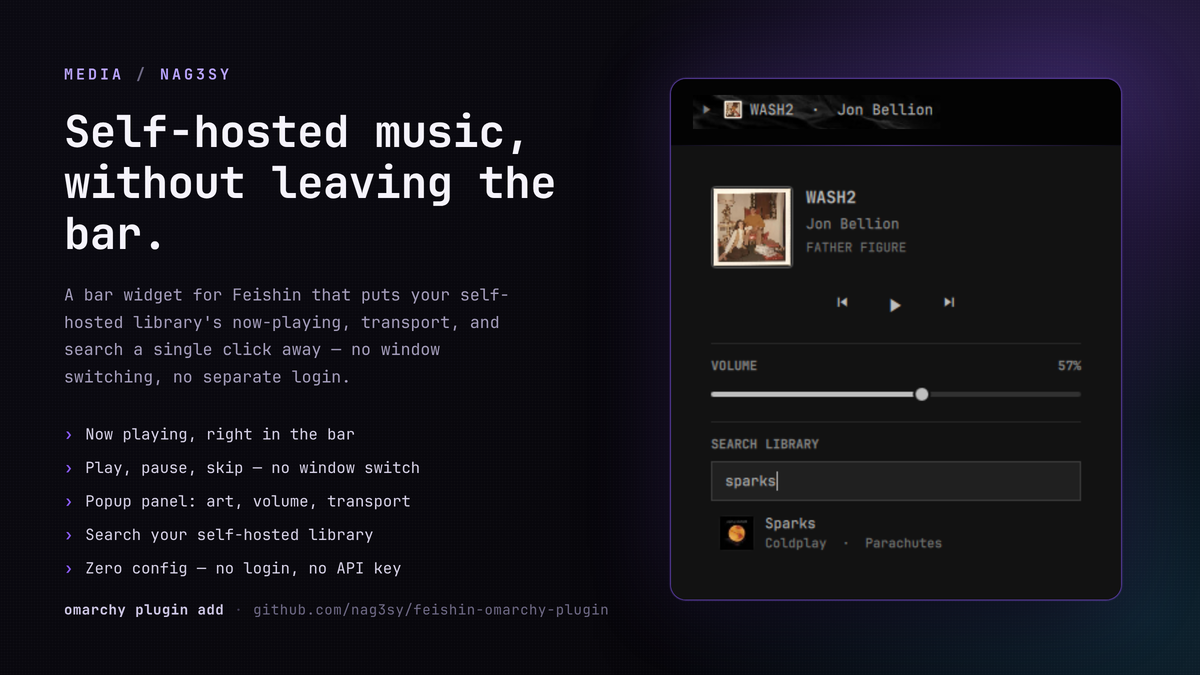
A bar-widget plugin for Omarchy that shows what's currently playing in Feishin and lets you control it — play/pause, skip, volume, and a quick library search — without switching to the Feishin window.
Why this exists
I self-host most of my own infrastructure, including my music library, and Feishin is my client of choice for playing it back. But alt-tabbing into a full player window just to skip a track or see what's playing felt like a lot of friction for something that small. This widget puts my self-hosted library's now-playing, transport, volume, and search a single click away in the bar — no window switching, no separate login, no config file.
Features
<img width="204" height="28" alt="screenshot-2026-08-22_20-27-54" src="https://github.com/user-attachments/assets/00f3d487-4388-4dc4-a164-e59557dd80e9" />- Now playing in the bar — play/pause icon, mini album art, and a scrolling track name that never resizes the bar, however long the title is.
- Transport controls — click the icon to play/pause, middle-click or scroll over the track name to skip forward/back.
- Popup panel — click the art/track name to open a panel with full cover art, title/artist/album, and previous/play-pause/next buttons.
- Volume slider — drag to set Feishin's playback volume directly.
- Library search — search your music server's library from the popup and see matching songs with art, title, artist, and album.
- Jump to Feishin — clicking a search result, or the now-playing art/title, brings the Feishin window to the front and copies the track/album name to your clipboard so it's a paste away in Feishin's own search.
- Zero configuration — no login, server URL, or API key to enter. The widget reuses the same auth token Feishin's own MPRIS integration already exposes.
Demo
A ~1 minute walkthrough of the widget in the bar, the popup panel, and library search.
https://github.com/user-attachments/assets/6ad6e854-97b5-4b68-8a05-ac864dc99c39
Requirements
- Omarchy with its Quickshell-based shell.
- Feishin running on Linux, with its MPRIS integration enabled (this is Feishin's default behavior — nothing to turn on).
wl-copy(part ofwl-clipboard) for the clipboard bridge described above. Already present on a standard Omarchy install.- A Subsonic/OpenSubsonic-compatible music server (e.g. Navidrome) for the library search feature. Transport controls (play/pause/skip/volume) work without one — search just won't be available until Feishin has loaded a track's cover art at least once, since that's where the widget reads the server's auth token from.
Install
omarchy plugin add https://github.com/nag3sy/feishin-omarchy-plugin --enable
Or manually:
git clone https://github.com/nag3sy/feishin-omarchy-plugin \
  ~/.config/omarchy/plugins/io.github.nag3sy.feishin
omarchy-shell shell rescanPlugins
omarchy plugin enable io.github.nag3sy.feishin --section right
Remove
omarchy plugin remove io.github.nag3sy.feishin
How it works
Feishin registers itself on the session D-Bus as an
MPRIS media player
(org.mpris.MediaPlayer2.Feishin) via its bundled mpris-service dependency.
This widget talks to that MPRIS player directly through Quickshell's built-in
Quickshell.Services.Mpris module for now-playing info, transport control, and
volume — no polling scripts or external processes involved.
For search, Feishin's cover-art URLs already embed a valid Subsonic-style auth
token for your music server (u, t, s, v query parameters). The widget
picks that up from the currently-loaded track's art URL and reuses it to query
your server's search3 endpoint directly — the same server Feishin itself
talks to, with no separate login.
Security model
This widget identifies "the" Feishin player by matching the MPRIS Identity
property reported on the session D-Bus, which is a self-reported string, not
a verified identity. Any local process the same OS user runs could register
its own MPRIS player and claim to be Feishin. This is the same trust
assumption every MPRIS-based bar widget makes to display track art and
metadata at all — Omarchy's session D-Bus has no stronger guarantee to offer.
Where this widget goes further than a read-only "now playing" display is the library-search feature: it makes an outbound HTTP(S) request to whatever server origin it reads out of the current track's art URL. Concretely, that means:
- The origin must be
http://orhttps://— anything else is rejected before use. - Requests time out after 8 seconds. Responses over 1 MB are aborted
mid-transfer — rejected as soon as the cap is crossed, from the declared
Content-Lengthif the server sends one, or from bytes buffered so far otherwise — rather than downloaded in full and only then discarded. - No destination allowlist is enforced beyond that, because the whole point
of the feature is to reach your own self-hosted server, which is
legitimately often on
localhostor a private LAN address. - Track/artist/album metadata and search-result strings are always rendered
as plain text (
Text.PlainText), never QML's default auto-detected rich text, so a malicious value can't smuggle markup into the bar or popup.
Net effect: a malicious local process impersonating Feishin could, at most, learn what you type into the search box (by pointing the widget at a server it controls) or show fake cover art in the popup. It cannot use this widget to read files, run commands, render markup, or reach anything the widget itself doesn't already talk to. If that residual risk matters to you, treat it the same way you'd treat any other MPRIS-aware bar widget — it depends on nothing else on your system running untrusted code as your user.
Known limitation
There is currently no way for anything outside Feishin — this widget included — to make a running Feishin instance start playing an arbitrary track. This was confirmed by checking every external control surface Feishin exposes:
- MPRIS's
OpenUriis declared but not wired to anything. - Feishin's
feishin://URI scheme only serves local font files internally. - Feishin's own built-in Remote Control Server (Settings → General) only forwards transport commands (play/pause/next/previous/volume/etc.) over its WebSocket — no search, browse, or "play this track" event exists.
This is tracked upstream as jeffvli/feishin#1221. Until Feishin adds a real remote-play API, "jump to Feishin" here means: bring the window to the front and copy the track/album name to your clipboard, so finding it in Feishin is a paste and a click away rather than a manual search from scratch. If that issue gets resolved upstream, this widget can be updated to start playback directly.
License
MIT — see LICENSE.