
<img src="icon.png" width="40" align="top" alt=""> Omarchy FPL Tracker
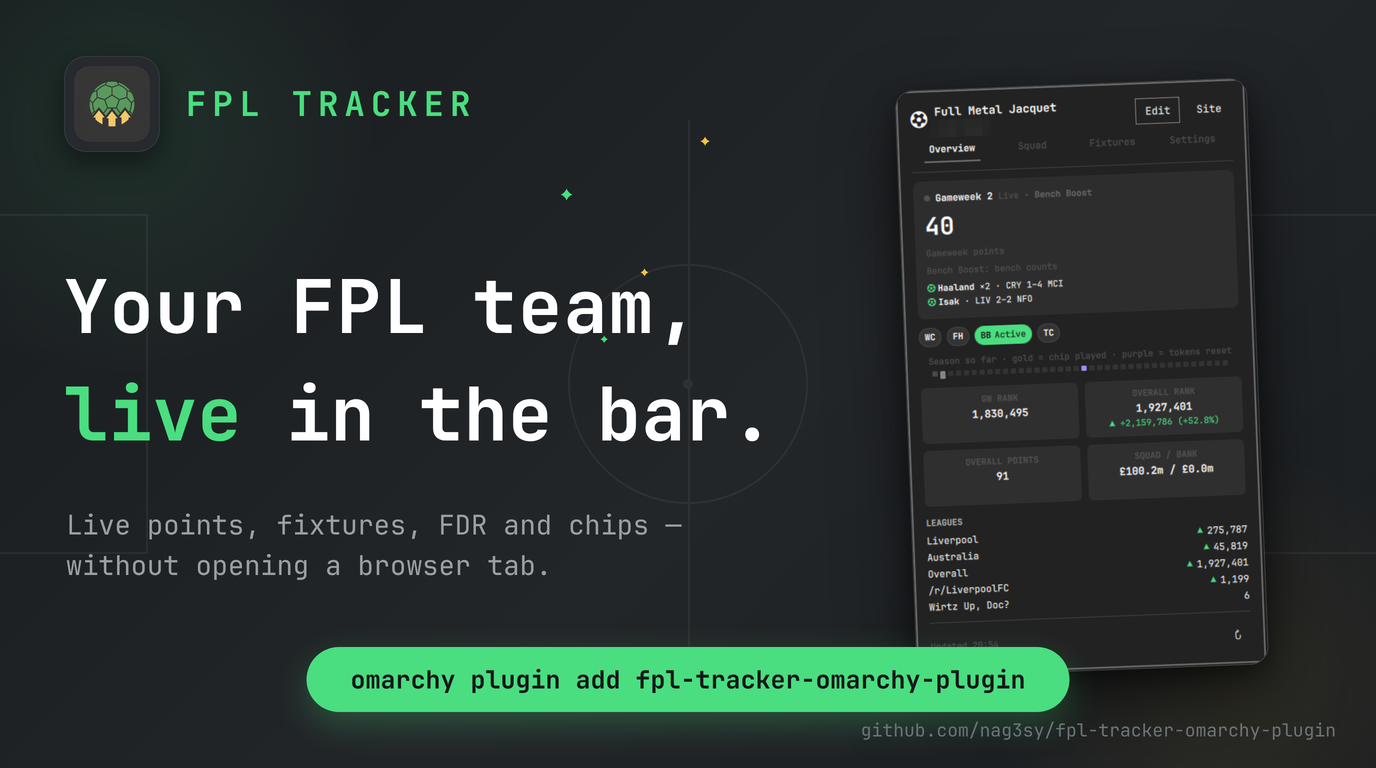
A bar-widget plugin for Omarchy that turns your Fantasy Premier League Team ID into a live gameweek tracker — correct captain and chip math, your full squad, live scores and fixture difficulty, rank movement, and every league you care about, right in the bar. No login, no API key, just your public Team ID.
Why this exists
FPL's own site (and its bonus-point recalculation in particular) is slow to reflect what's actually happening in a live gameweek — a captain who's just scored won't show up doubled in some of FPL's own API fields for minutes. This widget cross-checks the endpoints that do update live against the ones that lag, so the number in your bar is the same one LiveFPL and the FPL site itself show — not a stale one — one click away in the bar instead of a browser tab.
Features
- Live gameweek points, calculated correctly — captain doubling, triple captain's ×3, and Bench Boost's bench points are all reflected the moment FPL's live data shows them, not whenever FPL's backend gets around to its next recalculation pass.
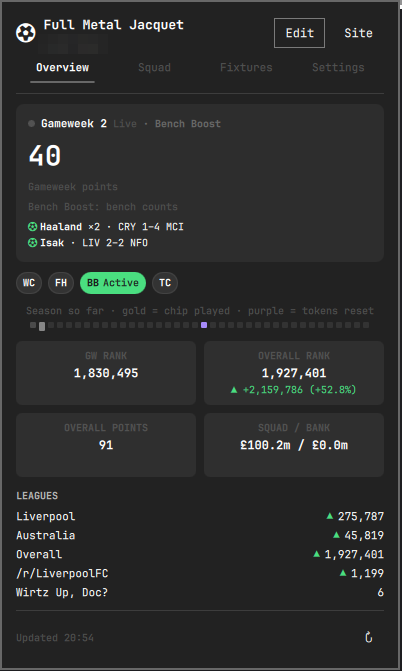
- Card-based control-center UI — a gameweek hero card (points or live deadline countdown, plus a live feed of your own players' goals and assists as they happen), stat tiles for ranks and squad value, and pill-style chip badges, all colored with your Omarchy theme's own tokens.
- Season strip — a hoverable gameweek ruler: played weeks faint, weeks where you played a chip in gold (hover to see which chip), a purple tick where FPL's half-season token allowance resets (~GW20), and this week glowing green while matches are in play.
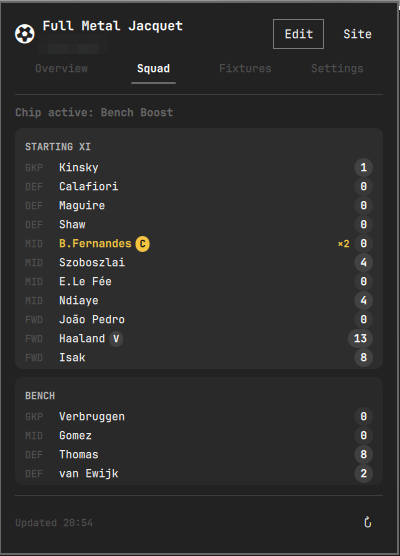
- Full squad breakdown — starting XI and bench, each player's live points, a ×2/×3 badge when a multiplier applies, captain/vice pills, and this gameweek's £0.1m price moves (▲/▼) on your own players, one click into the Squad tab.
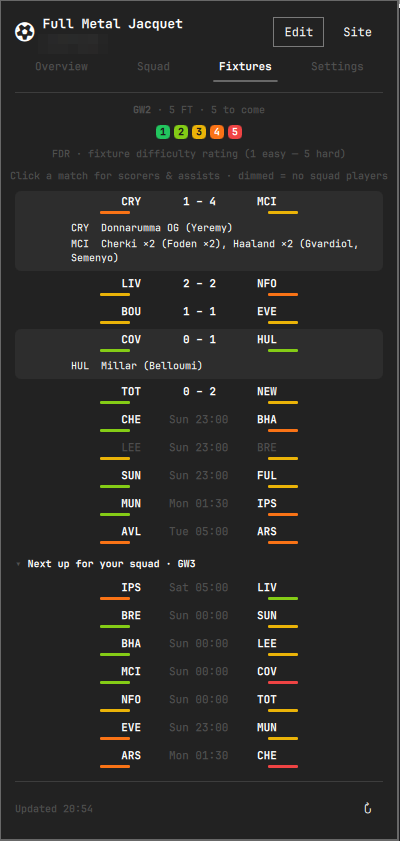
- Fixtures tab with live scores and FDR — every Premier League match of the gameweek with in-play scores, a pulsing live indicator and minute tracker (only while a match is actually in play — finished matches always settle to their final score), kickoff times, and the official 1–5 Fixture Difficulty Rating on both sides. Matches involving teams you own players from are shown at full brightness; the rest are dimmed, so your squad's games stand out at a glance. Click any started match to expand a mini match review — goal scorers, assisters, own goals, missed/saved penalties, and bookings — the same events FPL's own live feed tracks.
- Chip tracker — Wildcard, Free Hit, Bench Boost, and Triple Captain at a glance, each shown as a Ready, Active, or Used (GW N) pill — the active chip glows green, the same success green used for positive rank movement throughout. FPL grants one of each chip per half-season; the tracker re-derives which half-season window is current from the live gameweek calendar every refresh, so it flips back to Ready at the gameweek ~20 reset with no special-cased date logic.
- Live rank movement — a LiveFPL-style indicator: your overall rank's absolute and percentage change versus the last completed gameweek, ▲ or ▼, colored with your Omarchy theme's own accent — the widget follows your theme throughout rather than imposing its own palette (the FDR scale is the one deliberate exception, since green→red is the universal FDR convention).
- Pick your leagues — every classic league you're in shows up with its own rank and an up/down arrow by default; the Settings tab lets you hide the ones you don't care about, useful if you're in a lot of them.
- Jump to the official site — a Site button opens
fantasy.premierleague.com/my-teamdirectly, for transfers and anything else the widget itself doesn't do. - Auto-updating, and fresh on open — live data refreshes every 90 seconds during a gameweek; the calendar, history baseline, and next-GW fixtures refresh every 10 minutes; and opening the popup always triggers a fresh fetch so you never read stale numbers. A manual refresh button is always available too.
- Keybindable —
omarchy-shell fpl-tracker toggle(plusopen,close, andtab overview|squad|fixtures|settings) can be bound to any key in your Hyprland config. - Zero login, zero config — only your public Team ID is needed, saved locally. No FPL account credentials or API key, ever.
Screenshots
| Overview | Squad | Fixtures | Settings |
|---|---|---|---|
 |
 |
 |
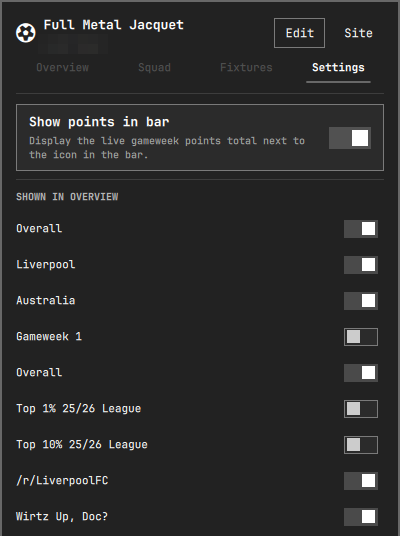 |
<img src="screenshots/bar-pill.png" alt="Bar pill" height="23"> — one click away in the bar. Icon-only by default so it blends with the rest of the bar's glyphs; your live gameweek points can be switched on in Settings.
<img src="screenshots/onboarding.png" alt="Setup" width="402"> — onboarding takes seconds: paste your Team ID, done.
Setup
Click the widget in the bar and enter your FPL Team ID — the number in the URL when you view your team on fantasy.premierleague.com, e.g.:
https://fantasy.premierleague.com/entry/1234567/event/1
                                   ^^^^^^^
Your Team ID and Settings-tab choices (show-points-in-bar, hidden leagues)
are saved to ~/.local/state/omarchy/settings/fpl-tracker.json and reused
on future logins. None of this is secret — it's the same public data
visible to anyone who opens your team's page on fantasy.premierleague.com.
Click "Edit" in the popup any time to change your Team ID.
Requirements
- Omarchy with its Quickshell-based shell.
- Network access to
fantasy.premierleague.com(the official, public FPL API — no authentication required for team/league data).
No other dependencies beyond Perl (needed by the one bundled helper script described in Security — Perl ships with every mainstream distro), no bundled binaries, and nothing is installed outside the plugin's own directory and the one settings file above.
Install
omarchy plugin add https://github.com/nag3sy/fpl-tracker-omarchy-plugin --enable
Or manually:
git clone https://github.com/nag3sy/fpl-tracker-omarchy-plugin \
  ~/.config/omarchy/plugins/io.github.nag3sy.fpl-tracker
omarchy-shell shell rescanPlugins
omarchy plugin enable io.github.nag3sy.fpl-tracker --section right
Remove
omarchy plugin remove io.github.nag3sy.fpl-tracker
This also stops all network activity from the plugin. It does not delete
~/.local/state/omarchy/settings/fpl-tracker.json (your Team ID and
Settings choices); delete that file yourself for a clean slate.
How it works
Six official, unauthenticated FPL endpoints, polled directly from the
widget via QML's XMLHttpRequest — no helper scripts for network access,
and no eval anywhere in the plugin (the one bundled helper script,
described below, never touches the network):
| Endpoint | Used for |
|---|---|
GET /api/entry/{teamId}/ |
Team/manager name, overall rank/points, this gameweek's live points and rank, squad value/bank, and every classic league you're in |
GET /api/entry/{teamId}/event/{eventId}/picks/ |
Your picks, captain/vice markers, active chip, transfer cost |
GET /api/event/{eventId}/live/ |
Every player's live gameweek points — builds the Squad tab and bench points |
GET /api/entry/{teamId}/history/ |
Last gameweek's final overall rank (rank-movement baseline) and your chip-usage history |
GET /api/bootstrap-static/ |
Gameweek calendar, player/team/position names, price moves, and the season's chip windows — refreshed every 10 minutes, since it's a much larger payload that rarely changes intra-day |
GET /api/fixtures/?event={eventId} |
Current gameweek: live scores/minutes, match events (goals, assists, cards — for the expandable match review) + official FDR — and next gameweek (static, slow-polled): the "next up for your squad" difficulty preview |
The per-gameweek ?event= form is used deliberately: it returns one
gameweek's fixture list (~30KB) instead of the megabyte-scale full-season
/fixtures/ payload, so both fixture requests are small, bounded, and
carried by the same mid-transfer size-cap enforcement as every other
request above. Match-review events (scorers, assists, cards) come from the
same fixture payload's stats array — no additional endpoints.
A note on the fixtures tab's brightness: matches involving teams that appear in your current squad are rendered at full brightness, and all other matches are dimmed. It's a readability device, not missing data — every fixture in the gameweek is shown regardless.
The only other network action is the Site button, which opens the
fixed, hardcoded URL https://fantasy.premierleague.com/my-team in your
default browser — only on an explicit click, never automatically, and never
with any data appended to it.
Your Team ID is validated against ^[1-9][0-9]{0,9}$ before it's used
anywhere and is always URL-encoded. All requests are plain HTTPS GETs to the
fixed fantasy.premierleague.com host — nothing else is contacted, and no
credentials, tokens, or secrets exist anywhere in the plugin to leak.
League rank deltas (▲/▼) come from the API's own entry_last_rank field
(your rank as of the previous gameweek), not a same-session comparison, so
they stay meaningful across a single 90-second poll interval instead of
being noise.
A note on which endpoint is actually "live"
The picks endpoint's entry_history.points/entry_history.rank only update
on FPL's periodic backend recalculation and visibly lag during a live
match — a captain who has just scored shows up doubled in the entry
endpoint's summary_event_points/summary_event_rank well before
entry_history catches up, sometimes by several points. This widget uses
the entry endpoint's figures for the gameweek points total and gameweek
rank, and computes bench points directly from bench picks' own live scores
via /live/, rather than trusting entry_history for either. Squad-tab
per-player contributions were always computed as live points × FPL's own
multiplier, so they were unaffected by this — only the Overview headline
number was, and it's fixed.
Upcoming features
Planned, not yet built:
- Multi-week FDR planner — the full-season fixture list with difficulty filters, for transfer and chip planning beyond the next gameweek.
- Price prediction — flag players likely to rise or fall next, from FPL's own price-change-projection data (the Squad tab already shows this gameweek's moves).
- League standings detail — points behind the leader and the gap to the next rank in each of your leagues.
Have a feature request? Open an issue.
Security
This plugin was self-reviewed against the Omarchy plugin marketplace's security baseline before submission. Summary — full detail on the network side is in How it works above:
- No command execution, anywhere. No
sudo,pkexec,doas,eval, or shell invocation exists in this plugin. The runtime surface is sixXMLHttpRequestcalls, oneQt.openUrlExternally, and a single spawned process: the plugin's own bundled helper script (scripts/read-state-file), executed directly (never via a shell) to read the state file. It's a small Perl script that only ever receives the settings-file path and a byte cap, prints the file's bytes, and touches nothing else — and it's hardened against the file being swapped for a symlink or FIFO between checking and reading, via a singleO_NOFOLLOW|O_NONBLOCKdescriptor whosefstat()type/size check and read are done against the same open descriptor, with the cap re-checked during the read itself. - One fixed host, HTTPS only. Every request goes to the hardcoded
fantasy.premierleague.com— never a user-supplied or discovered URL. Your Team ID is validated against^[1-9][0-9]{0,9}$before it's used anywhere and is always URL-encoded, so it can't redirect a request elsewhere. Every one of the six requests is aborted mid-transfer the moment its response crosses an endpoint-specific byte cap — checked against the declaredContent-Lengthas soon as headers arrive, and again against bytes buffered so far as the body streams in — rather than downloaded in full and only then discarded. Every request also has an explicit timeout. - The Site button is inert data. It opens a single hardcoded URL on an explicit click only — never automatically, and never with any data appended to it.
- No credentials, ever. There's nothing to steal: no login, no API key, no token, no session of any kind exists anywhere in the plugin.
- Local storage is one file, and it's not sensitive. Your Team ID and
Settings-tab choices live in
~/.local/state/omarchy/settings/fpl-tracker.json— the same public data anyone can already see on your team's fantasy.premierleague.com page. Removing the plugin doesn't delete it; see Remove. It's read through the bundled helper script described above rather than Quickshell'sFileView, becauseFileViewhas no size-limited or streaming read of its own — the script refuses to hand back anything past a generous 64KB ceiling (this file normally runs a few hundred bytes), and the widget falls back to the unconfigured setup prompt on any rejected or empty read. - FPL-sourced text is never treated as rich text. Team/manager/player/
league names come from FPL's API and are rendered with
textFormat: Text.PlainTexteverywhere they're shown, so a crafted name can't be interpreted as markup. The two deliberateStyledTextexceptions (the matchday snapshot and the goal feed) are built entirely from the plugin's own markup, with any FPL-sourced names first stripped of angle brackets — and unknown chip codes from the API are stripped the same way. - No privileges. Never requests
sudo/pkexec, never touches system configuration, and never reads or writes any file other than its own settings file above.
The one residual risk worth naming: QML's XMLHttpRequest has no exposed
API to restrict redirect targets or protocols, so a DNS-hijack or
compromised-cert scenario against fantasy.premierleague.com isn't
something this plugin can defend against at its own layer — that's a
platform limitation, not something specific to this code.
License
MIT — see LICENSE.