
Omahub
← All plugins
N

Proton VPN

by nameless312

Connect to Proton VPN by country, city, or specific server, or jump to the fastest server. Status shown in the bar.

Security review

Review recommended · 2 findings

Deterministic scan — not a security guarantee

Low
Risk level
Low
Analyzed commit
d9fe76c
Scanned
1 month ago

Flagged patterns appear only in documentation files (README / docs) — descriptive examples, not executable code.

  • Docs sudo README.md:33

    Command runs with sudo, elevating the process beyond the plugin environment.

    sudo pacman -S proton-vpn-cli` (Arch/Omarchy)
  • Docs sudo README.md:36

    Command runs with sudo, elevating the process beyond the plugin environment.

    sudo pacman -Rns proton-vpn-gtk-app`

Automated analysis only — not a security guarantee.

AI advisory review

No obvious issues detected

Language-model assessment · ~deepseek/deepseek-v4-flash-latest — advisory only

None
AI risk level
None
Recommendation
install
Model
~deepseek/deepseek-v4-flash-latest
Analyzed commit
d9fe76c
Reviewed
1 month ago

The plugin is a QML bar widget that drives the official Proton VPN CLI with plain argv-style commands, reads status/configuration output, and opens a terminal for user sign-in. The deterministic scan's medium findings are only the README's `sudo pacman`/`pacman -Rns` setup lines, which are documentation for manual package installation and removal, not executable plugin installer code. No obfuscation, persistence, credential harvesting, or destructive actions were found in the reviewed plugin code.

How this check works

This review combines the deterministic scan (the rule-based results above) with an independent look at the plugin's code by a language model. The model reads a trimmed sample of the repository's files, the manifest, and the README, then gives a plain-language risk level and a recommendation: install (no notable danger), review (look closer first), or avoid (clearly dangerous).

It runs on the same analyzed commit as the deterministic scan and is strictly advisory — it is not a security guarantee and never blocks a plugin by itself. A human moderator still reviews plugins before they are listed.

AI advisory only — automated analysis, not a security guarantee.

Install
$ omarchy plugin add https://github.com/nameless312/protonvpn-plugin-omarchy --enable
System #bar #system #security

Proton VPN

An Omarchy Quattro shell plugin for Proton VPN. Connect by country, city, or specific server, jump to the fastest server, manage Proton VPN settings, and sign in — all from the bar, without touching the terminal.
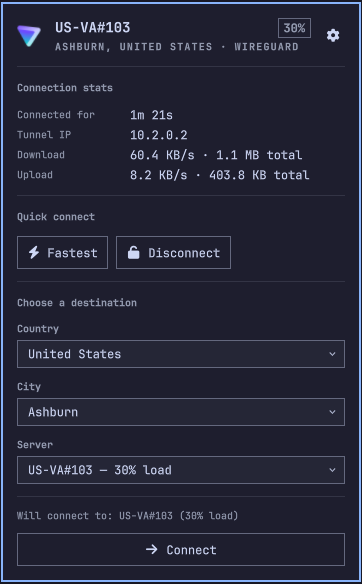
Proton VPN plugin preview

Built on top of the official Proton VPN Linux CLI.

Features

  • Bar icon showing the real Proton VPN mark, dimmed when disconnected
  • One-click connect to the fastest server
  • Search and pick a country, then a city, then a specific server — each pick just updates the selection, nothing connects until you press Connect
  • Free-tier servers are labeled inline (US-FREE#120 · Free — 83% load)
  • Live connection stats: uptime, tunnel IP, download/upload rate and totals
  • Settings page (gear icon) for NetShield, Kill Switch, VPN Accelerator, Moderate NAT, Port Forwarding, IPv6, Anonymous Crash Reports, and Custom DNS
  • Sign in without CLI knowledge: enter your email, and a terminal opens running protonvpn signin for you to enter your password (and 2FA, if any) — it closes itself once you're done
  • Sign out (with confirmation) from the settings page

Alternatives

Requirements

  • The official Proton VPN CLI: sudo pacman -S proton-vpn-cli (Arch/Omarchy)
  • jq, nmcli, and ip (all standard on Omarchy)
  • Cannot run alongside the Proton VPN GUI app. If proton-vpn-gtk-app is installed, remove it first: sudo pacman -Rns proton-vpn-gtk-app

Install

omarchy plugin add https://github.com/nameless312/protonvpn-plugin-omarchy.git --enable

Usage

Click the Proton VPN icon in the bar to open the panel:

  • Not signed in? Enter your email and press Log In — finish signing in in the terminal that opens.
  • Fastest connects immediately to the best available server.
  • Pick a country, city, and/or specific server, then press Connect.
  • Click the gear icon for VPN settings and sign out.

Configure

omarchy bar move io.github.nameless312.protonvpn --section right

Remove

omarchy plugin remove io.github.nameless312.protonvpn