
Omahub
← All plugins
N

Omawhoop

by Nathan Gagnon

Live WHOOP recovery, strain, and sleep stats in your Omarchy bar

Security review

No obvious issues detected

Deterministic scan — not a security guarantee

None
Risk level
None
Analyzed commit
7f85c0b
Scanned
1 month ago

No potentially dangerous behavior detected in the analyzed commit.

Automated analysis only — not a security guarantee.

AI advisory review

No obvious issues detected

Language-model assessment · ~deepseek/deepseek-v4-flash-latest — advisory only

Low
AI risk level
Low
Recommendation
install
Model
~deepseek/deepseek-v4-flash-latest
Analyzed commit
7f85c0b
Reviewed
1 month ago

This plugin is a WHOOP integration that uses OAuth to fetch health data. The code is transparent, uses standard OAuth flow, stores credentials and tokens locally with proper file permissions, and makes API calls only to WHOOP's official endpoints. No malicious behavior detected.

How this check works

This review combines the deterministic scan (the rule-based results above) with an independent look at the plugin's code by a language model. The model reads a trimmed sample of the repository's files, the manifest, and the README, then gives a plain-language risk level and a recommendation: install (no notable danger), review (look closer first), or avoid (clearly dangerous).

It runs on the same analyzed commit as the deterministic scan and is strictly advisory — it is not a security guarantee and never blocks a plugin by itself. A human moderator still reviews plugins before they are listed.

AI advisory only — automated analysis, not a security guarantee.

Install
$ omarchy plugin add https://github.com/NathanRGagnon/omawhoop --enable
Desktop #bar #quickshell

Omawhoop

preview

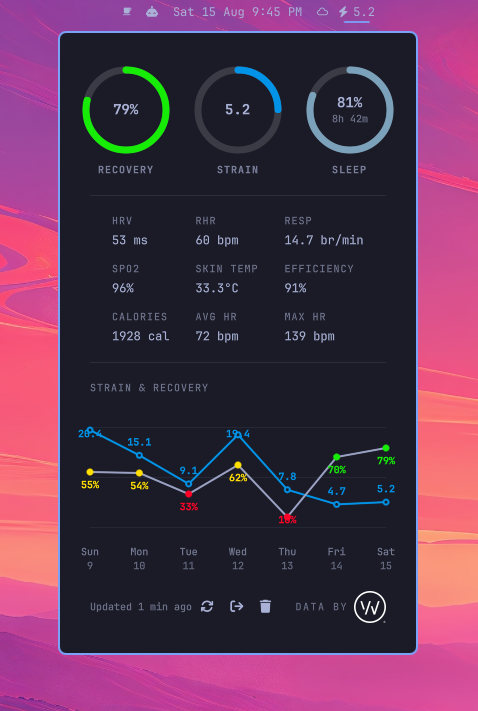
Bar widget + popup panel for WHOOP on Omarchy. Shows strain in the bar; click for recovery, sleep, HRV, RHR, SpO2, skin temperature, calories, and a 7-day strain/recovery trend chart.

Not affiliated with or endorsed by WHOOP, Inc. All data stays on your machine — direct HTTPS calls to api.prod.whoop.com, no third-party server.

Requirements

  • Omarchy (Quickshell-based desktop environment)
  • A WHOOP account with a device
  • A free WHOOP developer app, created at developer.whoop.com (client ID + secret — see Setup below)

Install

omarchy plugin add https://github.com/NathanRGagnon/omawhoop.git --enable

Or without --enable, then turn it on later:

omarchy plugin enable io.github.nathanrgagnon.omawhoop

Setup

  1. Create a free app at developer.whoop.com. Note its Client ID and Client Secret.
  2. Click the Omawhoop icon in your status bar. The panel shows a redirect URI — register that exact URI (http://localhost:8942/callback) in your WHOOP app's settings.
  3. Enter your Client ID and Client Secret and click Connect WHOOP. Approve the browser prompt, and the panel switches to your live data.

Usage

  • Left click — open/close the panel
  • Middle click — force a fresh pull, bypassing the cache
  • Data auto-refreshes every 15 minutes in the background

Update

omarchy plugin update io.github.nathanrgagnon.omawhoop

Uninstall

omarchy plugin remove io.github.nathanrgagnon.omawhoop

That removes the plugin's code but leaves your saved WHOOP credentials in place in case you reinstall. To also clear those, use the panel's Remove all data button, or:

rm -rf ~/.config/omarchy/omawhoop ~/.local/state/omarchy/omawhoop ~/.cache/omarchy/omawhoop

License

MIT — see LICENSE.