
KubeContext for Omarchy
Shows the active kubectl context in the bar, switches between contexts with a
click (or a right-click picker that never talks to a cluster), sets the current
namespace, and gives a short overview of the selected cluster.
(Deutsche Fassung: README.de.md.)
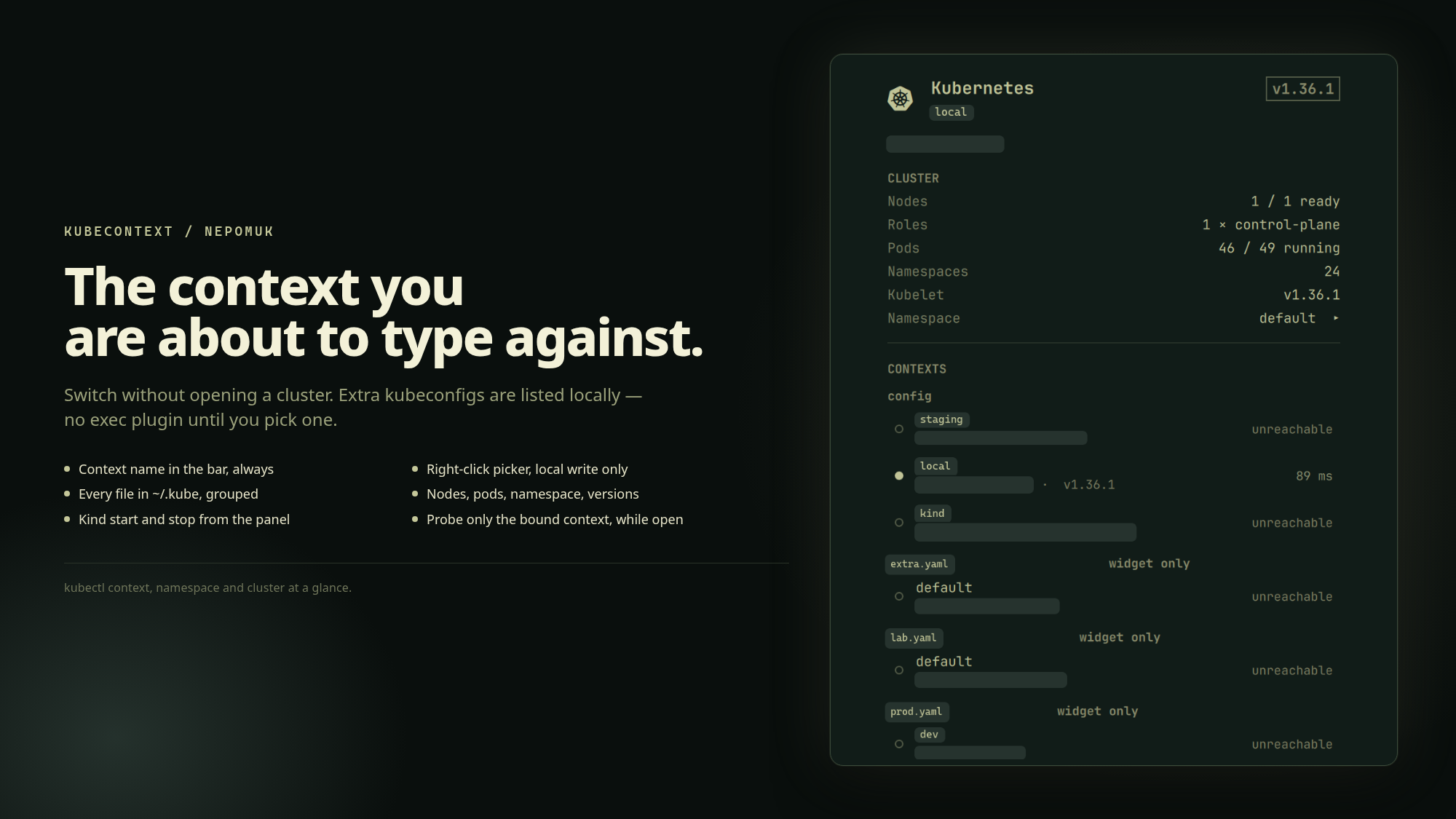
- Bar — the current context name next to a Kubernetes icon, so the context you are about to run a command against is never a guess. Optionally the namespace too. Tints if the last probe found the cluster unreachable or pods not running — without starting a new probe while the panel is closed.
- Picker — right-click the icon to switch context. That write is local; no API server is contacted.
- Contexts — every kubeconfig file sitting directly in
~/.kube(notcache/), grouped by file. Two files that both have a context nameddefaultare two rows. Listing is a local YAML/JSON parse —kubectlis not run against extra files, so a credentialexecplugin in a file you did not pick cannot start when the panel opens. Switching a context in~/.kube/configis what new shells inherit. Switching in another file binds this widget to that file (--kubeconfig); new terminals still use the default. - Cluster — nodes ready, roles, pods running, namespaces, server and kubelet
versions, and average CPU and memory when a metrics server answers. Click the
namespace to pick another; that is
kubectl config set-context --current --namespace=, same file as a context switch.
Why it stays out of the way
Reading a kubeconfig is a local file operation and costs nothing, so the bar label follows a context you changed in a terminal within seconds.
Talking to a cluster is the opposite. Clusters fail in more ways than they succeed — a credential plugin that errors, a private endpoint whose DNS does not resolve, an API server that simply never answers — and this widget lives inside the process that draws your desktop. So:
- Nothing leaves the machine while the panel is closed.
- Extra kubeconfigs are listed without
kubectl. Only the bound context is probed (kubectl get --raw /version), and only while the panel is open. - Every call is bounded twice, by
kubectl --request-timeoutand by an outertimeout, so a dead cluster costs seconds rather than forever. - A cluster that does not answer is reported as unreachable, never as an empty cluster with zero nodes and zero pods.
- A
kind-*context whose node container is not running is reported as Kind cluster is not running, not as a generic API timeout. That check is local (docker inspect/kind get nodes) and only runs while the panel is open.
Requirements
kubectl on PATH and a readable kubeconfig. Nothing else. If kubectl is
missing the panel says so instead of showing an empty list.
Install
omarchy plugin add https://github.com/Nepomuk-Software/KubeWidget.git --enable
Uninstall
omarchy plugin remove io.github.nepomuk-software.kubecontext
That takes the widget out of the bar and deletes the plugin directory. There is
nothing else to undo: it installs no files outside that directory, no services
and no privileged helper. Kind node containers it started or stopped stay in
whatever state you left them. Kubeconfig writes (current-context and the
current namespace) stay as you left them too.
What it writes
Three things, all on an explicit click, always against the file of the row:
kubectl --kubeconfig=<file> config use-context <name>— setscurrent-contextin that filekubectl --kubeconfig=<file> config set-context --current --namespace=<name>— sets the namespace of the current context in that filedocker start/docker stopof the Kind node containers labeledio.x-k8s.kind.cluster=<name>(andcloud-provider-kind-<name>if that sidecar exists). Kind has no start/stop CLI; this is the local equivalent. Only offered forkind-*contexts whose containers were actually found.
Writes against the default kubeconfig (~/.kube/config, or the first
KUBECONFIG entry) are what new shells inherit. Writes against another file
stay in that file; the widget keeps --kubeconfig pointed there until you pick
a context in a different file. New terminals still use kubectl's default. The
widget never copies clusters into ~/.kube/config, never exports KUBECONFIG,
and never replaces ~/.kube/config with a symlink.
Docker start/stop never happens on its own. Everything else the widget does is read-only. The right-click picker only switches context, and never contacts a cluster or Docker.
Usage
| Where | Action |
|---|---|
| Bar, left | open/close the panel |
| Bar, right | pick a context (no network) |
| Bar, middle | re-read the kubeconfig; full refresh if the panel is open |
| Panel, click a context | switch to it |
| Panel, Start / Stop Kind cluster | docker start / docker stop the local Kind nodes |
| Panel, click Namespace | list namespaces of the current cluster, click to set |
Panel, n |
open/close the namespace list |
| Panel, ↑ ↓ / Enter | pick a context or namespace |
Panel, r |
refresh |
| Panel, Esc | close |
Settings
omarchy bar set io.github.nepomuk-software.kubecontext <key> <value>
| Key | Default | Effect |
|---|---|---|
showContext |
true |
context name next to the icon; ignored on vertical bars |
showNamespace |
false |
append /namespace to the bar label |
maxLabel |
18 |
longer names are elided in the bar |
contextIntervalSec |
5 |
how often the kubeconfig is re-read (local, no network) |
probeIntervalSec |
30 |
how often the bound cluster is contacted while the panel is open |
IPC
omarchy-shell io.github.nepomuk-software.kubecontext <method> [context]
| Method | Does |
|---|---|
open close toggle |
the popup |
current |
the active context name |
kubeconfig |
the kubeconfig file this widget is bound to |
rows |
every row as name<TAB>file, * on the bound one |
namespace |
the current context's namespace |
use <context> |
switch to a context in the bound file, or the unique name; name@file when two files share a name |
useIn <file> <context> |
same, with the file as its own argument |
useNamespace <name> |
set the current context's namespace |
kindStart kindStop |
start or stop the Kind node containers for the current kind-* context |
refresh |
re-read kubeconfig; probe the bound context and overview only while the panel is open |
status |
<context> reachable <version> nodes=r/t pods=r/t ns=n, or unreachable, unprobed, no kubectl |
License
MIT — see LICENSE. Plugins run unsandboxed inside the Omarchy shell; read the code before you install it.