
EVE Online Monitor for Omarchy
Keep an eye on your capsuleers without leaving the Omarchy bar. EVE Online Monitor puts skill queues, character details, and wallet activity into one fast, keyboard-friendly popup for every character you authorize.
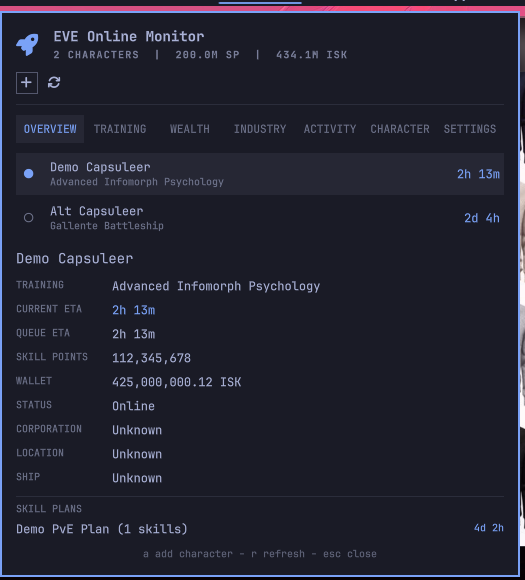
Highlights
- Live skill-queue countdowns with current and total queue ETAs.
- Multi-character support with quick character switching.
- Overview, Training, Wealth, Industry, Activity, and Character views.
- Collapsible queues, skill categories, wallet panels, implants, clones, fatigue, standings, and loyalty sections.
- Wallet balance and 30-day cash-flow chart with income, expenses, and net.
- Local-time timestamps and readable EVE names for factions, corporations, stations, systems, and accessible structures.
- Local skill plans with prerequisite expansion and training-time estimates.
- Persistent ESI caching, safe error fallbacks, and a demo mode for previews.
The popup is deliberately focused on monitoring. It does not attempt to replace the EVE client or manage your character in-game.
Requirements
- Omarchy Quickshell (
omarchy-shell) - Python 3.10 or newer
The backend uses only Python's standard library. It does not install a daemon, package, browser extension, or privileged service.
The plugin includes its public EVE client ID, so no local OAuth configuration is required. Authorization uses this callback URL:
http://127.0.0.1:48173/callback
Forks or development overrides can configure a different public client ID in:
~/.config/omarchy-eve-monitor/config.json
Example override:
{
  "client_id": "your-public-client-id",
  "redirect_uri": "http://127.0.0.1:48173/callback"
}
The client ID is public and is safe to keep in the plugin repository. Do not put a client secret in this file or in the repository. Authorization uses OAuth Authorization Code with PKCE. A fork using its own client ID must register the same callback URL in its EVE developer application.
Install
Install directly from the public repository:
omarchy plugin add https://github.com/Nicoolai/omarchy-eve-monitor.git --enable
omarchy bar move io.github.nicoolai.eve-monitor --section right
For local development from a checkout:
mkdir -p ~/.config/omarchy/plugins
cp -a /home/nicolai/src/omarchy-eve-monitor ~/.config/omarchy/plugins/io.github.nicoolai.eve-monitor
omarchy-shell shell rescanPlugins
omarchy plugin enable io.github.nicoolai.eve-monitor
omarchy bar move io.github.nicoolai.eve-monitor --section right
To remove the plugin:
omarchy plugin remove io.github.nicoolai.eve-monitor
Use
- Left-click the bar widget to open the character dashboard.
- Right-click to authorize another character.
- Middle-click to refresh ESI data immediately.
- Press
ain the panel to add a character. - Press
rin the panel to refresh. - Select a character row to make it the selected bar character.
- Use
escto close the panel.
The detail views are loaded on demand:
Overviewshows queue status, skill points, wallet, location, ship, and saved plan ETAs.Trainingshows the active queue and categorized trained skills.Wealthshows wallet balance and recent cash flow.Industrycombines industry jobs and market orders.Activityshows character notifications.Charactershows implants, clones, fatigue, standings, and loyalty.
Click a section heading to expand or collapse it. The panel also supports keyboard scrolling and keeps its scroll position while character details refresh.
Configure the top-bar countdown with Omarchy's inline bar settings:
omarchy bar set io.github.nicoolai.eve-monitor barMode "Soonest active"
The available values are Selected character, Soonest active, and
Automatic. Settings are stored in ~/.config/omarchy/shell.json.
With one character, the bar shows that character's current training time. By
default, Selected character follows the character chosen in the popup.
Soonest active always selects the shortest active training time. Automatic
follows the selected character with one character and uses the soonest active
completion with multiple characters. The popup always lists every character, and
the widget never creates one bar entry per character.
Demo mode
Demo mode is safe for screenshots and UI development:
python3 bin/omarchy-eve-monitor demo on
omarchy-shell shell rescanPlugins
python3 bin/omarchy-eve-monitor snapshot
python3 bin/omarchy-eve-monitor demo off
The repository includes a root-level preview.png captured in demo mode for
the Omarchy plugin marketplace and GitHub visitors.
Data and API behavior
Credentials are stored in ~/.config/omarchy-eve-monitor/state.json with
private permissions. ESI responses are cached below
$XDG_CACHE_HOME/omarchy-eve-monitor and conditional requests use ETags and
Last-Modified headers. The widget refreshes no faster than the cache policy
allows and computes countdowns locally between API refreshes.
Authorization uses EVE Online SSO with OAuth PKCE. Press a in the popup to
authorize a character. The plugin requests ESI permissions for the data it
uses and performs no in-game write actions. Reauthorize existing characters
after a scope change if private structure names are needed; those require
esi-universe.read_structures.v1 and docking access to the structure.
The ESI API exposes the current skill queue, not an EVEMon-style saved skill plan. Saved plans will be local plugin data and will use ESI/SDE skill metadata for prerequisites, attributes, implants, training estimates, and in-game skill groups. Download the official skill catalog once before using plan estimates or grouped trained skills:
python3 bin/omarchy-eve-monitor catalog-update
python3 bin/omarchy-eve-monitor plan-add "PvE Core" 3300 5
The Training tab shows the current skill queue followed by trained skills grouped using EVE's in-game skill groups. The dashboard's detail tabs load on demand. The same data can be inspected from the backend for troubleshooting:
python3 bin/omarchy-eve-monitor details CHARACTER_ID skills
python3 bin/omarchy-eve-monitor details CHARACTER_ID wallet
The Wealth tab focuses on wallet balance and 30-day journal cash flow. Asset browsing and transaction details are currently not shown in the panel.
Some ESI data is inherently limited: wallet journal data is limited to 30 days, many histories are limited to 90 days, and skills may remain stale until the character logs in. The panel will retain the last successful cache and show the error instead of replacing useful data with an empty view.
Development checks
python3 -m unittest discover -s tests -v
omarchy plugin validate .
qmllint -I "$OMARCHY_PATH/shell" BarWidget.qml Panel.qml
License
MIT. See LICENSE.