
Omamin
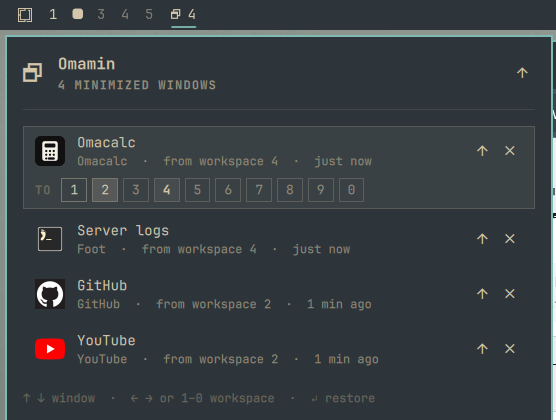
Minimize windows and bring them back — to the workspace they left, or any other — from the Omarchy bar. No daemons, no downloads, no network: every action is one Hyprland dispatcher over the shell's own IPC.
Install
omarchy plugin add https://github.com/nousd/omamin.git --enable
Click the new bar icon and press Add keybindings. It appends three lines
to ~/.config/hypr/bindings.lua (backup kept) — or paste them yourself:
o.bind("SUPER + M", "Omamin: minimize window", "omarchy-shell -q omamin minimize")
o.bind("SUPER + CTRL + M", "Omamin: minimized windows", "omarchy-shell -q shell toggle io.github.nousd.omamin")
o.bind("SUPER + ALT + M", "Omamin: restore last minimized", "omarchy-shell -q omamin restoreLast")
Use
| Key | |
|---|---|
SUPER + M |
Minimize the focused window |
SUPER + CTRL + M |
Open the list |
SUPER + ALT + M |
Restore the last minimized window |
In the list: ↑ ↓ pick a window, ← → or 1–0 pick a workspace, Enter
restore, x close, Esc leave. Mouse: click a row to restore, a chip to
pick a workspace, ✕ to close; the bar icon restores the last one on right
click and minimizes the focused window on middle click.
Configure
omarchy bar set io.github.nousd.omamin hideWhenEmpty true --json   # hide the icon when nothing is minimized
omarchy bar set io.github.nousd.omamin showCount false --json      # icon only
omarchy bar move io.github.nousd.omamin --section right
Scripting
omarchy-shell omamin <verb>: minimize, minimizeWindow <addr>,
restore <addr>, restoreTo <addr> <workspace|current>, restoreLast,
restoreAll, closeWindow <addr>, list (JSON), count, toggle,
setupKeybindings, removeKeybindings, resolve <class> (what the list
shows for a window class).
How it works
Minimizing moves the window to the hidden special:minimized workspace and
tags it with where it came from; restoring moves it back and drops the tag.
State lives in Hyprland, so it survives shell restarts and is shared across
monitors. Windows still parked when the plugin is removed reappear with
hyprctl dispatch 'hl.dsp.workspace.toggle_special("minimized")'.
Titles and workspace names belong to other processes, so they are stripped
to bounded single-line plain text and every label is rendered as
Text.PlainText. It touches nothing but Hyprland, and
~/.config/hypr/bindings.lua only when you press Add keybindings (one
marked block, one backup). Needs the
Lua-configured Hyprland of Omarchy 4.
Remove
~/.config/omarchy/plugins/io.github.nousd.omamin/uninstall.sh
Restores every window, removes the keybindings block, removes the plugin.
Develop
scripts/dev-sync.sh --restart   # copy the checkout into the plugin dir, restart the shell
scripts/lint.sh                 # manifest, qmllint, model + script tests
MIT — see LICENSE.