
Voxbox
Reads anything on your screen aloud. 100% offline — no cloud, no accounts, no privacy concerns.
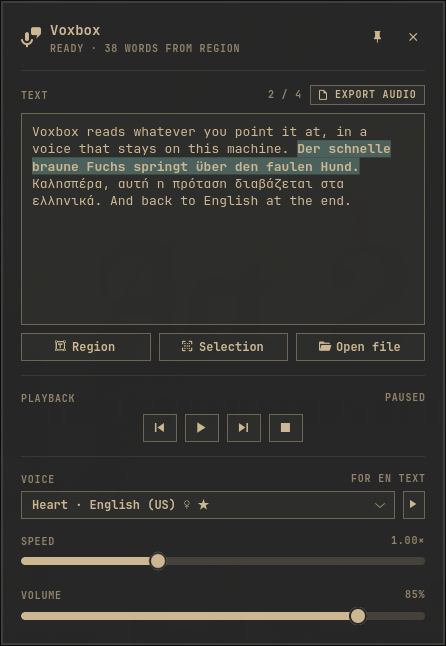
- Drag a box over anything on screen → OCR → speech
- Read your text selection, or a PDF / EPUB / txt / HTML file
- 51 languages offline, auto-detected per sentence — mixed-language text just works
- Export to MP3 / WAV / FLAC / OGG
- Omarchy shell plugin (bar widget + native panel) and standalone GTK4 app
- Follows your Omarchy theme, live
Install
Omarchy plugin:
omarchy plugin add https://github.com/nousd/voxbox.git --enable
Click the new bar icon and press Install speech engine (one-time ~600 MB,
sha256-verified) — or run ~/.config/omarchy/plugins/io.github.nousd.voxbox/install.sh.
Bar icon: click — panel · right-click — capture a region · middle — play/pause.
No keybindings are installed — bind voxbox or omarchy-shell shell toggle io.github.nousd.voxbox however you like.
Standalone (any Wayland desktop):
git clone https://github.com/nousd/voxbox.git && cd voxbox && ./install.sh
System packages (Arch):
sudo pacman -S --needed python python-gobject gtk4 libadwaita ffmpeg \
  grim slurp hyprpicker tesseract tesseract-data-eng wl-clipboard poppler
More languages — voice and OCR data, no root:
voxbox-add-language el de # no arguments lists what you can add
Uninstall
~/.config/omarchy/plugins/io.github.nousd.voxbox/uninstall.sh # or ./uninstall.sh from a clone
Removes everything: bar widget, engine, voices, launcher entry. --purge
removes your settings too. (The app launcher's own "Uninstall" only removes
the launcher entry — that's how Omarchy treats local apps.)
Built on kokoro-onnx, piper, lingua and tesseract. MIT — see LICENSE.