
Bing Wallpaper for Omarchy
A native Omarchy Quattro bar widget and background service that downloads Bing's current homepage image for one selected market, then optionally sets it as the system background. It checks immediately when Omarchy Shell starts and every hour afterward.
The market follows the desktop locale by default. Downloads are atomic, unchanged images are reused, and the cache retains the eight most recent images for each market you have selected. Only the currently selected market is requested and downloaded during a check.
Requirements
- Omarchy 4 / Quattro
curl,jq,flock,sha256sum,ffmpeg, andffprobe(included in a standard Omarchy install)- Network access to
www.bing.com
The plugin runs without elevated privileges. It contacts Bing's homepage image
feed and stores images under ~/.cache/omarchy/bing-wallpaper/.
Bar widget
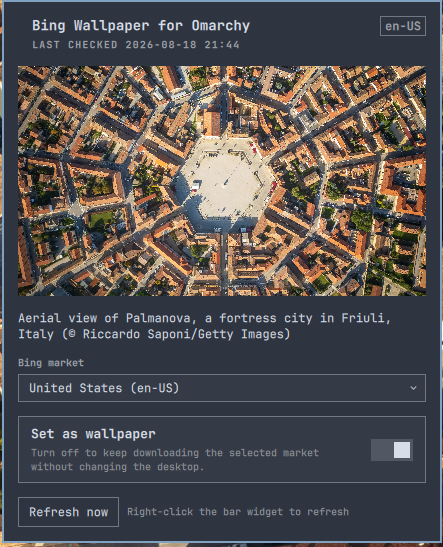
Enable the plugin to place its native image icon in the right section of the Omarchy bar. Left-click the image icon to open a panel with:
- A preview and Bing's image attribution
- Market selection, including Bing's Global / Rest-of-World feed
- A Set as wallpaper toggle
- A Refresh now button and update status
Right-click the bar widget to refresh immediately. With Set as wallpaper off, hourly polling and download of the selected market continue but the desktop is not changed.
The service also watches Omarchy's current background once per minute. If it
previously owned the background and detects that you selected a different one
manually, it automatically turns Set as wallpaper off in shell.json.
Downloads, preview updates, and attribution continue; only automatic wallpaper
application stops. Turn the option back on whenever you want the plugin to take
ownership again.
Theme changes are handled separately. If a cached Bing image was still the active background immediately before the theme switch, the service restores that same image after Omarchy's theme transition. If the plugin did not own the background, it leaves the theme or manually selected background alone. Because manual changes are detected by a one-minute poll, changing the background and then switching themes within that same minute can restore the Bing image once; the following poll detects the manual choice and disables wallpaper application.
The icon inherits Omarchy's bar foreground color. For a transparent bar, Omarchy automatically chooses between the theme's text and background colors after the wallpaper changes. Double-click an empty part of the bar to toggle transparency globally if a visually busy wallpaper still hurts readability.
Install
Install directly from GitHub:
omarchy plugin add https://github.com/odessa2/bing-wallpaper-for-omarchy.git --enable
For local development, clone or copy this folder to
~/.config/omarchy/plugins/io.github.odessa2.bing-wallpaper, then run:
omarchy plugin validate ~/.config/omarchy/plugins/io.github.odessa2.bing-wallpaper
omarchy-shell shell rescanPlugins
omarchy plugin enable io.github.odessa2.bing-wallpaper
Update
Update an installed Git-managed plugin through Omarchy so it is validated and rescanned after the fast-forward:
omarchy plugin update io.github.odessa2.bing-wallpaper
When updating the installed checkout manually during development, force a rescan after all files have changed. If old and new QML components still appear mixed, restart the shell:
omarchy-shell shell rescanPlugins
omarchy restart shell
Configure
Use the native bar panel to select a market and toggle Set as wallpaper.
The values are stored with the widget in ~/.config/omarchy/shell.json:
{
  "id": "io.github.odessa2.bing-wallpaper",
  "market": "de-DE",
  "setWallpaper": false
}
market:autouses the desktop locale,globalselects Bing's Rest-of-World feed, or use a market such asde-DE,en-GB, orja-JP.setWallpaper: set tofalseto keep polling and downloading the selected market without changing the system background. The bar panel exposes this as a native toggle and the service also switches it off when it detects a manual background change.
Omarchy writes this entry atomically and hot-reloads it without rebuilding the
rest of the bar. The settings are also available through Omarchy's native bar
widget settings UI. A valid manual shell.json edit is hot-reloaded and causes
the service to refresh automatically.
Inspect the service state with:
omarchy-shell bing-wallpaper status
Image metadata is available in the cache as current.json, including Bing's
market, copyright attribution, and link.
Upgrading from 1.0.0
When no inline settings exist yet, version 1.0.1 reads the previous
~/.config/omarchy/bing-wallpaper.json as a fallback. The next change made in
the bar panel stores both values in shell.json; the legacy file can then be
removed. The plugin never rewrites shell.json merely because it was updated.
Credits
Thanks to Shimon Rura for diagnosing and fixing the third-party plugin API compatibility issue in pull request #2.
Remove
omarchy plugin remove io.github.odessa2.bing-wallpaper
Omarchy keeps the last selected background after the plugin is removed. If it points into the plugin cache, select another background before deleting the downloaded images. Then optionally remove all retained plugin data:
rm -f ~/.config/omarchy/bing-wallpaper.json
rm -rf ~/.cache/omarchy/bing-wallpaper ~/.local/state/omarchy/bing-wallpaper
Data source
The plugin uses Bing's homepage image archive endpoint:
https://www.bing.com/HPImageArchive.aspx. Bing owns the images and associated
metadata; this plugin does not grant redistribution rights.
Images are requested from Bing's _UHD.jpg asset, which is the highest-quality
version exposed by the feed. The normal feed URL is used only when a particular
image has no UHD asset.
For safety, the downloader accepts only Bing-relative image paths, does not follow redirects, applies isolated per-transfer response-size limits without lowering the shell's hard file-size limit, and validates that downloaded bytes decode as a JPEG before caching or applying them as the wallpaper. Bing-provided titles and copyright attribution are rendered explicitly as plain text. They are never interpreted as rich text or used as tooltip markup, so embedded tags cannot trigger additional network resource loads.