
Dictation (Voxtype) History
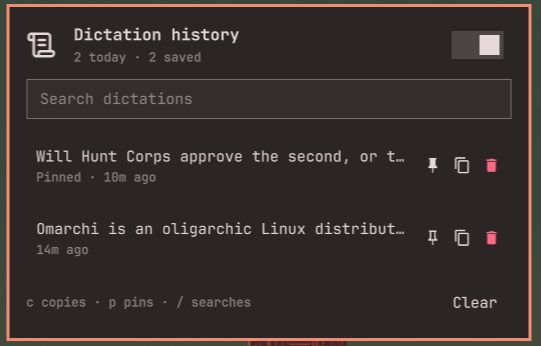
Search, copy, and pin past Voxtype dictations from the Omarchy bar.
Voxtype types into the focused window and then forgets the transcript. This plugin keeps a local log so you can recover a paste that landed in the wrong window, reuse yesterday's paragraph, or pin a phrase you say often.
Nothing leaves the machine. History is 0600 under ~/.local/share/voxtype-history/.
Install
omarchy plugin add https://github.com/okurmustafa/omarchy-plugin-voxtype-history.git --enable
Or copy this folder to ~/.config/omarchy/plugins/io.github.okurmustafa.voxtype-history and enable it from the Omarchy bar settings.
Place the widget:
omarchy bar move io.github.okurmustafa.voxtype-history --section right
Setup
- Install Voxtype if you have not: Omarchy menu → Install → AI → Dictation.
- Click the history icon in the bar.
- Click Enable capture. That backs up
~/.config/voxtype/config.toml, points[output.post_process]at this plugin's hook, and restarts the Voxtype user service.
If you already had a post-process command (for example an Ollama cleanup), the hook pipes the text through that command and logs the result.
Usage
Hold F9 or toggle Super+Ctrl+X to dictate as usual. Each finished transcript appears in the panel.
| Action | How |
|---|---|
| Open | Click the bar icon |
| Copy | Click a row, or c |
| Pin | p or the pin button (pinned rows survive prune and Clear) |
| Delete | x or the delete button |
| Search | / |
| Pause logging | Right-click the bar icon, or the header switch |
The bar icon tints while Voxtype is recording or transcribing.
Files
| Path | Role |
|---|---|
~/.local/share/voxtype-history/history.jsonl |
One JSON object per dictation |
~/.local/share/voxtype-history/meta.json |
Pause flag and previous post-process command |
~/.config/voxtype/config.toml |
Voxtype config; Enable capture writes [output.post_process] |
Unpinned history is pruned to 500 entries. Disable capture from a terminal if you want Voxtype to stop calling the hook:
~/.config/omarchy/plugins/io.github.okurmustafa.voxtype-history/bin/voxtype-history disable
Remove
omarchy plugin remove io.github.okurmustafa.voxtype-history
Run disable first if you enabled capture, so Voxtype is not left pointing at a missing hook.
Requirements
- Voxtype (Omarchy menu → Install → AI → Dictation)
wl-copyfor clipboard copy (included with Omarchy)
License
MIT. See LICENSE.