
Keyboard Layout Switcher
Keyboard Layout Switcher lets you switch layouts for each keyboard, manually or automatically when an app is focused. It uses the layouts already configured in Hyprland and XKB.
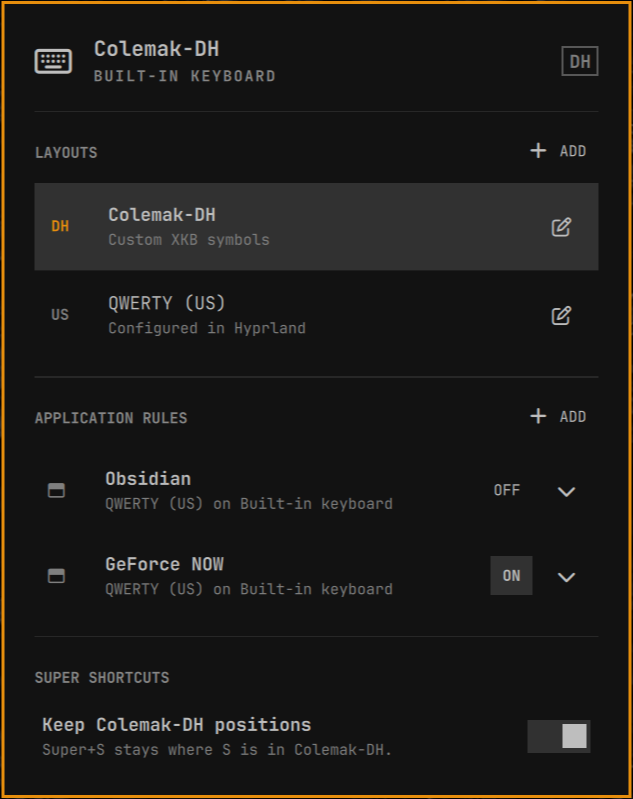
What it adds
- Open a panel and switch directly to a layout.
- Choose which physical keyboard to change.
- Give each application a layout while it is focused.
- Restore the previous layout when focus leaves.
- Choose whether Super shortcuts follow the typing layout or stay in the first configured layout's positions.
- Open layout configuration in your normal Omarchy editor.
Keyboard Layout Switcher can replace Omarchy's first-party keyboard-layout
widget. It uses the same hyprctl switchxkblayout mechanism underneath,
without root access.
Configuration
Hyprland and XKB remain the source of truth. For example:
hl.config({
  input = {
    kb_layout = "colemak_dh,us",
    kb_variant = ",",
    resolve_binds_by_sym = true,
  },
})

hl.device({
  name = "zsa-technology-labs-voyager-keyboard",
  kb_layout = "us",
  kb_variant = "",
})
With that configuration, the built-in keyboard offers Colemak-DH and QWERTY. The first layout also defines shortcut positions when the plugin is set to keep them fixed, so put the layout you use for shortcuts first. The Voyager offers only QWERTY because its firmware already produces the custom layout. Keyboard Layout Switcher never adds another remapping layer or silently changes that device configuration.
Keyboard Layout Switcher stores only its additional policy in:
~/.config/omarchy-keyboard-switcher/policy.json
That file contains the selected keyboard, remembered layouts, shortcut
preference, and application rules. Custom mappings stay in user-owned XKB files
such as ~/.config/xkb/symbols/colemak_dh.
Requirements
- Omarchy Quattro
- Hyprland with Lua configuration support
- Two or more XKB groups if you want to switch layouts
Install
Install and enable Keyboard Layout Switcher with the standard Omarchy plugin command:
omarchy plugin add https://github.com/olivoil/omarchy-keyboard-switcher.git --enable
The plugin is placed on the right side of the bar by default. Omarchy prompts for placement during installation, so you can choose another section.
Disable the first-party widget to avoid showing two layout indicators:
omarchy plugin disable omarchy.keyboard-layout
Use
- Click the keyboard indicator to open the panel.
- If several keyboards are connected, choose Keyboard to change first.
- Click one of that keyboard's configured layout rows.
- Use Add beside Layouts to open Hyprland's input configuration in your normal Omarchy editor.
- Use the edit icon to open the relevant Hyprland or XKB file.
- Add an application rule to switch only while that application has focus.
- In a rule, choose App layout to move Super shortcuts with the temporary layout, or choose the named base layout to keep those shortcut positions.
- Right-click, middle-click, or scroll the bar indicator to cycle the selected keyboard's layouts.
The bar shows the main keyboard's layout. If other keyboards differ, it adds a
count such as DH +2; the tooltip lists each connected keyboard.
Lock screen shortcut
Hyprland can keep a layout shortcut available while the session is locked. Add
this optional binding to ~/.config/hypr/bindings.lua:
o.bind("CTRL + ALT + SPACE", "Cycle keyboard layout", "omarchy-shell io.github.olivoil.omarchy-keyboard-switcher next", { locked = true })
Ctrl+Alt+Space then cycles the keyboard selected in the plugin, including on
the lock screen.
Remove
Remove Keyboard Layout Switcher with the standard Omarchy plugin command:
omarchy plugin remove io.github.olivoil.omarchy-keyboard-switcher
Removal does not delete your Hyprland or XKB configuration. The small policy file may be removed manually if you do not want to keep application rules.
Command line
The backend prints JSON:
bin/keyboard-layout-switcher snapshot
bin/keyboard-layout-switcher switch --keyboard at-translated-set-2-keyboard --layout us
bin/keyboard-layout-switcher cycle --keyboard at-translated-set-2-keyboard --direction next
bin/keyboard-layout-switcher doctor
Development
Run the local checks:
scripts/ci.sh
See architecture, layout configuration, and the interactive design mockup.