
OmaDeezer
A Deezer now-playing bar widget and popup player for Omarchy, built as a Quickshell shell plugin.
Features
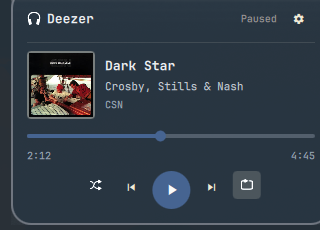
- Bar widget showing the current Deezer track via MPRIS, with play/pause, next/previous
- Click to open a popup with album art, a live seek bar, shuffle, and repeat (off → repeat playlist → repeat track)
- Popup colors are extracted from your wallpaper's dominant colors and update automatically when you change wallpaper, with text kept legible against whatever color that produces
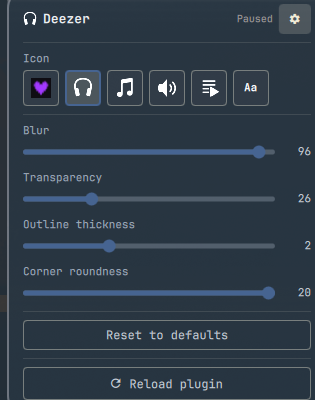
- Settings panel (gear icon) with live sliders for blur, transparency, outline thickness, and corner roundness, plus reset-to-defaults and a manual reload button
- 6 bar icon choices: logo, headphones, music note, speaker, playlist, or a text label (title + artist)
Requirements
- Omarchy with its Quickshell-based shell
- The official Deezer desktop app running, exposing an MPRIS interface identifying as "Deezer" (this is how the widget finds the player - it doesn't talk to the Deezer web API or need any API key)
- ImageMagick (
magickon PATH) for the wallpaper-based color extraction. If it's missing, that feature silently falls back to your theme's normal accent color - nothing else is affected.
Install
omarchy plugin add https://github.com/Deunnis/OmaDeezer.git --enable
By default it's placed on the right side of the bar; move it with:
omarchy bar move io.github.omadeezer --section right
(or place it via ~/.config/omarchy/shell.json, which is where all the settings below are also stored per-widget).
Uninstall
omarchy plugin remove io.github.omadeezer
Settings
Available from the gear icon inside the popup:
| Setting | Range | Description |
|---|---|---|
| Icon | 6 options | What's shown on the bar and as the popup header icon |
| Blur | 0-100 | Backdrop blur behind the popup (this is a global Hyprland decoration setting, not scoped to just this popup) |
| Transparency | 0-100 | How see-through the popup background is |
| Outline thickness | 0-6px | Popup card border width |
| Corner roundness | 0-20px | Popup card corner radius |
"Reset to defaults" restores all of the above. "Reload plugin" does a full reload if the widget ever looks stuck.
Notes for reviewers
- Runs entirely as your normal user session with no elevated permissions requested. The plugin itself never calls out to the Deezer web API or needs any API key or credentials.
- Album art is loaded from whatever
mpris:artUrlthe active MPRIS player reports - for the real Deezer app that's anhttps://URL on Deezer's own CDN (*.dzcdn.net). Since any local process can claim the "deezer" MPRIS identity and control that URL, it's anchored to that CDN host specifically (file://and any other host are rejected outright), then downloaded by the plugin itself viacurl(no redirects followed, so a redirect can't hand trust to a different host) into an exclusively-created file in a private per-plugin cache dir, with--max-filesizebounding the transfer and a follow-up size check before the file is ever handed toImage.source. The image is also decoded with a boundedsourceSizeso a malicious value can't force an oversized decode in the shared shell process. - Track title/artist/album come from the same untrusted MPRIS source. Every
Textitem displaying them is forced toText.PlainText, and angle brackets are stripped before the text reaches the shared bar tooltip (whose own rendering this plugin doesn't control and defaults to AutoText) - both against a rogue "deezer" player smuggling rich text into the bar label, popup header, or tooltip. - Two external commands run via Quickshell's
Process:magick(read-only, analyzes the current wallpaper image) andhyprctl evalfor the Blur slider. - The Blur slider is the one thing with a side effect beyond this widget: it sets Hyprland's global
decoration.blur.size, so turning it up blurs behind every window/layer, not just this popup.
Not included
Browsing/shuffling playlists and albums from the popup was attempted but removed - it requires Deezer's app API, and Deezer isn't accepting new API app registrations at the moment. Worth revisiting if that changes.
License
MIT - see LICENSE.