
Omacorners
macOS-style hot corners for Omarchy.
Move the pointer into a screen corner, wait the dwell delay, and Omarchy runs the action you assigned: lock, screensaver, show desktop, menu, notifications, clipboard, screenshot, and more.
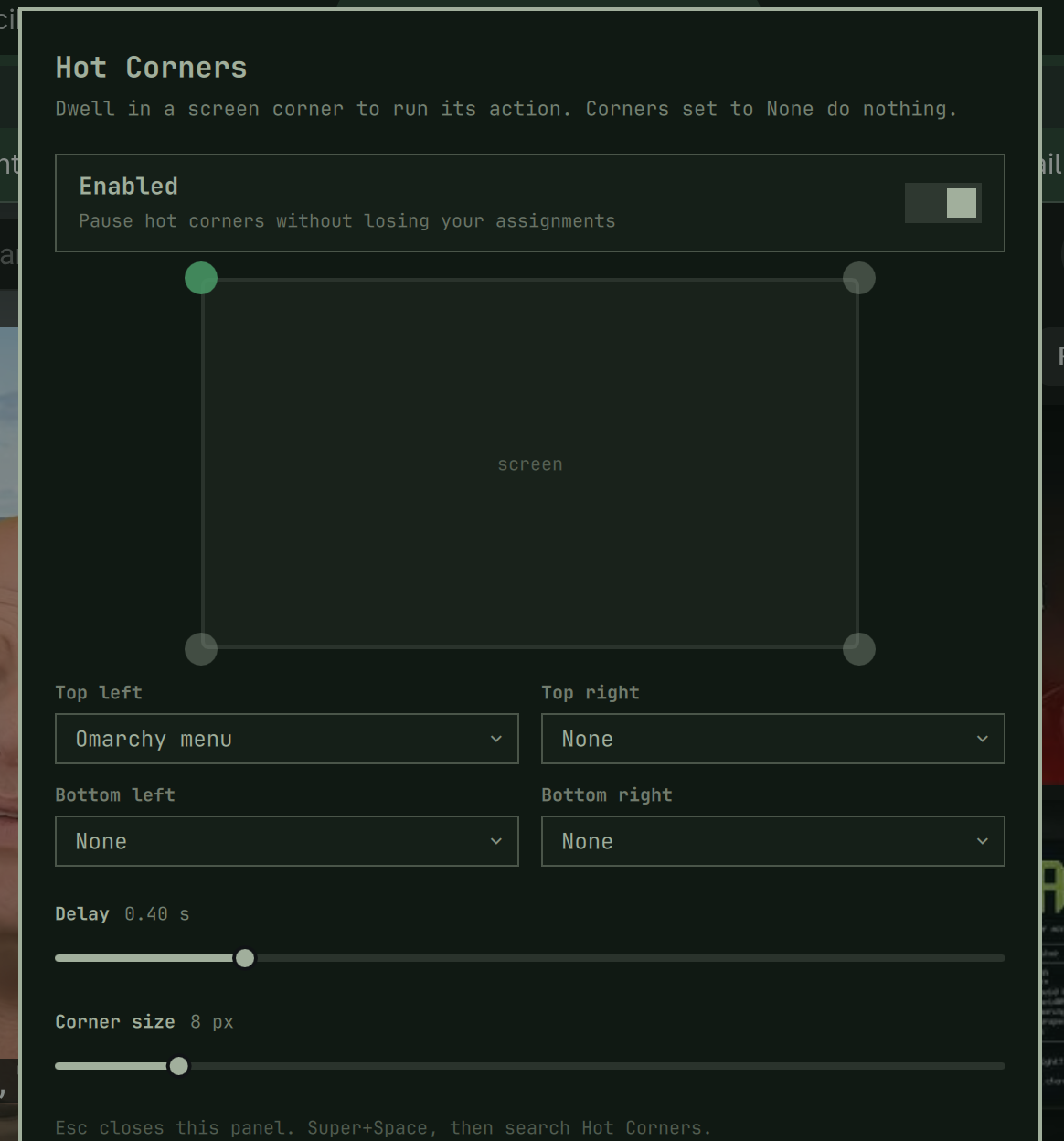
Features
- Per-corner actions. Top-left, top-right, bottom-left, bottom-right, each independently assigned from a fixed whitelist, including any installed application, plus Shut down and Restart.
- Per-workspace overrides. Defaults apply everywhere. A workspace can override only the corners that should differ; the rest inherit.
- Hold Super to arm (on by default). Corners fire only while Super is held, so dragging a window to an edge does not trip them.
- Open or focus. An app corner focuses an existing window if one exists, preferring the current workspace. If that instance is already focused, the next trigger jumps to another workspace that has the same app. It launches only when none is mapped.
- Suppression. Fullscreen, pointer-button drag, and the Omarchy menu / emoji / clipboard overlays do not fire corners.
- Power dwell. Shut down and restart add extra dwell time, then still ask to confirm.
- Bar dots. A 2×2 of dots shows the current workspace map; click opens settings.
- Dwell delay. Default 400ms, 0–2s. Corners set to None never fire.
- Corner glow. An accent blob grows while you dwell. Click-through overlay.
Install
omarchy plugin add https://github.com/OmarGonD/omacorners.git --enable
omarchy restart shell
Open settings:
omarchy-shell shell toggle io.github.omargond.omacorners
Or from the Omarchy menu, add this to
~/.config/omarchy/extensions/omarchy-menu.jsonc:
"setup.omacorners": {
"icon": "",
"label": "Omacorners",
"aliases": ["hotcorners", "hot-corners", "omacorners"],
"description": "Assign an action to each screen corner",
"action": "omarchy-shell shell toggle io.github.omargond.omacorners"
}
A keybind, if you want one, in ~/.config/hypr/bindings.lua:
o.bind("SUPER + SHIFT + H", "Omacorners", "omarchy-shell shell toggle io.github.omargond.omacorners")
Enable or Disable
omarchy plugin enable io.github.omargond.omacorners
omarchy plugin disable io.github.omargond.omacorners
The settings overlay also has an Enabled switch that pauses corner detection without dropping your assignments.
Remove
omarchy plugin remove io.github.omargond.omacorners
Deletes the plugin checkout and its shell.json entry. Menu rows or
keybindings you added by hand are left in place.
Actions
| Action | What it runs |
|---|---|
| None | — |
| Lock screen | omarchy-system-lock |
| Screensaver | omarchy-launch-screensaver force |
| Show desktop | hyprctl dispatch togglespecialworkspace omacorners |
| Omarchy menu | omarchy-menu toggle |
| Notification history | omarchy-shell notifications showHistory |
| Clipboard history | omarchy-shell shell toggle omarchy.clipboard |
| Emoji picker | omarchy-shell shell toggle omarchy.emojis |
| Screenshot | omarchy-capture-screenshot |
| Color picker | hyprpicker -a |
| Do not disturb | omarchy-toggle-notification-silencing |
| Night light | omarchy-toggle-nightlight |
| Toggle bar | omarchy-toggle-bar |
| Terminal | omarchy-launch-terminal |
| Browser | omarchy-launch-browser |
| Default agent | omarchy-agent |
| Claude, Grok, Codex, … | omarchy-launch-tui --app-id=org.omarchy.agent.<name> … |
| Next / previous workspace | workspace e+1 / workspace e-1 |
| Shut down | omarchy-system-shutdown (asks to confirm) |
| Restart | omarchy-system-reboot (asks to confirm) |
| An installed app | uwsm-app -- gtk-launch <desktop-id>.desktop |
| Omacorners settings | this overlay |
Search a corner's dropdown for an app or agent name (Chrome, Claude, Grok,
Codex, …). Desktop apps are stored as app:<desktop-id>; coding agents as
agent:<name> from a fixed list. Shut down and Restart open a confirm
dialog before they run.
Unknown values in shell.json normalize to None. There is no free-form
command field.
Settings
Stored on the plugin's entry in ~/.config/omarchy/shell.json:
| Key | Default | Meaning |
|---|---|---|
active |
true |
Master switch |
delayMs |
400 |
Dwell time, 0–2000 |
powerDelayMs |
800 |
Extra dwell for shut down / restart, 0–2000 |
thresholdPx |
8 |
Corner hit size in layout pixels, 2–48 |
requireSuper |
true |
Hold Super to arm corners |
suppressFullscreen |
true |
Ignore fullscreen windows |
suppressDrag |
true |
Ignore while a pointer button is held |
suppressOverlay |
true |
Ignore menu / emoji / clipboard overlays |
topLeft / topRight / bottomLeft / bottomRight |
none |
Default actions |
workspaces |
{} |
{ "2": { "topLeft": "app:google-chrome" } } overrides |
IPC for debugging: omarchy-shell omacorners status
Architecture & Security
- No extra permissions. The helper talks only to Hyprland's local request
socket (
$XDG_RUNTIME_DIR/hypr/$HYPRLAND_INSTANCE_SIGNATURE/.socket.sock) forcursorposandj/monitors. It never opens/dev/input, never injects input, and never elevates privileges. - No network. No HTTP, no analytics, no remote dependencies.
- No shell interpolation. Every action is a constant argv vector or a
constant Hyprland dispatcher string. User-edited action ids that are not on
the whitelist become
none. - Click-through glow. The per-monitor overlay uses an empty input region
(
mask: Region {}) so it cannot eat clicks. - Cursor coordinates exist only in memory while the helper is running. They are not logged, persisted, or sent anywhere.
The plugin runs unsandboxed inside omarchy-shell, like every Omarchy plugin.
Read Omacorners.qml, Actions.js, Corners.js, Settings.qml, and
scripts/omacorners-cursor before enabling.
Requirements
- Omarchy 4.x with Quickshell
- Hyprland (the running compositor)
python3(standard library only)
Development
tests/run-tests.sh
omarchy plugin validate .
Symlink into the live plugin dir and restart the shell after edits:
ln -sfn "$PWD" ~/.config/omarchy/plugins/io.github.omargond.omacorners
omarchy-shell shell rescanPlugins
omarchy plugin enable io.github.omargond.omacorners
omarchy restart shell
License
MIT