
Fresh Wallpaper
Fresh Wallpaper is a wallpaper rotation plugin for Omarchy Quattro. It downloads a random unseen image from Bing's recent daily wallpaper collection and applies it through Omarchy's native background command.
Its small bar control opens a native configuration panel. Fresh Wallpaper runs inside omarchy-shell and launches temporary helper processes for downloads. The bar control is also the plugin's on-switch, so removing or disabling it stops wallpaper rotation.
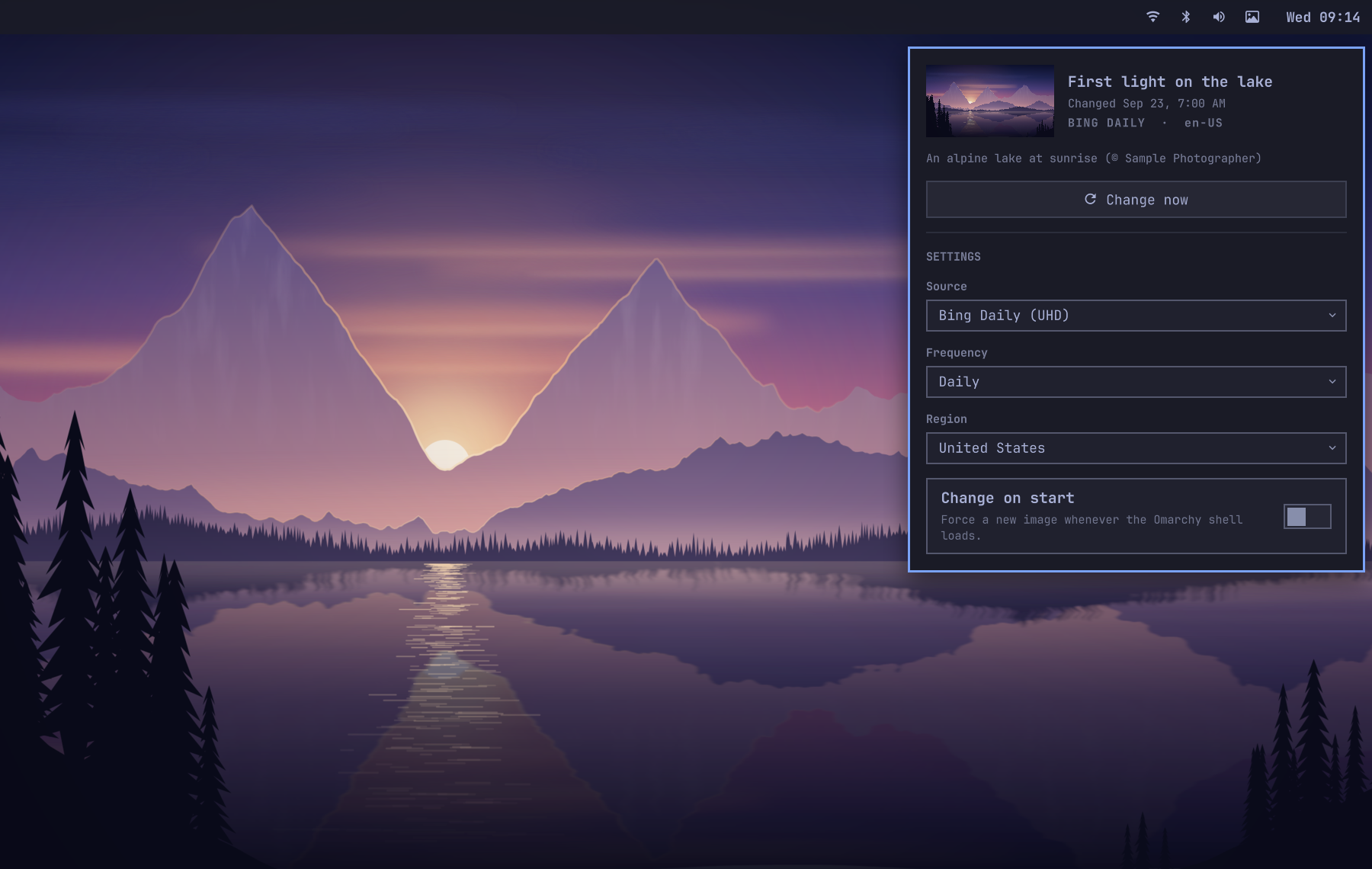
Default behavior
- Adds a wallpaper control to the right side of the Omarchy bar.
- Downloads a UHD Bing wallpaper the first time the plugin is enabled.
- Changes the wallpaper daily.
- Schedules Daily, Weekly, and Monthly as elapsed time after the last successful change.
- Checks for changes that came due during sleep within a minute of waking; downloading waits for network connectivity.
- Does not force another change when the Omarchy shell or plugin reloads.
- Recovers a missing cached wallpaper on startup, while preserving an available background selected outside the plugin.
- Chooses an image not used yet from Bing's archive of about the last two weeks.
- Prefers the 3840x2160 image and falls back to 1920x1080 when UHD is unavailable.
- Retries UHD on later selections when only a 1080p copy is cached.
- Starts a new random pass after all available images have been used, without immediately repeating the current image.
- Keeps the active wallpaper and the Previous history, and caps the download cache at 30 images by default.
- Waits for the network after login instead of treating a connecting link as a wallpaper failure.
- Retries quietly while offline, then shows at most one notification for a real download failure until an update succeeds.
Why Bing first
Bing is the best first provider for this small plugin: it needs no API key, publishes a curated landscape image every day, supplies attribution metadata, and currently serves a 3840x2160 UHD image. Its homepage archive is not a versioned public API, so a future Bing change may require a plugin update.
Other providers can be added behind the existing provider setting without changing the scheduler or Omarchy integration.
Requirements
- Omarchy 4.0 or newer
curljqdjpeg(fromlibjpeg-turbo2.1 or newer)- GNU core utilities
flock(fromutil-linux)- Python 3 (standard library only)
These commands are included in a normal Omarchy installation. No sudo or pkexec is required.
Install
[!IMPORTANT] On older Omarchy releases without the plugin hot-reload fix, install, update, or edit plugin files only while the session is unlocked. The affected releases can strand or crash an active lock screen when plugin code reloads. Scheduled wallpaper changes are unaffected because they update cache and state files without reloading plugin code.
omarchy plugin add https://github.com/orienw/omarchy-fresh-wallpaper.git --enable
Enabling adds the bar control and downloads the first wallpaper. Later starts respect the Daily schedule instead of forcing another change.
Use
Click the wallpaper icon to open the panel. The panel shows the current image, its attribution, and when the next change is due. Its info button opens Bing's page about the photo, and the settings let you choose the source, frequency, region, and whether to change the wallpaper when Omarchy starts. Bing Daily is the only source in version 0.1, with more providers planned. Frequency defaults to Daily, with simple Manual, Weekly, and Monthly choices alongside it.
Daily means 24 hours after the last successful wallpaper change, Weekly means 7 days, and Monthly means 30 days. A successful Change now starts that interval again, so these are elapsed schedules rather than fixed calendar times.
Selecting Manual cancels pending retries from scheduled rotations. First-run and Change on start updates can still retry while offline.
Press Change now in the panel or middle-click the bar icon to apply another wallpaper immediately. The undo button next to it restores the wallpaper shown before, and pressing it again keeps going back through the last few changes.
A theme switch or another tool can replace the background between changes. The panel then shows that background instead of the last Bing image, and the next scheduled change or Change now brings Fresh Wallpaper back.
The shell commands remain available for shortcuts and automation:
omarchy-shell fresh-wallpaper refresh
omarchy-shell fresh-wallpaper previous
Inspect the schedule, last result, image path, and Bing attribution:
omarchy-shell fresh-wallpaper status | jq
Configure
Use the bar panel for normal configuration. Its primary frequency choices are Manual, Daily, Weekly, and Monthly. Switching from a preset to Custom minutes... saves a 60-minute interval and reveals the advanced field for further adjustment. Every change is saved to Omarchy's native shell configuration.
Use the commands below for scripting or values not offered as presets.
Set the interval in minutes. Use 0 for manual-only rotation or a value from 15 through 525,600:
omarchy-shell fresh-wallpaper setIntervalMinutes 360
Choose the Bing market used for the image collection and metadata:
omarchy-shell fresh-wallpaper setMarket en-GB
Control whether every Omarchy shell or plugin start forces an additional wallpaper change. This is off by default; the plugin still downloads a wallpaper when no prior state exists:
omarchy-shell fresh-wallpaper setRunOnStart false
Advanced users can set the maximum number of downloaded wallpapers retained in the cache. The default is 30, and accepted values are 8 through 100:
omarchy-shell fresh-wallpaper setCacheLimit 30
The provider setting is ready for future sources. Version 0.1 supports Bing:
omarchy-shell fresh-wallpaper setProvider bing
These commands persist settings in the plugin's existing entry in ~/.config/omarchy/shell.json. The equivalent entry is:
{
  "id": "io.github.orienw.fresh-wallpaper",
  "provider": "bing",
  "market": "en-US",
  "intervalMinutes": 1440,
  "runOnStart": false,
  "cacheLimit": 30
}
Storage and network behavior
Fresh Wallpaper makes HTTPS requests to www.bing.com. Redirects are restricted to HTTPS. Archive responses are capped at 2 MiB and wallpaper downloads at 50 MiB. Automatic updates wait for NetworkManager and a successful HTTPS probe before downloading, then retry quietly if the machine is still offline. It stores downloaded images under ${XDG_CACHE_HOME:-$HOME/.cache}/omarchy/fresh-wallpaper/ and rotation metadata under ${XDG_STATE_HOME:-$HOME/.local/state}/omarchy/fresh-wallpaper/.
The helper fully decodes each JPEG before changing the desktop, rejecting incomplete or corrupt downloads and cache entries. Decoding uses libjpeg's 64 MB memory limit and allows at most 64 scans per image. If no valid image can be obtained, the current Omarchy background stays unchanged. A failure saving metadata after Omarchy applies the image can report an error even though the background has changed.
The Omarchy shell asks the helper for saved metadata and preview paths instead of reading state files itself. The helper rejects symlink and non-regular state paths, ignores state files larger than 256 KiB, and only accepts saved wallpaper paths within its own cache directory. A status only names images checked to be regular files within the 50 MiB download limit, and the helper refuses to run if its cache or state directory is a symlink. Shell-launched helpers use a 25-minute update timeout, with up to 10 more seconds before a forced stop, and a 10-second status timeout. The shell also caps how much of the helper's output it keeps.
A failed status read preserves the last known metadata and retries with increasing delays. It does not count as a missing wallpaper or trigger an extra first-run download.
The helper holds the cache and state directories open and verifies their identities before using them. Its lock, state reads and writes, downloads, and cleanup use those open directories, so replacing a directory or one of its parents during an update cannot redirect those operations.
Temporary files are created exclusively and written through the original open file handle. Replacing a temporary filename with a link cannot redirect a state write or download. Interrupted temporary files are removed on cancellation or during the next update under the storage lock.
Parent-directory symlinks remain supported for redirected XDG storage. Omarchy and Qt open applied and previewed images by pathname, so another process running as the same user can still replace an image between validation and display.
Bing images remain copyrighted by their respective owners. Use them as personal desktop wallpapers and inspect the preserved attribution with the status command.
Update
Update the installed plugin from its Git repository:
omarchy plugin update io.github.orienw.fresh-wallpaper
Omarchy shows the incoming changes before updating, validates the plugin, and reloads it. With Change on start left at its default Off setting, the plugin resumes the existing schedule. An overdue change or recovery of a missing cached wallpaper can still start an update after reload.
Remove
omarchy plugin remove io.github.orienw.fresh-wallpaper
Removal stops rotation and removes the plugin checkout. Downloaded wallpapers and metadata remain so an active background never becomes a broken path. To delete them too, first select another Omarchy background, then remove these two plugin-owned directories:
rm -r -- "${XDG_CACHE_HOME:-$HOME/.cache}/omarchy/fresh-wallpaper"
rm -r -- "${XDG_STATE_HOME:-$HOME/.local/state}/omarchy/fresh-wallpaper"
Develop
Validate the plugin contract and QML entry points:
omarchy plugin validate .
tests/lint-qml
Run the downloader and scheduler tests without network access or desktop changes:
tests/test-fetch-wallpaper
tests/test-service
From an active, unlocked Omarchy Wayland session, smoke-test the real panel and bar widget types. The panel stays closed and no settings are changed:
tests/test-ui
Probe the live Bing source without changing the wallpaper:
scripts/fetch-wallpaper --provider bing --market en-US --no-apply | jq
License
Fresh Wallpaper is released under the MIT License. See LICENSE.