
Restic Backups for Omarchy
An Omarchy shell plugin for the restic backups you already run. It finds your existing restic systemd jobs, tells you whether they are working, starts one on demand, and gets files back from any snapshot.
Other restic plugins set up backups for you. This one adopts the setup you already have: no migration, no second config, no new timers.
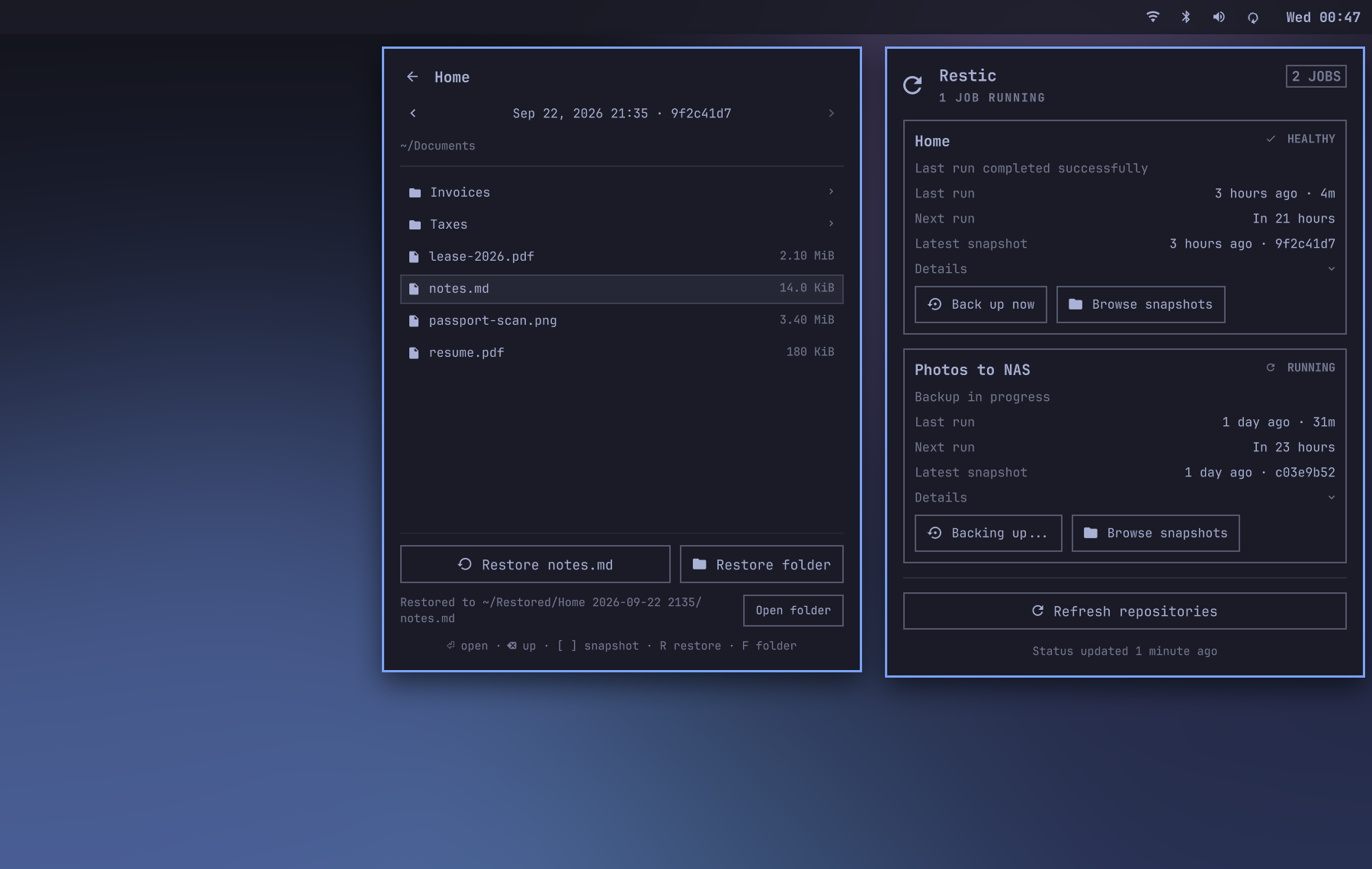
What it does
- Overall health in the Omarchy bar and per-job status in the panel
- Last completed run, duration, and next timer run
- Latest snapshot and its backup summary when restic recorded one
- Snapshot count and raw-data statistics
- Repository reachability and cache freshness
- Optional integrity-check service health
- Redacted recent logs when a job needs attention
- A Back up now action that starts the job's own systemd service
- A desktop notification when a job needs attention
- A snapshot browser that restores a file or folder into
~/Restored
Health follows completed systemd runs, not snapshot age. This matters when a backup uses --skip-if-unchanged, because a successful unchanged run intentionally creates no snapshot. If no run history survives, the timer's last trigger time is used instead.
If collection fails or status is older than two refresh intervals (at least two minutes), the bar reports unknown and the panel explains why. Previously collected job details remain visible.
Repository statistics are supplementary. If snapshots can be read but the stats query fails, the job stays healthy and the card reports that statistics are unavailable.
Safety boundary
The plugin never changes your repository or backup configuration. For status it runs only:
systemctl --user showsystemctl --user list-unit-filesjournalctl --usersystemd-analyze calendarrestic snapshots --jsonrestic stats --json --mode raw-data
Browsing and restoring add restic ls --json and restic restore.
Back up now runs systemctl --user start --no-block on the job's existing backup service, the same thing its timer does. It is unavailable while that job is running. While any job runs, status refreshes every 10 seconds so the result appears promptly.
Discovery inspects effective user-unit properties, including drop-ins, and reads referenced environment files and local wrapper scripts as plain text. It never sources them. Environment files override unit environment settings in their declared order.
Repository commands use normal restic locking and are deferred while the matching service is active. The lock protects the race if a job starts between checks. Successful metadata is cached for later display and refreshed after each completed backup run. After a failed refresh, the plugin waits one repository refresh interval before trying again, unless a refresh is forced. Cache directories use mode 0700, cache files use mode 0600, and restic gets a private cache directory under the plugin cache.
Restore writes only into a new folder it creates under ~/Restored. It never restores over your current files, and it never reuses a folder, so an earlier restore is never overwritten either.
The plugin never uses --no-lock, reads password contents itself, prunes snapshots, unlocks repositories, or changes restic configuration.
Requirements
- Omarchy 4 with shell plugin support
- Python 3
- restic 0.16 or newer, for restoring a single file or folder
- Each monitored backup represented by a user systemd service and timer
- Repository and password files usable by restic
Install
Install and enable the plugin:
omarchy plugin add https://github.com/orienw/omarchy-restic.git --enable
The plugin discovers restic jobs automatically. It lists user systemd timers, resolves each triggered service, and inspects static service metadata or a readable local wrapper script. Discovery recognizes restic backup jobs and extracts:
- The service and timer names
RESTIC_REPOSITORY_FILERESTIC_PASSWORD_FILE- The restic executable when statically assigned
- The backup tag when present
Discovery never sources or executes a backup script. Direct restic commands and static shell assignments are supported. Dynamic command construction, repository URLs without repository files, and unusual credential loading need an override.
Discovered job identifiers come from the service unit name, so changing a unit description only changes the label. The last good discovery is cached. If timer discovery later fails, the existing cards remain visible while the panel reports that verification is degraded. If a single service or its wrapper script cannot be inspected, its cached definition is reused the same way.
Optional job overrides
If automatic discovery cannot fully describe a job, copy and edit the included override file:
install -Dm600 \
  ~/.config/omarchy/plugins/io.github.orienw.restic/config/jobs.example.json \
  ~/.config/omarchy-restic/jobs.json
When this file exists, its jobs are merged with automatic discovery by service name. A configured job replaces the discovered definition for the same service. Discovered services not mentioned in the file remain visible. Example:
{
  "schemaVersion": 1,
  "jobs": [
    {
      "id": "home",
      "name": "Home",
      "service": "restic-backup.service",
      "timer": "restic-backup.timer",
      "repositoryFile": "~/.config/restic/repository",
      "passwordFile": "~/.config/restic/password",
      "tag": "forge",
      "maxRunAgeHours": 36
    }
  ]
}
Job fields:
| Field | Required | Purpose |
|---|---|---|
id |
Yes | Stable lowercase identifier |
name |
No | Label shown in the panel |
service |
Yes | User systemd backup service |
timer |
Yes | User systemd schedule timer |
repositoryFile |
Yes | File containing the restic repository location |
passwordFile |
Yes | Restic repository password file |
restic |
No | Executable name or path, defaults to restic |
tag |
No | Restricts snapshots and stats to one restic tag |
maxRunAgeHours |
No | Successful-run deadline. Defaults to 36 hours or the configured timer interval plus its random delay and 12 hours, whichever is larger. Calendar deadlines follow the next scheduled occurrence after the last successful run or trigger. If the schedule cannot be evaluated, the default is 36 hours |
checkService |
No | Existing user service that runs restic check |
checkTimer |
No | Timer for the integrity-check service |
checkMaxAgeHours |
No | Integrity-check deadline, defaults to 720 hours |
Paths expand ~ and environment variables. Backend credentials needed by restic must already be available to the Omarchy shell process. Their values are never returned in the status report.
Controls
- Left click opens the details panel.
- Middle click refreshes status without forcing a repository query.
- Right click forces a read-only repository refresh.
- Press
Rin the panel to force a repository refresh. - Press
↑/↓orj/kto select a job, thenBto back it up orEnterto browse its snapshots. With a single job, neither needs a selection.
Getting files back
Choose Browse snapshots on a job, or select the job and press Enter. The browser opens the newest snapshot at the folder your backup covers, or at the top for a backup of relative paths.
↑/↓orj/kselect,Enteror→opens a folder,Backspaceor←goes up.[and]step to an older or newer snapshot and keep you in the same folder, so you can compare days.Ror Restore restores the selected file or folder. The selection stays put when you switch snapshots, and if it is not in a snapshot, nothing is restored.For Restore folder restores the folder you are in, even an empty one.Escreturns to the job list.
Each restore lands in its own folder, such as ~/Restored/Home 2026-09-20 0300/notes.md. Move files back into place yourself, where you can see what you are replacing. A notification says when the restore is done, and clicking it opens the folder. A running restore can be cancelled and keeps going if you close the panel. If it fails or is cancelled partway, the files it already restored stay in its folder, and the browser says where. When a failed restore kept files, clicking its notification opens that folder. If the shell restarts or the plugin reloads mid-restore, restic is told to stop, releases its repository lock, and leaves the partial restore in its folder. If your job's restic command is a wrapper script that does not exec restic, the restore instead runs to completion in the background and then releases its lock.
Restore waits until the folder's listing for the chosen snapshot has loaded, so it always restores what you see. restic shows filenames that are not valid UTF-8 with a �, which can make two different files look identical, so those names cannot be restored one at a time. Restore the folder that contains them instead.
Restore somewhere else with:
omarchy bar set io.github.orienw.restic restoreDirectory '~/Recovered'
Notifications
When a job fails, falls overdue, loses its timer, or fails its integrity check, the plugin sends one desktop notification. Clicking it opens the job's journal in a terminal. Each problem notifies on its own, so an open schedule problem never hides a later failed run. It notifies again for each new failed run, or when a fixed job breaks again, but not on every refresh while a job stays broken, and not when systemd briefly fails to answer. Restarting the shell notifies about problems that are still open.
A repository that is temporarily unreachable, such as a NAS while you are away from home, does not notify. It still shows in the bar and panel.
Turn off all notifications, including restore results, with:
omarchy bar set io.github.orienw.restic notifications false --json
Update
Update the plugin and restart the shell so every part of it reloads:
omarchy plugin update io.github.orienw.restic
omarchy restart shell
Remove
omarchy plugin remove io.github.orienw.restic
Removal only removes the Omarchy shell integration. It does not stop or change backup services, timers, repositories, or the optional override file under ~/.config/omarchy-restic/.
Not included
Repository creation, prune, unlock, and retention editing are out of scope. Use restic directly.