
Chord Expander for Omarchy
A cursor-aware text expander built on native Hyprland submaps. Chord Expander does not monitor system-wide typing: it waits for an explicit leader shortcut, then handles one configured key and immediately returns to normal input.
Fresh installs use SUPER + E as the leader and start with no snippets.
Features
- No daemon or system-wide input listener
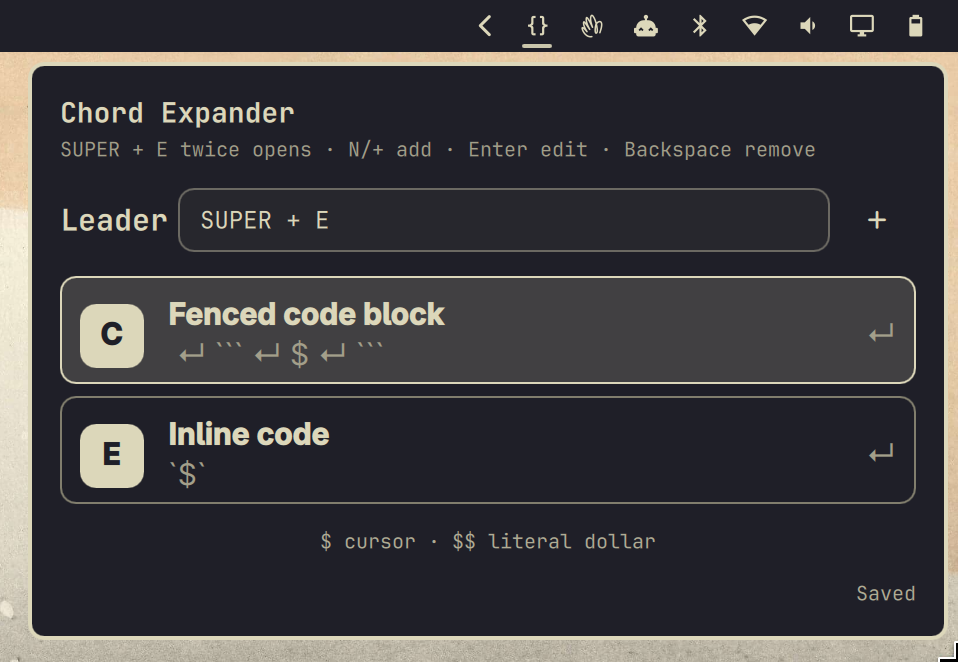
- Native Omarchy navbar widget and popup panel
- Inline editing for each snippet's name, one-key chord, and expansion text
- Configurable leader chord
- Multiline expansion and explicit cursor placement
- Wrap selected text around the cursor marker
- Instant clipboard-based insertion, including long and multiline snippets
- Native Hyprland submaps that reset after expansion or cancellation
Chord Expanderentry in Omarchy'sSUPER + Kshortcut list- User configuration stored outside the plugin checkout
Using Chord Expander
Click the braces icon in the Omarchy bar to open the manager. You can also
press the leader twice; with the default leader, that is SUPER + E, followed
by SUPER + E again.
Inside the popup:
- Press
Nor+, or click the plus icon, to add a snippet. - Move with
Up/DownorJ/K. - Press
Enteror click an entry to edit it inline. - Press
Backspacewhile navigating to remove the selected entry. - Edit the leader in the field at the top.
To expand text, press the leader followed by a snippet's one-key chord. Press
Escape after the leader to cancel.
Cursor placement
Use a single $ in expansion text to mark the final cursor position. For a
fenced Markdown block, the snippet text could be:
```
$
```
Use $$ when the expanded text should contain a literal dollar sign. When no
cursor marker is present, the cursor remains at the end of the inserted text.
If text is selected when you invoke a snippet containing $, Chord Expander
places that selection at the marker. For example, [$] wraps selected text in
square brackets. A snippet without $ replaces the selection normally.
Requirements
- Omarchy 4 with Hyprland's Lua configuration API
jq,wtype, andwl-clipboard(included with current Omarchy installations)
Install
omarchy plugin add https://github.com/orthodoX/omarchy-chord-expander.git --enable
~/.config/omarchy/plugins/io.github.orthodox.omarchy-chord-expander/bin/chord-expander install
The setup command adds a clearly marked loader block to
~/.config/hypr/bindings.lua, generates the Hyprland submap, reloads Hyprland,
and checks for configuration errors. The plugin never silently replaces an
existing binding.
Configuration is stored at:
~/.config/omarchy/chord-expander/snippets.json
Remove
Remove the Hyprland integration first. Your snippet configuration is preserved.
~/.config/omarchy/plugins/io.github.orthodox.omarchy-chord-expander/bin/chord-expander uninstall
omarchy plugin remove io.github.orthodox.omarchy-chord-expander
Development
./tests/run
omarchy plugin validate .
Privacy and security
Chord Expander runs only when its leader or popup is invoked. It does not
monitor keystrokes, focused-window contents, credentials, or network resources.
It briefly uses the clipboard to paste expansions, then restores the prior
clipboard value. For snippets containing $, it also copies any active
selection so it can insert the wrapped text at the marker. Snippets without a
cursor marker paste over selected text without reading it.
License
MIT