
Overview
Omarchy shell plugin: search your home folder and preview files from the bar. Idle Cinema Mode in 60s for viewing images using Ken Burns style.
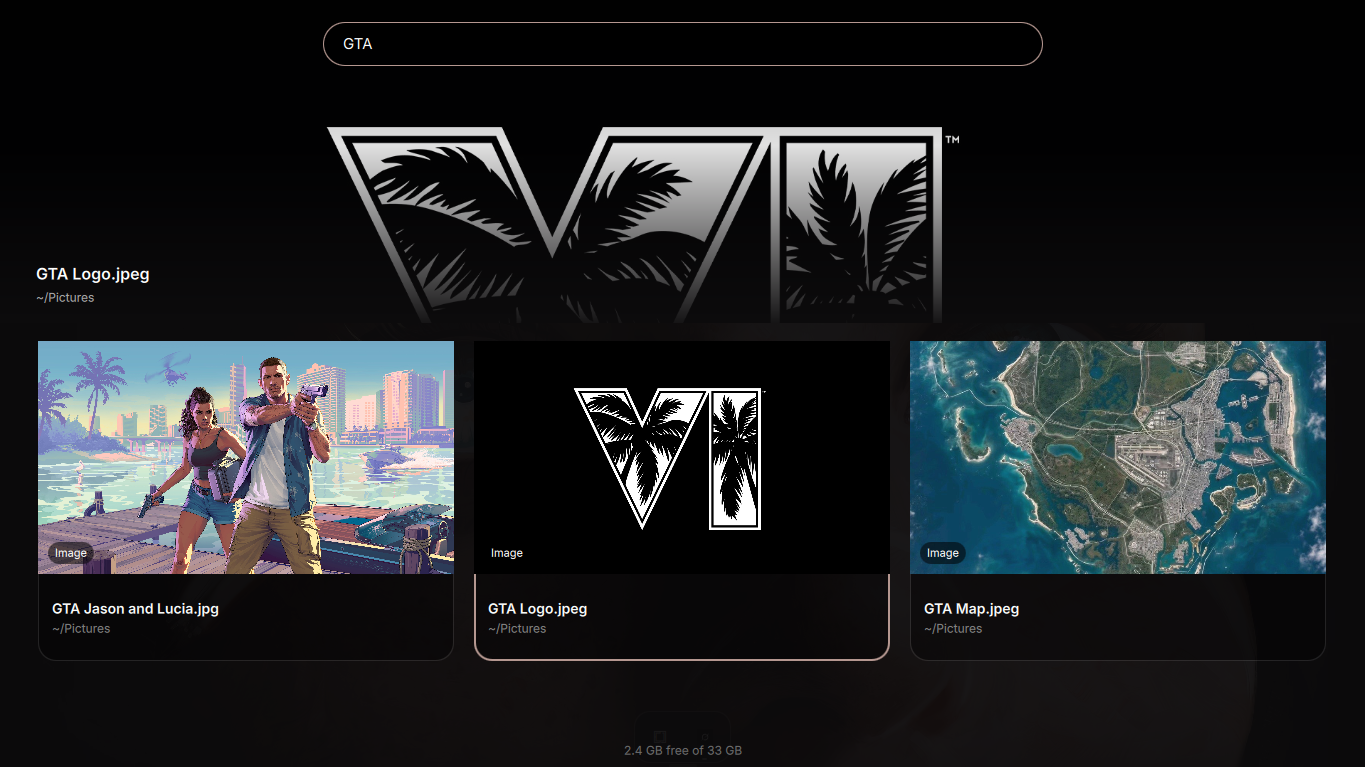
Fuzzy-find any file and preview it instantly: images, code, music, videos, PDFs, CSVs — Space to pin, Enter to close.
Install as an Omarchy plugin
omarchy plugin add https://github.com/maiosx/Overview.git --enable
That clones this repo into ~/.config/omarchy/plugins/io.github.overview/ (named from manifest.json), validates the manifest, and enables the overlay, service, and bar widget.
Reload if the shell was already running:
omarchy-shell shell rescanPlugins
Add a Hyprland binding to ~/.config/hypr/bindings.lua:
o.bind("SUPER + A", "Overview", "omarchy-shell shell toggle io.github.overview")
Choose any unused chord if SUPER + A is already bound.
Install FFMPEG for video playback
sudo pacman -S ffmpeg
Manual zip download
- Download the source zip from github.com/maiosx/Overview → Code → Download ZIP, or: https://github.com/maiosx/Overview/archive/refs/heads/main.zip
- Unpack so
manifest.jsonis at the plugin root. - Copy into plugins (Omarchy rejects symlinks):
mkdir -p ~/.config/omarchy/plugins
rm -rf ~/.config/omarchy/plugins/io.github.overview
cp -a Overview-main ~/.config/omarchy/plugins/io.github.overview
omarchy plugin validate ~/.config/omarchy/plugins/io.github.overview
omarchy-shell shell rescanPlugins
omarchy plugin enable io.github.overview
On first summon the overlay talks to the service-owned helper over omarchy-shell io.github.overview (Python compat/ when the Rust binary is missing). PDF pages rasterize through resource-limited pdftoppm when Poppler is installed; images over 20 MP are downsampled before QML sees them. No build.sh is required to get a working finder.
The full Rust helper (nucleo ranking, sqlite frecency, isolated PDF children, 20 MP downsample) is optional.
~/.config/omarchy/plugins/io.github.overview/build.sh
PDF previews need Poppler (pdftotext / pdftoppm):
pacman -S poppler
fd is the fast live search backend:
pacman -S fd
Uninstall
omarchy plugin remove io.github.overview
omarchy-shell shell rescanPlugins
Optional leftovers:
rm -rf ~/.cache/overview ~/.local/state/overview
Older versions may have written a bind to ~/.config/hypr/bindings.lua. Delete any marked -- BEGIN/END io.github.overview block if it is still there.
Usage
Click the search icon in the bar. Overview opens fullscreen: a hero preview of the selected file on top, a three-column card grid below. Type to search $HOME. Arrow keys move across the grid, Enter opens, Space pins a full-page preview.
What renders in 1.0
| Format | How |
|---|---|
| Images (png/jpg/webp/svg/gif) | QML Image / AnimatedImage. Helper downsamples stills over 20 MP. |
| Code / text (~40 langs) | syntect → <font color> spans only (QML rich text has no CSS classes). Files over 200 KB are truncated and labeled “large file”. |
pdftoppm in a disposable subprocess with CPU/memory rlimits and a wall-clock kill. No poppler → designed empty state. Enter still opens. |
|
| CSV / TSV | First 500 rows as a zebra table; delimiter sniffing. |
| Directories | Entry listing + total size. |
| Videos | Playback with FFMPEG installed only. |
| Anything else | Hex head + file-style magic. Never a blank pane. |
Settings
Settings are inline on the shell.json plugins[] entry.
{
  "id": "io.github.overview",
  "roots": ["~/Documents", "~/Downloads", "~/Desktop"],
  "watchCap": 2000,
  "cacheMb": 500,
  "maxFiles": 500000
}
Omit roots to index $HOME (with the default exclude list).
IPC
omarchy-shell shell toggle io.github.overview '{}'
omarchy-shell shell summon io.github.overview '{"path":"/tmp/file.pdf"}'
omarchy-shell shell hide io.github.overview
omarchy-shell io.github.overview status ''
omarchy-shell io.github.overview query invo
omarchy-shell io.github.overview preview '{"path":"/tmp/file.pdf","page":1}'
omarchy-shell io.github.overview snapshot ''
omarchy-shell io.github.overview theme '{"bg":"#1e1e2e","fg":"#cdd6f4","accent":"#89b4fa"}'
omarchy-shell io.github.overview prefetch /tmp/file.pdf
omarchy-shell io.github.overview warmup ''
Plugin identity
| Field | Value |
|---|---|
| id | io.github.overview |
| name | Overview |
| kinds | overlay, service, bar-widget |
| entry points | Overlay.qml, Service.qml, BarWidget.qml |
License
MIT — see LICENSE.