
Trash
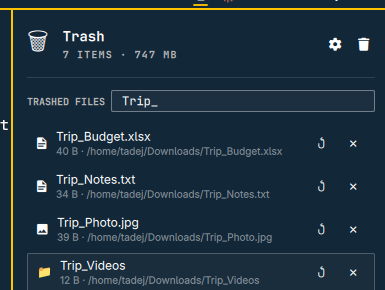
A trash can for the Omarchy Quattro bar. Browse recently deleted files, restore them to their original location, or empty the trash — without leaving the bar.
It drives the trash through gio/gvfs (trash:///) — the exact same backend
Nautilus uses — so it sees everything any
freedesktop.org Trash spec
tool trashes, including items in per-volume trash directories on external
drives and other partitions, aggregated into one list.
Install
omarchy plugin add https://github.com/paranojik/omarchy-trash.git --enable
Usage
- Click the 🗑 icon to open the list of trashed items.
- Click a row (or its filename) to open the trash (
trash:///) in your default file manager. - ↺ Restore moves an item back to its original path. If something
already exists at that path, the restored copy is renamed with a
(restored N)suffix rather than overwriting it.- A trashed item's original path comes from its own metadata, which is
ordinary writable data — and the trash spans every mounted volume, so
it may come from a USB stick or a network share. If that path points
into a configuration or startup location (anything with a dot-prefixed
component, or a directory on your
PATH), the restore stops and shows you the exact destination first, because a file placed there can run automatically at your next login. Ordinary documents restore in one click.
- A trashed item's original path comes from its own metadata, which is
ordinary writable data — and the trash spans every mounted volume, so
it may come from a USB stick or a network share. If that path points
into a configuration or startup location (anything with a dot-prefixed
component, or a directory on your
- ✕ Delete permanently removes a single item — this cannot be undone.
- The 🗑 button next to the panel title permanently empties everything currently in the trash, after a confirmation.
- Filter by filename narrows the list to matching names — useful for quickly checking whether a specific file is still in the trash.
- Hover a filename to see its full original path in a tooltip.
- The bar icon glows briefly whenever something new lands in the trash while the bar is running — no desktop notification is sent.
Configure
omarchy bar move io.github.paranojik.trash --section left
Two settings are available from Omarchy's plugin settings UI (or by editing
the widget's entry in ~/.config/omarchy/shell.json):
- Show count next to icon (
showCount, default on) — hides the number entirely when off, leaving just the icon. - Count display (
countMode, defaultitems) —itemsshows the trashed-item count;sizeshows the total trash size (e.g.1.8 GB) instead.
Remove
omarchy plugin remove io.github.paranojik.trash
Dependencies
gvfs(thegvfsd-trashbackend) — does the actual trash handling; part of the Omarchy base install (pulled in bynautilus/gvfs-*)jq— used by the helper scripts to build JSON output and encode URIsxdg-open— used to open the trash in your file manager- Standard coreutils (
stat,du) — used only to report accurate recursive sizes for home-trash directories
No new background daemon is started by the plugin itself; gvfsd-trash
is spawned on demand by gvfs. The bar widget polls the trash every 2
seconds while the panel's Loader is active (which Quickshell keeps alive
for the lifetime of the bar), and every mutation (restore/delete/empty)
shells out to one of the three scripts in scripts/.
Known limitations
- Only sees the freedesktop trash. A plain
rmin a terminal bypasses trash entirely and is invisible to this plugin, the same as it would be to any file manager's trash. - Directory sizes on other volumes are approximate. gvfs reports a directory's entry size, not its content size; accurate recursive sizes are computed only for items in the home trash.
- Filenames containing a newline are skipped in the listing (the gio output is line-based); they remain visible in Nautilus.
- Names are shown with control and direction-changing characters
replaced. A file name can contain codepoints that make a row lie about
itself (a right-to-left override renders
invoice<RLO>gpj.exeasinvoiceexe.jpg). Those are displayed as�; the real name is still used for restore and delete. - The panel refreshes every 2 seconds while open, every 15 when closed. Sizing trashed folders is the expensive part, so the closed-panel rate is backed off; a newly trashed file can take up to 15 seconds to show up in the bar count.
- At most 500 entries are listed. Trash contents are untrusted input,
so the helper caps how much
giooutput it reads and how many entries it processes rather than growing without bound. Beyond that the list is truncated and a notice is written to the shell's log; empty-all still clears everything, and Nautilus shows the full trash.
License
MIT — see LICENSE.