
Portfolio Tracker for Omarchy
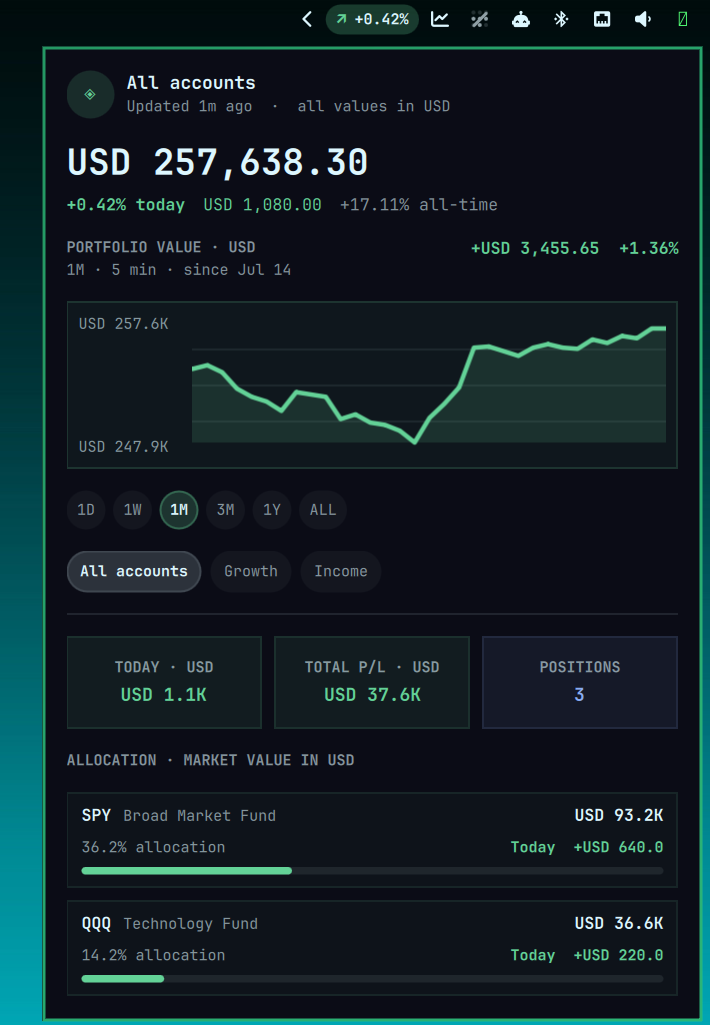
Portfolio Tracker is a top-bar widget for Omarchy Quattro. It shows portfolio performance directly in the desktop bar; clicking it opens a detailed, multi-account dashboard with historical charts. A local Python ledger handles transactions, automatic quote and FX refreshes, and optional agent-assisted updates through an open-format Agent Skill.
Features
- Combined and per-account views
- User-selected reporting currency, with per-account and per-instrument currencies
1D,1W,1M,3M,1Y, andALLcharts- Five-minute recent history and daily long-range backfills
- Deposits, withdrawals, trades, dividends, fees, and paired transfers
- Local SQLite storage with no broker credentials
- No-key automatic quotes, historical prices, and FX conversion
- Manual market data as an alternative to network refreshes
- Optional agent-assisted setup and ongoing ledger management
Requirements
- Omarchy Quattro
- Python 3.11 or newer
- Internet access for automatic market data
systemd --userfor scheduled refreshes (optional)
The tracker has no third-party Python dependencies and does not use sudo or
pkexec.
Install
After the repository is public:
omarchy plugin add https://github.com/paul-paliychuk/omarchy-portfolio-tracker
~/.config/omarchy/plugins/io.github.paul-paliychuk.portfolio-tracker/install.sh --base-currency EUR
Replace EUR with the three-letter code you want all dashboard totals reported
in. It is a required choice on first install, not a built-in default. Existing
installations keep their configured reporting currency.
The companion installer links the portfolio CLI and bundled Agent Skill,
initializes private local storage, validates and enables the widget, and starts
a five-minute user timer. Use --no-service for manual refreshes. For a
development checkout:
git clone https://github.com/paul-paliychuk/omarchy-portfolio-tracker
cd omarchy-portfolio-tracker
./install.sh --base-currency EUR
Agent-first setup
The intended workflow is to let a terminal-capable agent such as Codex, Claude
Code, or another Agent Skills-compatible tool operate the local CLI for you.
The installer makes the bundled manage-portfolio skill available to detected
agents. Restart an agent that was already running, then give it a prompt like:
Set up Portfolio Tracker for me using the installed manage-portfolio skill.
Ask me for each account and current holding, including symbol, quantity,
currency, average cost, and effective date. Use only explicit portfolio CLI
commands, refresh market data, and show me the resulting summary and warnings.
After setup, tell the agent whenever you buy or sell, deposit or withdraw cash, receive a dividend, pay a fee, or transfer between accounts. Include the account, date, currency, and exact amounts; the agent should update the append-only local ledger and rebuild the widget snapshot. It must ask rather than inventing any missing financial detail. No agent or brokerage connection is required—the CLI remains the source of truth and all portfolio records stay on this machine.
Quick start
The following example uses EUR for reporting and one USD-denominated holding. Account IDs, names, types, colours, brokers, and currencies are user-defined.
portfolio account add primary --name "Primary" --currency USD --color '#63d297'

portfolio transaction add --account primary --kind deposit --amount 1000 --currency USD --date 2026-01-15
portfolio instrument add SPY --name "S&P 500 ETF" --currency USD --type etf --quote-symbol SPY
portfolio transaction add --account primary --kind buy --symbol SPY --quantity 1 --unit-price 510 --currency USD --date 2026-01-15
portfolio refresh
The CLI is the complete interface; an AI agent is optional. Explore every command and subcommand with:
portfolio --help
portfolio account --help
portfolio transaction --help
portfolio history --help
Common operations:
portfolio account list
portfolio transaction list --account growth
portfolio summary --account all
portfolio history backfill
portfolio refresh
The command groups cover the complete tracker lifecycle:
account: create, list, edit, and archive accountsinstrument: register securities and quote symbolstransaction: record, list, and void ledger entriestransfer: move cash between tracked accounts atomicallypriceandfx: provide manual market datarefresh: fetch quotes, rebuild history, and update the widgethistory: backfill or inspect historical valuationssnapshotandsummary: calculate current portfolio stateconfig: select reporting currency and market-data provider
Use with an AI agent
The repository includes an Agent Skills compatible
SKILL.md package at agent-skill/manage-portfolio. The installer links it to
the shared personal skills directory at ~/.agents/skills/manage-portfolio and
to detected agent-specific skill directories. Restart the agent if it does not
discover newly installed skills during a running session.
For an agent with a different skills directory, link the same package manually:
mkdir -p /path/to/your-agent/skills
ln -s \
  "$HOME/.config/omarchy/plugins/io.github.paul-paliychuk.portfolio-tracker/agent-skill/manage-portfolio" \
  /path/to/your-agent/skills/manage-portfolio
Then ask naturally, for example:
Create two investment accounts named Growth and Income, reporting in USD.
Add 10 shares of SPY bought at USD 510 on 2026-01-15 to Growth.
Add my remaining current holdings after asking me for any missing details.
Refresh prices and backfill portfolio history.
Summarize performance across all accounts.
Agents without Agent Skills support can use the same tracker through the
portfolio CLI. Tell the agent to inspect portfolio --help, use only explicit
ledger commands, and run portfolio snapshot after mutations. The agent needs
local terminal access; it never needs brokerage credentials.
Use Yahoo Finance symbols such as SPY or AIR.PA for automatic prices.
Transactions are append-only: inspect and void a mistake instead of deleting
history.
portfolio transaction list --account growth
portfolio transaction void TRANSACTION_ID
portfolio transfer --from growth --to income --amount 100 --currency EUR
Upgrade
Update the checkout, then rerun the companion installer. It preserves the ledger and configured reporting currency, updates the companion links, and restarts the Omarchy shell so the new QML replaces any component cached in the running process.
omarchy plugin update io.github.paul-paliychuk.portfolio-tracker
~/.config/omarchy/plugins/io.github.paul-paliychuk.portfolio-tracker/install.sh
Market data and calculations
New installations use the built-in yahoo compatibility provider. It requires
no account or API key and supports the broad exchange-qualified symbols commonly
used by Yahoo Finance, including exchange suffixes such as .PA or .L. To
select it explicitly:
portfolio config --price-provider yahoo
portfolio refresh
This provider calls Yahoo Finance's unofficial, undocumented chart endpoint at
query1.finance.yahoo.com/v8/finance/chart/{symbol}. It requests one-minute
data for the latest available quote and previous trading-session close,
five-minute adjusted history for recent charts, daily adjusted history for
longer charts, and {FROM}{TO}=X symbols for currency conversion. Quotes may be
delayed depending on the exchange.
The project is not affiliated with or endorsed by Yahoo. This is a best-effort compatibility integration, not an official API: Yahoo may limit, change, or discontinue it. Yahoo's current terms restrict automated collection without express prior permission. Before using network refreshes, review the current Yahoo Terms of Service, determine whether you have the required permission, and ensure your use is permitted. This project cannot grant Yahoo permission or legal advice. Only quote symbols and currency pairs are sent. Account names, quantities, transactions, and the SQLite ledger remain local. Network and provider errors are surfaced while existing local data is preserved.
Current market value is quantity × latest quote × FX rate. Historical values
replay dated transactions against adjusted historical quotes and the FX rate at
that point in time. “Today” measures each security's move from its previous
close, converted at the latest FX rate; it does not separately attribute the
day's currency movement. Total gain is current value minus net external
contributions.
The provider-reported currency must match the instrument currency. Missing FX rates stop valuation rather than assuming two currencies are equal. To work without a network provider, switch to manual data and provide prices and FX rates yourself:
portfolio config --price-provider manual
portfolio price set SPY --price 512.40 --previous-close 510.10 --currency USD
portfolio fx set USD EUR 0.92
portfolio snapshot
Custom provider override
For a documented API, licensed feed, or another local data source, configure a trusted executable adapter without modifying the repository:
portfolio config \
  --price-provider command \
  --provider-command "$HOME/.config/portfolio-tracker/providers/my-provider"
portfolio refresh
The adapter receives quote, fx, and history operations and returns strict
JSON. It may be written in any language. The tracker requires an absolute path,
current-user ownership, execute permission, and no group/world write access.
See the complete provider command contract.
The same reference includes an Alpha Vantage recipe. Alpha Vantage is not the default because its current free tier is limited to 25 requests per day and the intraday history needed by the dashboard is a premium endpoint.
Users can ask their preferred terminal-capable agent to implement an adapter:
Create a local Portfolio Tracker command-provider adapter for PROVIDER.
Read the bundled provider-overrides contract, keep credentials outside the
repository with user-only permissions, test currency and previous-close
semantics, then configure and refresh the tracker.
Widget controls
- Left click opens the dashboard.
- Middle click refreshes market data.
- Right click or the mouse wheel cycles accounts.
- Range pills change the chart window.
Settings control the default chart range, bar account label, and privacy mode. Privacy mode hides monetary values and account names; symbols and percentages remain visible so the chart is still useful.
Local data
- Ledger:
$XDG_DATA_HOME/portfolio-tracker/portfolio.sqlite3 - Snapshot:
$XDG_DATA_HOME/portfolio-tracker/snapshot.json - Configuration:
$XDG_CONFIG_HOME/portfolio-tracker/config.json
The usual ~/.local/share and ~/.config locations are used when XDG variables
are unset. Data directories and files are created with user-only permissions
where possible. PORTFOLIO_TRACKER_HOME and
PORTFOLIO_TRACKER_CONFIG_HOME can isolate test data.
This is a display and record-keeping tool, not brokerage, accounting, tax, or investment-advice software. Verify transactions and prices against primary records.
Remove
Run the companion uninstaller from the installed checkout before removing the Omarchy checkout:
~/.config/omarchy/plugins/io.github.paul-paliychuk.portfolio-tracker/uninstall.sh
omarchy plugin remove io.github.paul-paliychuk.portfolio-tracker
The first command removes only links and the user timer created by this project. The ledger, configuration, snapshot, and any timestamped backups are preserved. Ordinary Omarchy removal alone cannot clean companion files after the checkout has disappeared. If you manually linked the Agent Skill into a custom directory, remove that custom link separately.
Development
python3 -m unittest discover -s tests -v
python3 -m json.tool manifest.json >/dev/null
omarchy plugin validate .
See CONTRIBUTING.md, SECURITY.md, and LICENSE.