
OmaDex
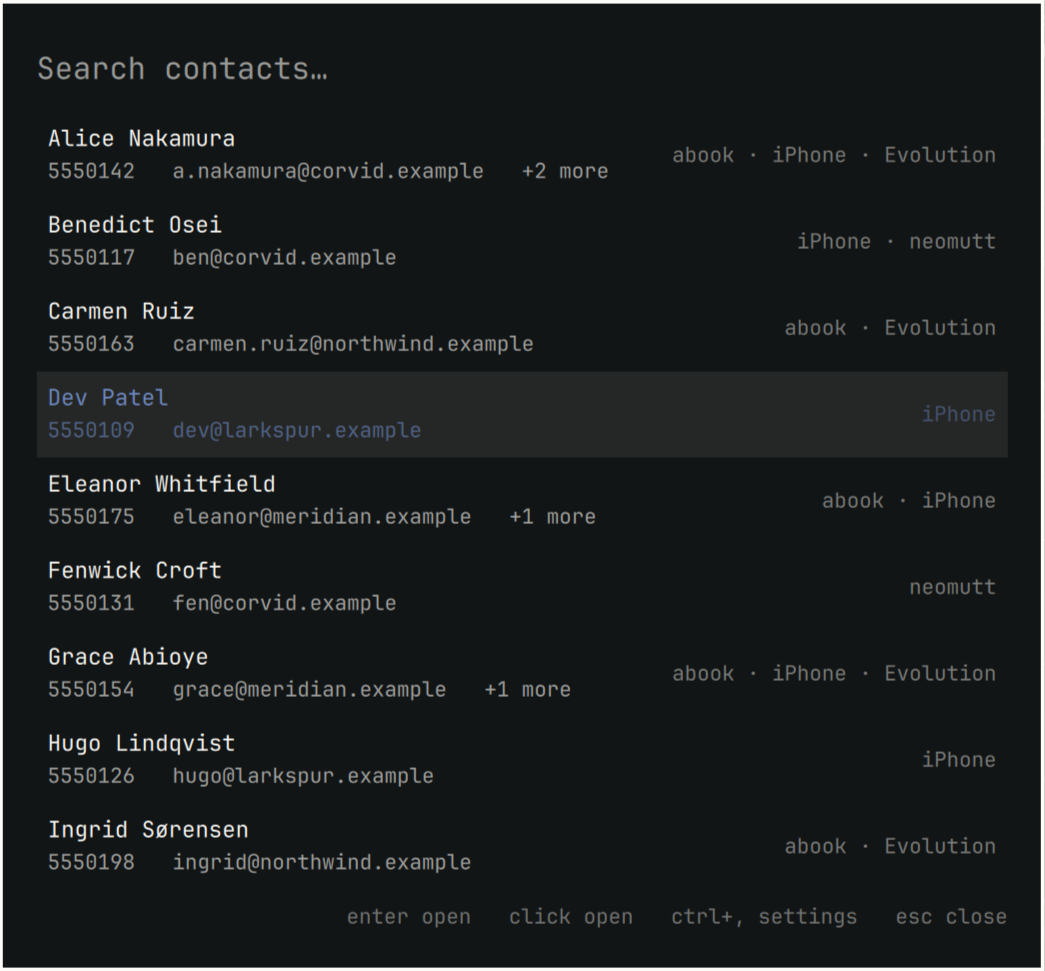
One address layer for Omarchy. OmaDex reads the address books you already have — your iPhone, abook, Evolution, neomutt aliases, indexed mail, CardDAV — merges them into one set of people, and puts that behind a keyboard-driven overlay.
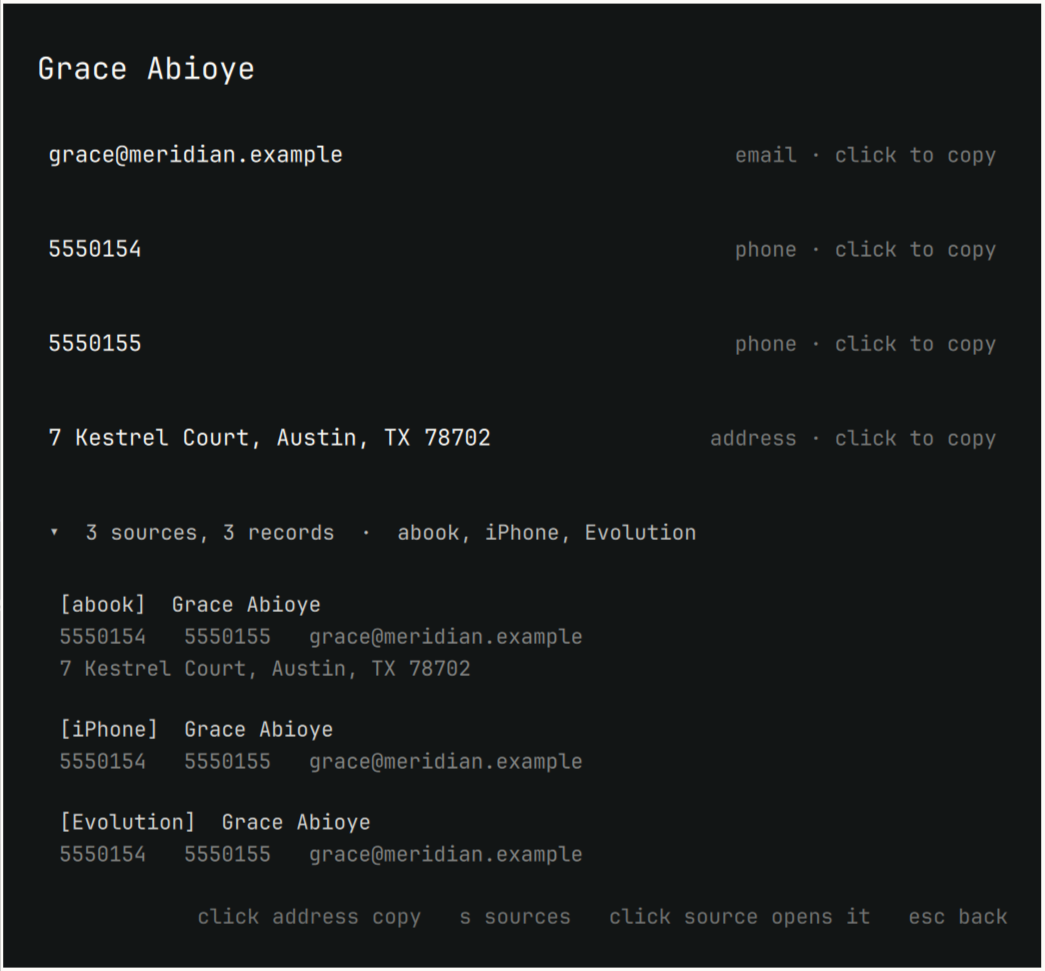
OmaDex never writes to your address books. It does write one thing of its own: the claim that two records are the same person. No source made that claim — OmaDex did — so it keeps the evidence and shows its working. Expand any merged contact to see the record each source contributed and what joined them.
The merged view is derived and rebuilt from the sources on every sync, so it can be thrown away at any time. The exception is your corrections: telling OmaDex that two people are the same, or that they are not, is the one thing it keeps.
What it does
- Search everything at once.
SUPER+CTRL+ALT+C, type, Enter. - Show where a contact came from. Expand a person to see the record each source contributed, then click one to open that application — neomutt composing to them, the exact vCard file, abook on the right address book.
- Explain its merges. A shared email address merges two records. A shared phone merges them only when the names also agree. Everything else is held for you to decide, and your decision survives every later sync.
- Copy anything. Click an address or a street address to put it on the clipboard.
Expanding a contact shows the record each source contributed, so OmaDex's judgement can always be checked against the sources it came from — and clicking one opens that application.
Requirements
Omarchy, for the overlay and its launch helpers. The CLI works anywhere.
Every source is optional and OmaDex runs with any subset of them. Install nothing and the overlay tells you what to set up.
| Source | Needs | Preloads a contact when opened |
|---|---|---|
| abook | abook |
no — abook cannot open at a record |
| iPhone | blueferry-backend with ListContacts |
no — no thread selector exists |
| Evolution | evolution-data-server |
needs gnome-contacts |
| neomutt | neomutt |
yes — composes to the address |
| notmuch | notmuch with an indexed maildir |
yes — searches mail with them |
| CardDAV | vdirsyncer writing a vdir |
yes — opens the vCard |
The iPhone source is optional and self-contained
OmaDex talks to an already-installed BlueFerry backend over D-Bus, using its
ListContacts method. It never fetches, builds, or installs that project:
follow BlueFerry's own installation
instructions if you want this source,
and skip it otherwise. Every other source works without it.
omadex doctor reports whether the running backend exposes the method. Without
that check the failure is silent: the phone stays paired, the daemon stays
healthy, and contacts simply never arrive. If it is missing, the iPhone source
stays unavailable and every other source carries on.
Install
omarchy pkg aur add omadex
omadex plugin install     # copy the overlay into ~/.config/omarchy/plugins
omarchy plugin enable io.github.peteonrails.omadex
omadex sync
Or, from a checkout of this repository, ./build.sh -si instead of the first line.
Or install the overlay straight from this repository:
omarchy plugin add https://github.com/peteonrails/omadex
omarchy plugin enable io.github.peteonrails.omadex
The plugin is only the interface. It needs the omadex package for anything
to appear, and says so if it is missing.
omadex plugin install also adds a launcher entry, so OmaDex can be opened
from the Omarchy menu by name without a keybinding.
For a key of its own, add this to ~/.config/hypr/bindings.lua:
o.bind("SUPER + CTRL + ALT + C", "Contacts",
       "omarchy-shell shell toggle io.github.peteonrails.omadex '{}'")
Removing it
omarchy plugin disable io.github.peteonrails.omadex
omadex plugin remove          # deletes the overlay and its launcher entry
omarchy pkg drop omadex       # if installed as a package
Your contacts are untouched — OmaDex only ever read them. To drop its own
derived data as well, delete ~/.local/state/omadex/ and
~/.config/omadex/, and remove the keybinding from
~/.config/hypr/bindings.lua.
External dependencies
python and wl-clipboard are required; xdg-utils is used to open mail and
vCard files. Contacts are encrypted at rest, which needs
python-cryptography, python-gobject, libsecret and a Secret Service
provider such as gnome-keyring.
Every contact source is optional — see the table above — and OmaDex runs with
any subset installed, including none. The Omarchy launch helpers
(omarchy-launch-terminal, omarchy-launch-or-focus-tui) are used to open a
source's own application. Nothing is bundled or vendored.
Command line
omadex doctor                     # is each source usable, and if not, why
omadex sync                       # rebuild from every enabled source
omadex search alice               # find people
omadex show <address> --records   # one person, and what each source gave
omadex list --source iPhone       # everyone a source contributed to
omadex open <address>             # open the application a record came from
omadex review                     # merges held back for a human
omadex link <a> <b>               # these two addresses are one person
omadex unlink <a> <b>             # these two are not
omadex sources                    # what is enabled, and where it reads from
omadex sources disable notmuch   # turn a source off
How merging works
Only addresses identify a person. Names never merge anyone — they are used to withhold a merge, never to make one — and neither do street addresses, since housemates share those.
- A shared email merges two records outright.
- A shared phone merges them only if their names agree, because colleagues
share switchboards. Disagreeing names go to
omadex review. - A destination on four or more records under three or more names is a switchboard and merges nobody.
- Records with no address at all merge on an exact name match, which is safe precisely because they carry no address to attach to the wrong person.
Your link and unlink decisions live in the one table a sync never clears.
Configuration
~/.config/omadex/settings.json holds only what you changed; everything else
follows the defaults, so upgrades reach you. ctrl+, in the overlay shows each
source, what it contributed, and where it reads from.
Data
Contacts live in ~/.local/state/omadex/contacts.sqlite (0600, in a 0700
directory), rebuilt from the sources on every sync. OmaDex sends nothing
anywhere and has no network code.
The file is encrypted: values are sealed with AES-GCM under a key kept in your
desktop wallet, and the columns OmaDex has to match on hold a keyed digest
rather than the address itself, so nothing legible is left in the file. Losing
the key costs you nothing but a omadex sync, since everything except your own
merge decisions is rebuilt from the sources.
omadexd is packaged but not enabled. The overlay uses the CLI; the daemon
exists to serve io.omadex.Contacts1 to other clients, and is opt-in:
systemctl --user enable --now omadex
Licence
MIT.