
Omarchy Plugin Manager
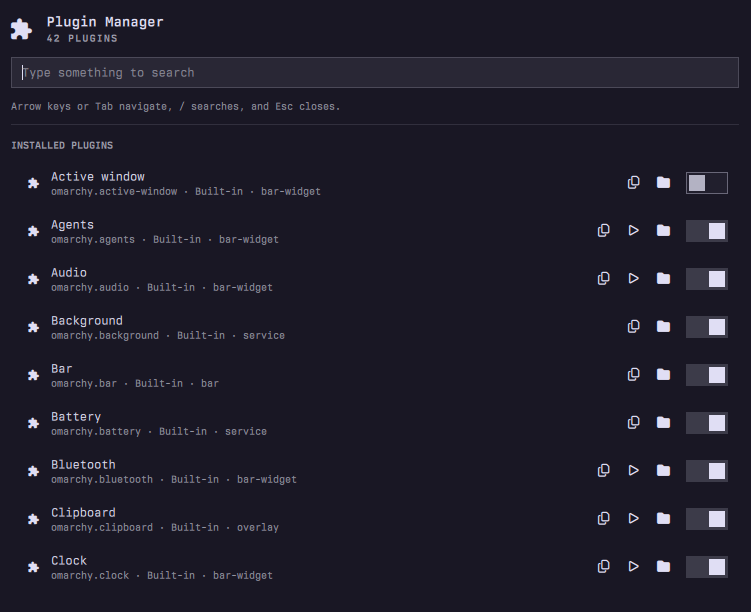
Browse and manage installed Omarchy shell plugins from one bar panel.
Features
- Browse built-in and third-party plugins
- Search by plugin name or ID
- Enable, disable, clone, and remove plugins
- Open plugin interfaces and source directories
- Rescan the plugin registry
Requirements
- Omarchy with the Quattro plugin runtime
xdg-openfor opening plugin directoriesomarchy-launch-config-editorfor editing plugin source directories
The plugin runs inside the existing omarchy-shell process. It does not start
services, make network requests, require elevated privileges, or overwrite user
configuration. Plugin actions use Omarchy's native omarchy-plugin-* commands.
Install
omarchy plugin add https://github.com/peterszarvas94/omarchy-plugin-manager.git --enable
omarchy bar move io.github.peterszarvas94.plugin-manager --section right
If necessary, rescan the plugin registry:
omarchy-shell shell rescanPlugins
Usage
Click the bar icon or summon the manager through shell IPC:
omarchy-shell shell summon io.github.peterszarvas94.plugin-manager '{}'
Use the search field to filter plugins. Arrow keys and Tab navigate; / focuses
the search field; Escape closes the panel.
Optional Shortcut
Add this to ~/.config/hypr/bindings.lua:
o.bind("SUPER + CTRL + SHIFT + M", "Plugin Manager", "omarchy-shell shell summon io.github.peterszarvas94.plugin-manager '{}'")
The plugin does not install or overwrite keybindings automatically.
Remove
omarchy plugin disable io.github.peterszarvas94.plugin-manager
omarchy plugin remove io.github.peterszarvas94.plugin-manager
License
MIT. See LICENSE.