
Kinesis Advantage360 for Omarchy
Reprogram your Kinesis Advantage360 (SmartSet, non-Pro) from the Omarchy bar, visually, instead of hand-editing the keyboard's own bracket/curly-brace syntax on its v-Drive.

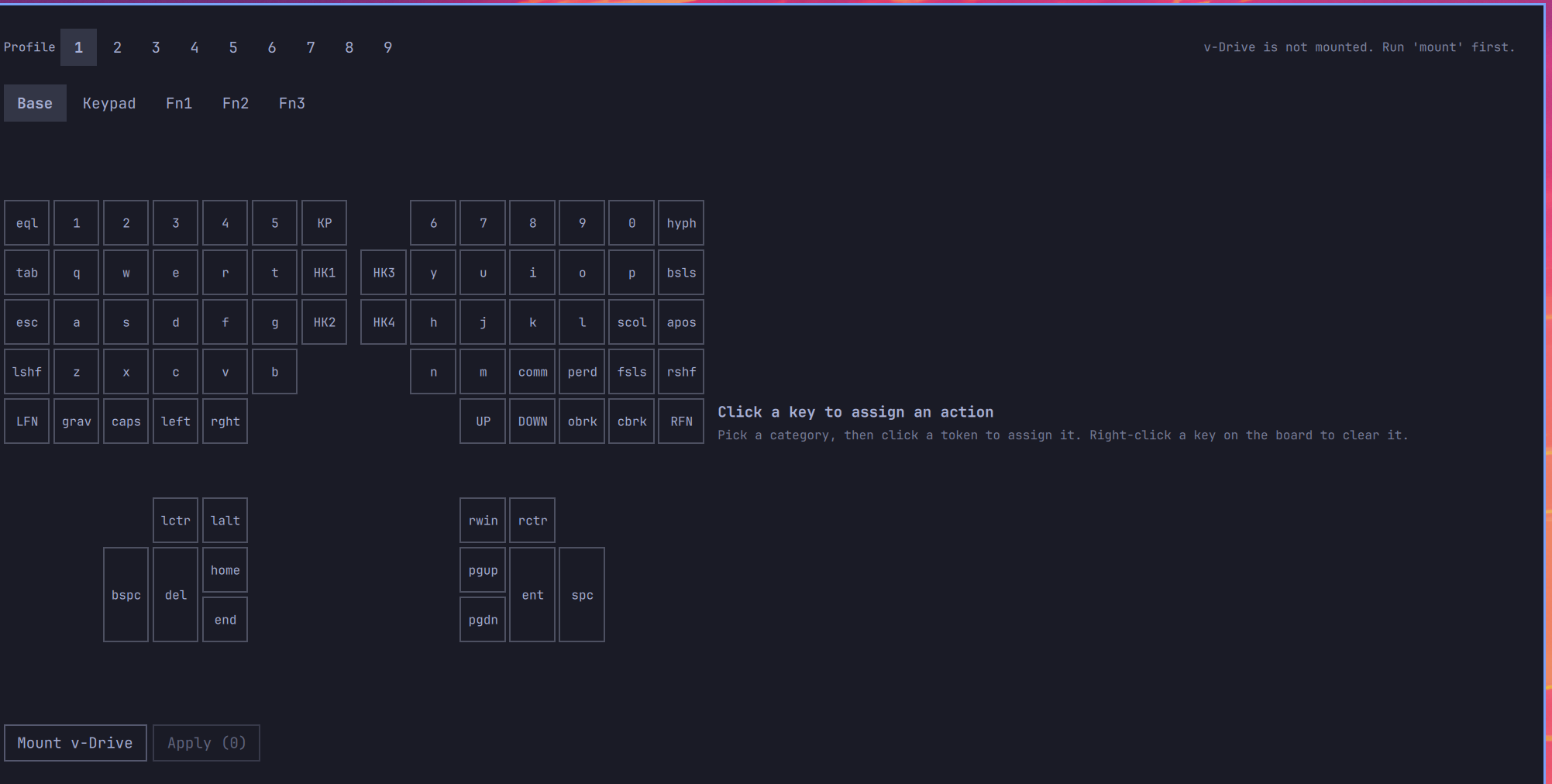
Install
omarchy plugin add https://github.com/phenasdev/omarchy-kinesis-advantage360 --enable
Requires udisks2 (already on stock Omarchy) — no other dependencies.
How it works
The Advantage360 exposes a v-Drive: a plain USB mass-storage device that
appears once you trigger the "connect v-Drive" shortcut on the keyboard
itself. It holds layouts/layout1.txt … layout9.txt (one per profile),
each a plain-text file with sections for the base/keypad/function1/
function2/function3 layers. This plugin mounts that drive (via
udisks2, no root), edits those files, and ejects it — nothing more.
bin/k360— the whole backend: detect/mount/eject the v-Drive, and read/validate/writelayouts/layoutN.txt. Every command prints one JSON object ({"ok": true, ...}or{"ok": false, "error": "..."}) and can be run standalone from a terminal for debugging.data/position_tokens.json/data/action_tokens.json— the keyboard's physical key map and the full action-token dictionary, transcribed from Kinesis's official "Direct Programming Guide" and "SmartSet Engine Supported Actions" documents.Service.qml— thin QML wrapper aroundbin/k360(polls v-Drive state, exposes mount/eject/read/write).Panel.qml/Editor.qml— the bar button and the visual keyboard popup.
Scope (v1)
Only simple remaps (one action per key), across all 5 layers and all 9 profiles. Macros, tap-and-hold, RGB LED programming, and the foot pedal are not editable here yet — if a key already has a macro, the editor shows "macro" and leaves it alone unless you explicitly reassign that key to a plain action (which replaces the macro).
settings/ on the v-Drive (settings.txt, app_settings.txt) is never
touched.
Safety
- Every write makes a timestamped backup of the profile's
.txtfile next to it before overwriting (layoutN.txt.bak.<unix-time>). - Writes are atomic (written to a temp file, then renamed over the target).
- The editor validates every position/action token against the data files before writing anything to the drive.
Remove
omarchy plugin remove io.github.phenasdev.kinesis360
Nothing is installed outside the plugin's own folder — no services, no system-wide files, no changes to the keyboard beyond whatever profiles you explicitly edited and applied.
Using it
Click the bar icon to mount the v-Drive (trigger the keyboard's own "connect v-Drive" shortcut first if it doesn't show up). Pick a profile and layer, click a key to assign a new action (right-click resets it to default), then Apply. When you're done, click Eject v-Drive before switching the keyboard back to normal mode on the hardware.